

jensrho
Participant
January 9, 2022
Answered

Vertical text spacing

  • January 9, 2022
  • 4 replies
  • 846 views

Hi everybody!

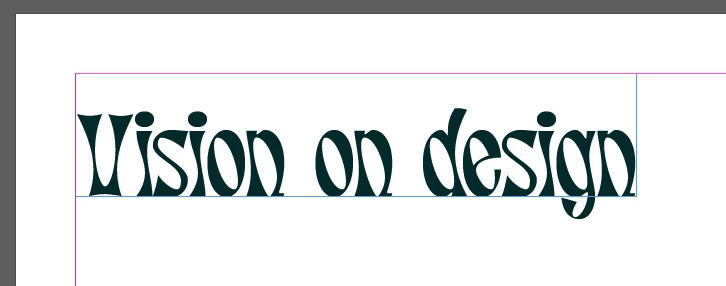
I was wondering about the vertical spacing of a certain font inside a frame. As you can see there is quite a lot of space in the frame above the text but I can not make the frame any smaller without the text not fitting anymore. I know this is quite an unusual font but is there a way to reduce the white space in the frame?
 

Thanks!


This topic has been closed for replies.
Correct answer Brad @ Roaring Mouse

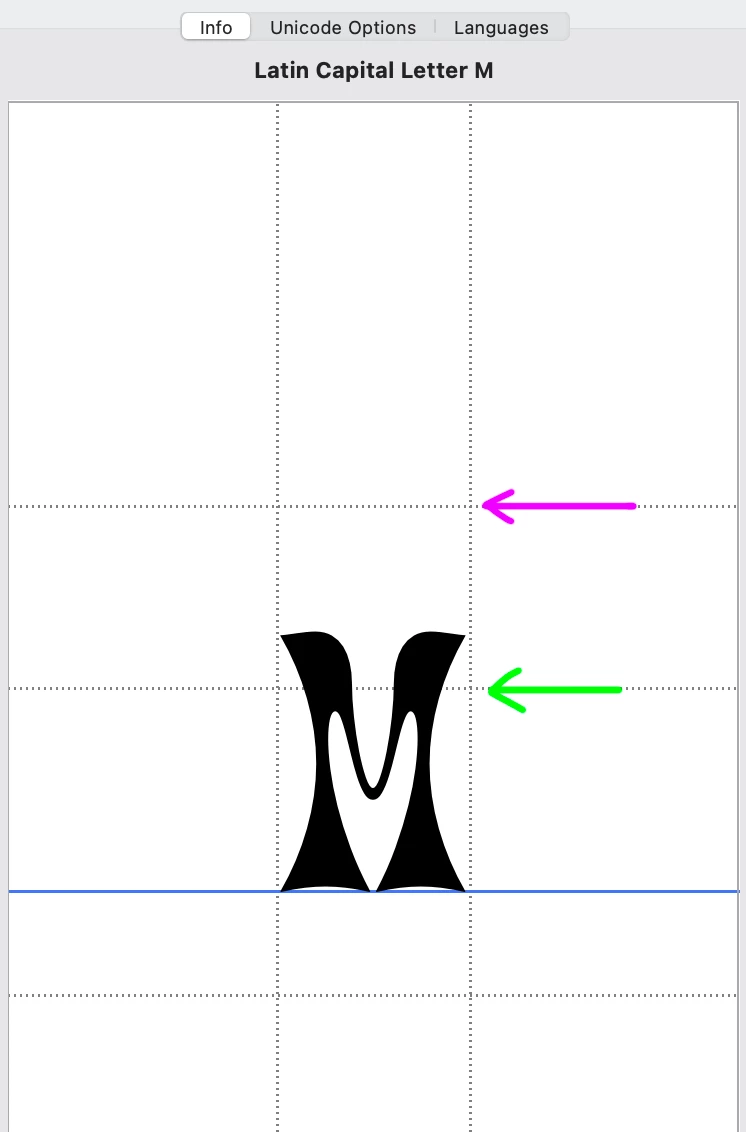
It looks like your text boxes have baseline alignment set to Ascender. That font has a large ascender space designed into it; that's the fault of the designer. See attached: The top pink line is the ascender as designed. The green line shows the x-height as designed. So, as mentioned, play with alternative alignments for your text boxes, starting with Cap Height, which will come closer to the top of your ca

pital letters.

4 replies

Brad @ Roaring Mouse
Community Expert
Brad @ Roaring MouseCommunity ExpertCorrect answer
Community Expert
January 9, 2022

It looks like your text boxes have baseline alignment set to Ascender. That font has a large ascender space designed into it; that's the fault of the designer. See attached: The top pink line is the ascender as designed. The green line shows the x-height as designed. So, as mentioned, play with alternative alignments for your text boxes, starting with Cap Height, which will come closer to the top of your ca

pital letters.

James Gifford—NitroPress
Legend
January 9, 2022

It's worth noting that decorative fonts (especially from free or "artistic" collections) often have indifferent spacing and kerning parameters, so you might see problems like this more with them than standard faces from high-quality sources.

Scott Falkner
Community Expert
Community Expert
January 9, 2022

Open the Text Frame Options for the text frame in quesion and play with the First Baseline Offset options. I usually prefer Cap Height, but you can use any value you want.

Peter Spier
Community Expert
Community Expert
January 9, 2022

Make sure the text is set to align to the top of the frame. Beyond that you can add some baseline shift to push it up, but be very careful doing that.