
Participant
April 24, 2021
Answered

Video keeps playing after pop up window is closed

  • April 24, 2021
  • 1 reply
  • 1375 views

I'm using the most recent Indesign CC and Publish Online.


I've pasted in a YouTube HTML code for a video, and have made a button with two states.

State One is a play button, clicking it takes you to State Two, which is the video itself. It's designed to look like the video window appears on your screen like a pop-up.


It plays fine, the problem is if I click a close button I made that takes you back to State One where the video no longer appears, the damn thing keeps playing in the background, as the sound continues.


Because the video dows not reside on my computer - it's the code you copy when sharing from YouTube - I can't just make a button action that stops the media from playing. How can I make the video stop playing when you go back to State One, or is there another way to do this entirely? Thanks.
This topic has been closed for replies.
Correct answer Diane Burns

Bob is the MSO master :-), so do look into the extension he mentions. 

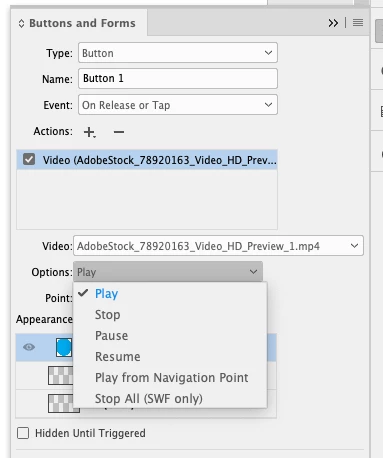
Keep in mind, though, you can set a button to not only PLAY video but to STOP, PAUSE, etc.


1 reply

Participant
December 7, 2021

Hi mikey,


Im actually facing the same damn issue, having a popup video, that keeps playing once u pressed play button even if u switched to different state that makes your video disapear.

When I think about it, I feel stupid for not realising that, and it's damn logic.


Nevertheless, since Indesign is still facing more important issues, I assume that for now, there arent any magic button to check that says "stop playing media" or "stop playing media for this state" etc..


This said, since Indesign allows you to embed video/media on different object's states, there HAVE TO BE something to shut the video that might be thought to disapear.


I would really like to be wrong, so that's why im posting, at least this post will be going up the thread.


Where are you indesign super hero guy ?

Regards,

Diane Burns
Diane BurnsCorrect answer
Inspiring
December 7, 2021

Bob is the MSO master :-), so do look into the extension he mentions. 

Keep in mind, though, you can set a button to not only PLAY video but to STOP, PAUSE, etc.


BobLevine
Community Expert
Community Expert
December 7, 2021

I'm honored, Diane. 🙂


I haven't done this with a video in a while but I do think the button has to be in the state with the video.