
Participant
January 28, 2020
Answered

View, Screen mode, Arrange options missing from top- panel in InDesign 2020

  • January 28, 2020
  • 1 reply
  • 2242 views

I updated my InDesign to the newest version. The downside is all my settings are gone and I have to reset things up --- I always had the 4 little buttons on the top that let me adjust the size i was viewing it in, the option to take frame edges off, screen mode etc.


How do i get those back?


Thanks.


{Renamed by MOD}
This topic has been closed for replies.
Correct answer Ashutosh_Mishra

Hi there,


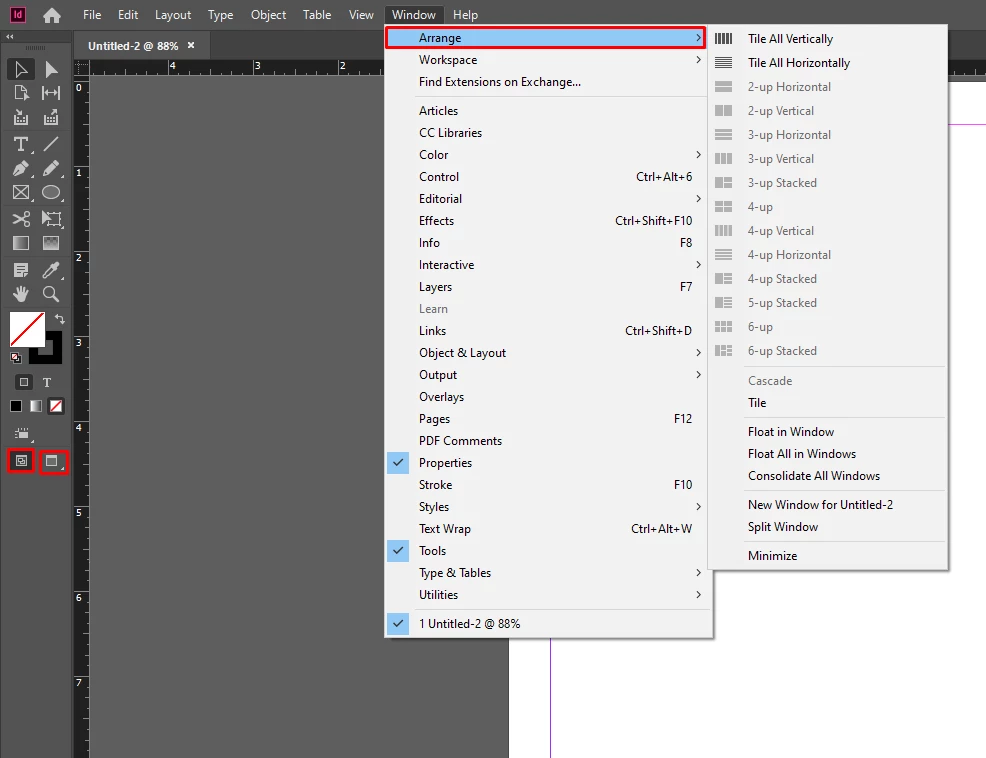
Thanks for reaching out. View Options, Screen mode and Arrange Documents panels have been removed from the top.
View Options & Screen Mode have been moved at the bottom of the toolbox. Arrange Documents are available under Window menu. I have attached screenshot of the options below for your reference:


Hope it helps.


Regards,

Ashutosh

1 reply

Ashutosh_Mishra
Ashutosh_MishraCorrect answer
Inspiring
January 28, 2020

Hi there,


Thanks for reaching out. View Options, Screen mode and Arrange Documents panels have been removed from the top.
View Options & Screen Mode have been moved at the bottom of the toolbox. Arrange Documents are available under Window menu. I have attached screenshot of the options below for your reference:


Hope it helps.


Regards,

Ashutosh

DWCastillo
Known Participant
June 24, 2020

Can we have it back?

Participant
October 27, 2020

I agree, can we have this back.