

Copy link to clipboard
Copied
Here's what I do. First, select the Polygon tool in the toolbar with a click of the mouse.
Then click and drag in the middle of the page *without* releasing the mouse.
Initially, the up and down arrow keys increase or decrease the "number of sides". Fine.
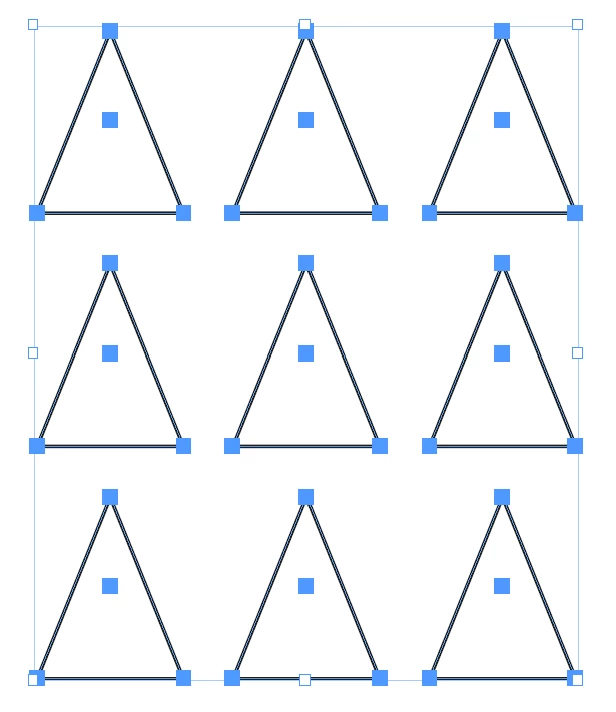
But! If I tap and release the space bar then, up and down arrow keys gives a "grid" of Polygons!
Holding the space bar down while tapping the right or left arrow keys turns the Polygon into a star.
Is that what you are getting too?
All under US Keyboard definition. Important.
Even weirder... I'm not sure what to think?
I start with a triangle.
Arrow keys produce a grid of triangles, as this image shows:
But if I tap once on the Space bar (press and release) then the behavior of the arrow keys change?
Left and Right transforms into a star shape while Up and Down adds/decrease the number of sides.
Is the the correct behavior?
Copy link to clipboard
Copied
Even weirder... I'm not sure what to think?
I start with a triangle.
Arrow keys produce a grid of triangles, as this image shows:
But if I tap once on the Space bar (press and release) then the behavior of the arrow keys change?
Left and Right transforms into a star shape while Up and Down adds/decrease the number of sides.
Is the the correct behavior?
Copy link to clipboard
Copied
Hi @Roger Breton,
Thank you for reaching out. This is an expected behaviour. Please check this video(Timestamp- 3 minutes) and feel free to update the discussion if you need further assistance.
Thanks
Rishabh
Find more inspiration, events, and resources on the new Adobe Community
Explore Now