Participating Frequently
May 28, 2024
Answered

What do these green paragraph symbols mean?

  • May 28, 2024
  • 3 replies
  • 708 views

Thank you in advance!

This topic has been closed for replies.
Correct answer Robert at ID-Tasker

@TomTom1836


Just to add - color will be the same as the color of the layer TextFrame is on. 


3 replies

Barb Binder
Community Expert
Community Expert
May 28, 2024

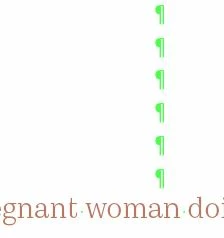
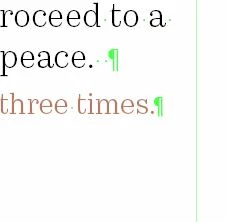
Leo is correct and here's a little more context: we press Enter (Windows) or Return (Mac) to signal the end of a paragraph and that's what we can see in your left column. This is a normal typing procedure that evolved from adding a carriage return on a typewriter to conclude one paragraph and start the next one. 


But a lot of new users press Enter Enter Enter (Windows) or Return Return Return (Mac) as a quick way to achieve vertical spacing, and that's what we see in the right column. As you begin to remove those extra returns ¶¶¶, you'll begin to close up the spacing above "woman do...". If it were my document I would remove all of the extra returns and then add the spacing back in via paragraph spacing. 
 

~Barb


~Barb at Rocky Mountain Training
Robert at ID-Tasker
Robert at ID-TaskerCorrect answer
Legend
May 28, 2024

@TomTom1836


Just to add - color will be the same as the color of the layer TextFrame is on. 


leo.r
Community Expert
Community Expert
May 28, 2024

end of paragraph (return key action).

leo.r
Community Expert
Community Expert
May 28, 2024

p.s. if you wonder why you see them at all then that's because you enabled hidden characters (see the bottom of the Type menu).