
dublove
Legend
October 24, 2025
Answered

What is the code to move the currently selected object up one layer?

  • October 24, 2025
  • 1 reply
  • 10071 views

For example:

I want sel[j] to be positioned above sel[j-1];

var doc = app.activeDocument;
var item = doc.selection;
sel = items;
for (var i = 0; i < sel.length; i++) {

};


 

Correct answer rob day

Hi rob day.

move()?
For example,
how do I use it? If possible, I'd like to get it done in one go.


how do I use it?


var d = app.activeDocument

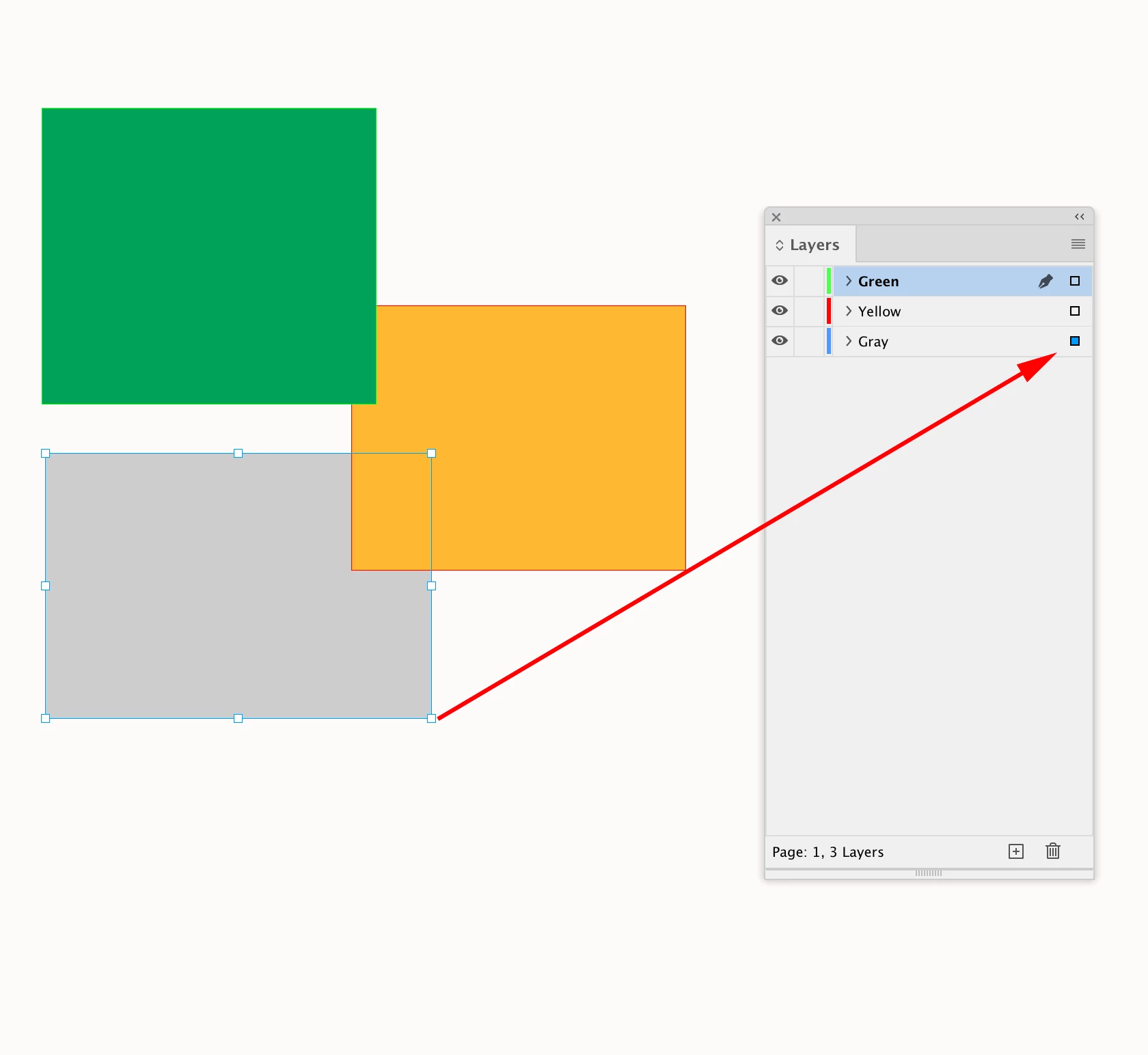
//a selection on the bottom layer
var s = d.selection[0]

//this doesn’t do anything because s 
//is the only object on the item Layer named "Gray"
s.bringForward()

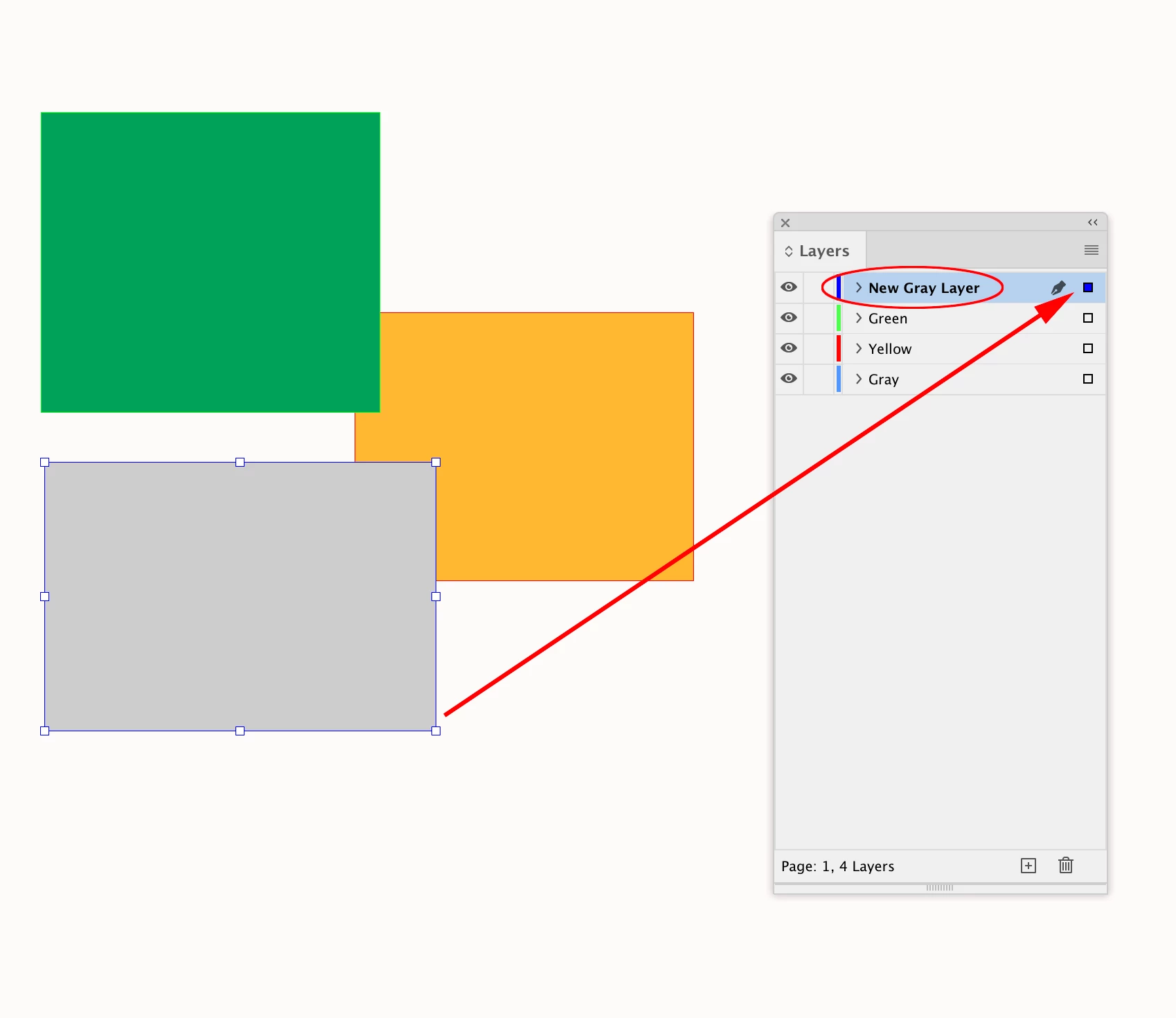
//make a new layer
var ns = makeLayer(d, "New Gray Layer");

//moves the selected page item to New Gray Layer 
// note that the parameter has to be a reference to an item Layer
s.move(ns)

/**
* Makes a new named Layer 
* @ param the document to add the layer 
* @ param layer name 
* @ return the new layer 
*/

function makeLayer(d, n){
    if (d.layers.itemByName(n).isValid) {
        return d.layers.itemByName(n);
    } else {
        return d.layers.add({name:n});
    }
}


1 reply

rob day
Community Expert
Community Expert
October 24, 2025

Do you want to move a page item up in the containing layer’s stacking order?


Here there are 3 page items in Layer 1 (there’s only 1 Document Layer). To move the selected item up 1 place in Layer 1’s stacking order (there is also s.bringToFront(), s.sendToBack(), s.sendBackward()):

var s = app.activeDocument.selection[0]
s.bringForward()


dublove
dubloveAuthor
Legend
October 25, 2025

Hi @rob day  @m1b 

Something seems off.
Is sort incorrect? Or is bringToFront() not working right?

The expected result should be 4 > 3 > 2 > 1.
But it appears to be jumbled.

var doc = app.activeDocument;
var items = doc.selection;
sel = items;
if (sel.length > 1) {
    sortObj(sel);
}

for (var i = 0; i < sel.length; i++) {
    bt(sel[i])
    alert(sel[i]);
};

function bt(s) {
    s.bringForward()
}


function sortObj(s) {
    s.sort(function (a, b) {
        var aBounds = a.visibleBounds;
        var bBounds = b.visibleBounds;
        
        if (aBounds[1] < bBounds[1] ) {
            return -1;
        } else if (aBounds[1] > bBounds[1] ) {
            return 1;
        }
        else {
            return bBounds[0] - aBounds[0];
        }
    });
}

m1b
Community Expert
Community Expert
October 25, 2025

Hi @dublove this function can set the stacking order. I am using a left-then-top sorting function, but you can use any criteria for sorting.

- Mark


/**
 * @file Set Item Stacking Order.js
 * @author m1b
 * @version 2025-10-25
 */
function main() {

    var doc = app.activeDocument;
    var items = doc.selection;

    // must update `items` with new item references
    items = setItemStackingOrder(doc, items, sortByLeftTop);


};
app.doScript(main, ScriptLanguage.JAVASCRIPT, undefined, UndoModes.ENTIRE_SCRIPT, 'Do Script');


/**
 * Sets the stacking order of the given `items`,
 * with optional `sorter` function and `parent`.
 *
 * Notes:
 *   - If no `sorter` is given, will keep the order
 *     of the `items` array.
 *   - If no `parent` is specified, will assign the
 *     parent of the first item.
 *
 * @author m1b
 * @version 2025-10-25
 * @param {Document} doc - an Indesign document.
 * @param {Array<PageItem>} items - the page items to order.
 * @param {Function} [sorter] - a sort function (default: use order of `items` array).
 * @param {Spread|Group|Rectangle} [parent] - the `parent` of the items (note: items will be moved if necessary to ensure this parent).
 */
function setItemStackingOrder(doc, items, sorter, parent, reverse) {

    var sortedItems = [];
    for (var i = 0; i < items.length; i++)
        sortedItems.push(items[i]);

    if ('function' === typeof sorter)
        sortedItems.sort(sorter);

    var firstItem;

    // collect the IDs
    // we need IDs because changing the parents
    // will likely mess up the references
    var ids = [];
    for (var i = 0; i < sortedItems.length; i++)
        ids.push(sortedItems[i].id);

    if (!parent)
        parent = doc.pageItems.itemByID(ids[0]).parent;

    if (reverse)
        ids.reverse();

    // move all to the same parent
    // and set the stacking order
    for (var i = sortedItems.length - 1, item; i > 0; i--) {

        item = doc.pageItems.itemByID(ids[i]);

        // must have the same parent
        if (item.parent !== parent)
            item.move(parent);

        item = doc.pageItems.itemByID(ids[i]);
        firstItem = doc.pageItems.itemByID(ids[0]);

        // move behind the first item
        item.sendToBack(firstItem);

    }

    return sortedItems;

};

/** Sort page item by left, then top, position. */
function sortByLeftTop(a, b) {

    // if the items are as closer than this (points) then treat them as exactly lining up
    const THRESHOLD = 2;

    if (Math.abs(b.geometricBounds[1] - a.geometricBounds[1]) < THRESHOLD)
        // x position is below threshold, so evaluate y position
        return a.geometricBounds[0] - b.geometricBounds[0]

    else if (a.geometricBounds[1] < b.geometricBounds[1])
        return -1;

    else if (a.geometricBounds[1] > b.geometricBounds[1])
        return 1;

};

Edit 2025-10-25: fixed bug in sortByLeftTop where it sorted verticall the wrong direction.

Edit 2025-10-25: improved sortByLeftTop so that if items are *close* but not exactly aligned on X it will sort by Y.

Edit 2025-10-25: fixed another bug in sortByTopLeft!