Andreas Jansson
Inspiring
June 16, 2009
Answered

What's character 65279 all about?

  • June 16, 2009
  • 1 reply
  • 3572 views

Under circumstances I'm not quite sure of. (I do set styles, autotag and map styles/xml, and also use duplicate on some occation). Anyway there are these extra characters added, with charCode 65279, and once they are there I can't seem to get rid of them.

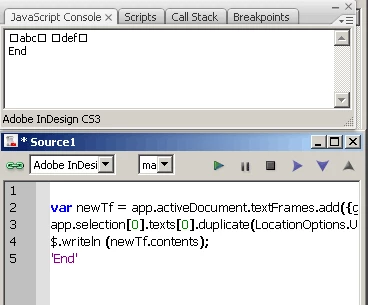
I attach an image of my debugging here:

Positions 10, 11, 15 and 16 contain the same 65279-code.

What does this mean in InDesign? I found someone stating that they are "Zero Width No-Break Space", but I'm not sure that's true, or if so, what's the meaning of them, and how can you replace them?

They get converted into spaces when I extract the contents and use it in a client application, and the next time two new spaces are added, that's why they are disturbing to me. The best thing would be if I could prevent them from appearing in the first place, or if they can be removed when reading the data.

Any ideas?

Best regards,

Andreas
This topic has been closed for replies.
Correct answer Harbs.

I checked this, but the text that I have is not tagged - no coloured brackets displayed when switching "view tag markers" on. But the origin of the text was indeed tagged, on those exact places which are now char 65279.

So it seems that the "duplicate" method I use on the original text does not remove the xml markers completely. The text gets dplicated with styles and all (duplicated from a table cell into a text frame).

I made a quick test which you can see below:

1. draw a text frame and enter some text. Set parts of it to any tag(s).

2. Select the text frame and run the code below:

var newTf = app.activeDocument.textFrames.add({geometricBounds:[0,0,100,100]});
app.selection[0].texts[0].duplicate(LocationOptions.UNKNOWN, newTf);
$.writeln (newTf.contents);

The result was a new text created with the contents of the first one. The new one is not tagged, but still carries the start- and end markers, as the contents property shows.

-- Andreas


I've never tried to duplicate tagged text, so I can't comment on what

you're seeing.

A few thoughts though:

1) What happens when you first tag the story that you're duplicating

the text to. Does that copy the text with the tags intact?

2) You might want to look into duplicating the xml elements instead of

the text.

Harbs

http://www.in-tools.com

Innovations in Automation

1 reply

Harbs.
Legend
June 16, 2009

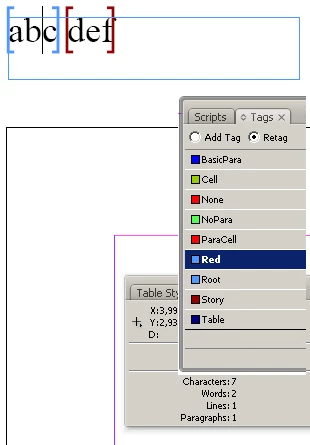
Those are xml tags. They a re always paired. The only way to get rid

of them (if you want to), is to untag the text, or select both the

opening and closing tags together and delete.

Harbs

Harbs.
Legend
June 16, 2009

Here's what tags look like when they are visible...

Andreas Jansson
Inspiring
June 18, 2009

I checked this, but the text that I have is not tagged - no coloured brackets displayed when switching "view tag markers" on. But the origin of the text was indeed tagged, on those exact places which are now char 65279.

So it seems that the "duplicate" method I use on the original text does not remove the xml markers completely. The text gets dplicated with styles and all (duplicated from a table cell into a text frame).

I made a quick test which you can see below:

1. draw a text frame and enter some text. Set parts of it to any tag(s).

2. Select the text frame and run the code below:

var newTf = app.activeDocument.textFrames.add({geometricBounds:[0,0,100,100]});
app.selection[0].texts[0].duplicate(LocationOptions.UNKNOWN, newTf);
$.writeln (newTf.contents);

The result was a new text created with the contents of the first one. The new one is not tagged, but still carries the start- and end markers, as the contents property shows.

-- Andreas