
Inspiring
December 7, 2023
Answered

Why bullet colors changes after i exported the pdf?

  • December 7, 2023
  • 1 reply
  • 1183 views

theis is the blue bullet points in my indesign file , the blue color is a cmyk color.

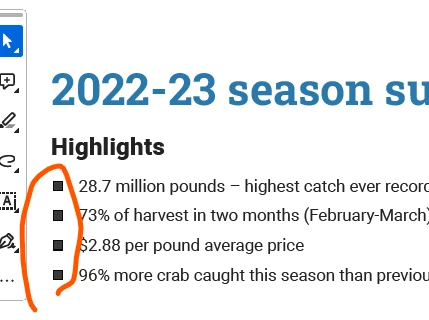
this is the exported pdf screenshot. bullet ponint color is changed to black.... i have no idea why only the bullet color changed... i exported it twice but got the same result.  (i use the same color for the title but the title color keeps the blue, just the bullet point color changed)

Anyone know can i fix it? please help.


This topic has been closed for replies.
Correct answer Willi Adelberger
  • Do you use Character Styles for bullets? You should do so as with Paragraph styles, otherwise it happens that the bullet inherit properties of the first character in the paragraph.
  • What color has the used Character Style?

1 reply

Willi Adelberger
Community Expert
Willi AdelbergerCommunity ExpertCorrect answer
Community Expert
December 7, 2023
  • Do you use Character Styles for bullets? You should do so as with Paragraph styles, otherwise it happens that the bullet inherit properties of the first character in the paragraph.
  • What color has the used Character Style?
Willi Adelberger
Community Expert
Community Expert
December 7, 2023

Additional question: Do you use manual or automatic bullets as part of the Paragraph Style?

Inspiring
December 7, 2023

i made the bullet point with the text  in paragraph style panel. and i only made a blue color in character style and i applied the blue color (character style) to the bulllet point style in paragraph style panel.

 it is very weird... and now i changed the shape to triangle and it has no problems that the blue color shows on the printed pdf. Just that solid squred shape prevents me to make it blue on printed PDF .... i have no idea what happend to the shapde... does the shape matters?