
Participating Frequently
February 13, 2023
Question

Why can't I keep a Chrome window open and any Adobe app window open at the same time?

  • February 13, 2023
  • 1 reply
  • 2455 views

Why does the green button on the upper left window for adobe apps not have the function to tile?


I want to keep an Indesign document and a window in chrome open AT THE SAME TIME. I am copying and pasting data from a website into an Indesign document. I can't keep both windows open at the same time. When I open one, the other closes.


The green button tile function works on Acrobat but not any other Adobe apps. It also works on all my Microsoft apps as well as chrome. I am using Mac Monterey.


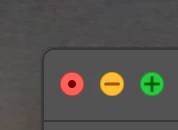
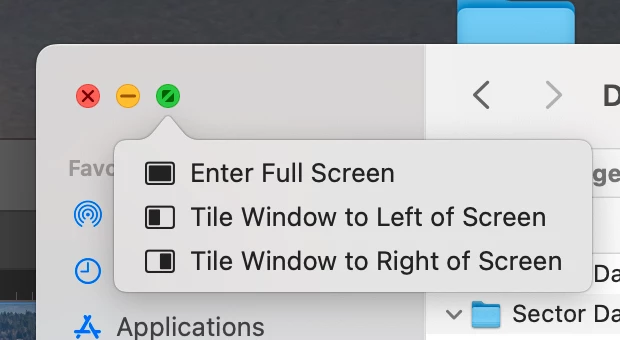
Currently green button on adobe apps looks like the left screen with only the ability to maximize or minimize the window, with no options to tile the window as shown on the right screen.
This topic has been closed for replies.

1 reply

Steve Werner
Community Expert
Community Expert
February 13, 2023

The simple answer is that the Creative Cloud apps (all of them) are not designed to work that way. They are highly complex professional applications which already have a carefully crafted set of panels and dialog boxes allowing you to share muliple windows of information. It would just not work well.


Also, Creative Cloud applications are designed to allow people to work as close to the same way in Macintosh and Windows applications. The tiling system is Mac only.


The system of tiling windows that Apple has developed can work well for simpler applications. But applications like Word or Acrobat usually only have one working window of information and they fit better into that kind of environment.


You're fighting an uphill battle and yours is the first request like this I've read. You're welcome to post your request in InDesign User Voice, but I don't think you'll get much support for it. 


https://indesign.uservoice.com/


Participating Frequently
February 13, 2023

I don't think that is the case! I'm a graphic designer and I frequently need to have multiple windows open on different apps. Everyone I know in my field works this way. Many people get a second monitor for this but I only have one.


If what you are saying is true, why can I have multiple windows open on adobe apps at the same time? I can have an Indesign, Illustrator and Photoshop document open for example all at the same time. I can also have excel, word, etc and any Adobe app open at the same time.


The only issue is with chrome. I cannot have any Adobe app and a chrome window open at the same time and this is the function that I need the most. I am creating a large infographics book and I need to copy a large amount of numbers from a website into an Indesign document. The easiest way to do this is to have both windows open and go back and forth between each and cut and paste.

Participating Frequently
February 14, 2023

I am unable to have two windows open as shown on your screenshot (indesign and chrome) I have no idea why. When I open chrome other windows close. That is why I asked this question on this forum.


I think this is a system preference and not involving Adobe since I opened Safari and when I do this it also closes active windows I have open for Adobe apps. So the issue is a web browser not closing windows.  Can anyone help?