
ChrisMix86
Inspiring
October 3, 2013
Question

Why do my JPEG file sizes shrink so dramatically?

  • October 3, 2013
  • 4 replies
  • 23226 views

This has got me completely and utterly baffled.

I have an image that I saved using Photoshop as JPEG at max quality and on disk it is 12.3mb.

After placing it at 100% in InDesign that spread when exported as a PDF with images set to max quality is a mere 2.9mb. (The spread is two pages, the image on one and the month of a calendar on the other)

The image in Photoshop is 3900px by 2650px and at 300ppi it's 33.02cm by 22.44. It is converted to CMYK and saved as JPEG at max 12

In InDesign it's frame is 330.2mm x 224.367mm on a document of 318mm x 212mm with 6mm bleed all round.

When InDesign is exporting as a PDF it must be recompressing the JPEG? Yet it seems to be throwing away 10mb even at max quality (see below) Or is it that Photoshop is saving CMYK JPEGs wrongly and producing files way too big - I've always thought PS produces huge JPEGs once you convert them to CMYK

What tests can I do? Have tried various output settings, these are current
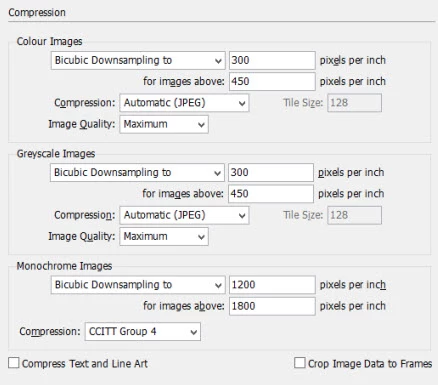
This topic has been closed for replies.

4 replies

sneha30692552dvkj
Inspiring
March 7, 2024

Hey hi @ChrisMix86You can try adjusting the compression setting in InDesign to see if it affects the file size further and also check that the JPEG compression settings in Photoshop are optimized for web or print use to avoid unnecessarily large file sizes.

BobLevine
Community Expert
Community Expert
March 11, 2024

This post is 11 years old!

Jongware
Community Expert
Community Expert
October 6, 2013

Amy2014 wrote:

This has got me completely and utterly baffled.

I have an image that I saved using Photoshop as JPEG at max quality and on disk it is 12.3mb.

Your disk image is not JPEG-compressed; it's a TIFF file with an EXIF wrapper. The large difference is because (1) the original image is *not* compressed, and (2) in the PDF it is *highly* compressed (with a slight loss of data). And (3) there is a slight size reduction -- 3900 x 2650 in the original, 3765 x 2513 in the PDF, so it's also 8.5% smaller (admittedly, not as significant as pts 1 and 2 combined).

Inside the PDF it is a JPEG, as confirmed by Acrobat Preflight -> Inventory. This shows it uses "JPEG compression (DCTDecode)".

For the original image, Apple's Preview (of all!) shows a 'TIFF information' field and says it's an uncompressed (!!) TIFF image. Examining the original file with a hex editor shows that this appears to be correct. (*)

You or your photographer presumably saved this from within Photoshop as a JPEG, but set the dialog options in such a way PS decided to save it in this format. Hold on while I check ... Hmm. By default, saving as TIFF preserves the original compression, and when saving it indeed says "None" in the Image Compression field. I wonder if the presence of EXIF information made PS work this way. Maybe someone on the PS forum can tell you that.


(*) Maybe not entirely true. For CMYK, the raw size would be 4 x 3900 x 2650 ~ 40 MB. If pressed, I could probably find out why this image is still only a quarter of that, but I think the main point is clear enough.

Inspiring
October 7, 2013

Jongware,

I had confirmed Amy's workflow with my own image. Data are here in #3:

http://forums.adobe.com/message/5740039

In my opinion, the JPEG compression settings in InDesign and Photoshop

are different.

It can be assumed that PhS qual.12 doesn't use color subsampling

but ID does. Color subsampling*) shrinks the file size for an RGB image

already by factor 1/2. For CMYK, which contains RGB=3/4 plus K=1/4

size the compressed size will be (1/2)·(3/4) + 1/4 = 5/8.

All the other compression effects are additional.

Furtheron it's very important to know, whether the CMYK profile (ca.2MB)

is embedded or not. In my example this is clearly mentioned.

I don't think that InDesign has an "improved" JPEG compression which

could explain  the observed effects. 

Best regards --Gernot Hoffmann

*) the most effective method uses only one of four value pairs Cb,Cr.

Jongware
Community Expert
Community Expert
October 7, 2013

Gernot, sorry, I didn't follow the discussion all the way to the PS forum.

Nevertheless, my main point:

I don't think that InDesign has an "improved" JPEG compression which

could explain  the observed effects.

.. the original file was not JPEG compressed (even though the file name seemed to indicate that), and so that fact in itself does explain the huge difference.

BobLevine
Community Expert
Community Expert
October 4, 2013

What tests can I do?

Print it.

ChrisMix86
Inspiring
October 4, 2013

My files are here: https://drive.google.com/folderview?id=0B5tpebpwHlb0aFU4VUV1R2M1amM&usp=sharing

There's the indd file cut down to two pages, the PDF output which is under 3mb (which I suspect is somehow sRGB) and the original files are in the folder created with Package.  I've pixelated the image which has knocked it down to 11.1mb when saved in Photoshop. Press PDF is coming out at 2.92mb.

I know I've misspelt censored, it's been a long night and it's now daytime in UK

Mike Witherell
Community Expert
Community Expert
October 4, 2013

Hey Gang, just in case you ever wondered about JPG compression:

The JPEG algorithms performs its compression in four phases:

  1. The JPEG algorithms first cuts up an image in blocks of 8x8 pixels. It converts image data to a luminance/chrominance color space, such as YUV. The algorithm retains more of the luminance in the compressed file.
  2. Next, apply a Discrete Cosine Transform (DCT) for the block. It replaces actual pixel color data for values that are relative to the average of the entire matrix. This replaces 8x8 pixel values by an 8x8 matrix of DCT coefficients.
  3. Two tables of quantization constants are calculated; luminance and chrominance. The constants from the two tables are used to quantize the DCT coefficients. Each DCT coefficient is divided by its corresponding constant in the quantization table and rounded off. The result of quantizing the DCT coefficients is that smaller coefficients will be replaced by zeros and larger coefficients will lose precision. This rounding-off causes a loss in quality. The resulting data are a list of streamlined DCT coefficients.
  4. Last, compress these coefficients using either a Huffman or arithmetic encoding scheme. Usually Huffman encoding is used. This is a second (lossless) compression that is applied.

By putting 2 compression algorithms on top of each other, JPEG achieves remarkable compression ratios, up to 20-to-1 can be achieved. JPEG decompression is supported in PostScript level 2 and 3 RIPs. This means that smaller files can be sent across the network to the RIP which frees the sending station faster, minimizes overhead on the print server and speeds up the RIP. The downside of JPEG compression is that the algorithm is only designed for continuous tone images. JPEG not does not lend itself for images with sharp changes in tone.

Mike Witherell
Legend
October 4, 2013

Have you verified that the exported PDF contains CMYK images?

ChrisMix86
Inspiring
October 4, 2013

Hi Doc

I haven't. I did try but I don't know how to do it. I have Adobe Reader and I can examine details about the document's properties like if any fonts are embedded but I can't see any info on the images at all.

Community Expert
October 4, 2013

http://forums.adobe.com/thread/1068393

There's a very real difference between "jpeg" and "automatic jpeg".

It's most likely with Automatic JPEG that the information is being zipped rather than lossy.