

Why do some Bengali words appear incorrectly in InDesign?
I am pasting Bengali from an excel file into InDesign CC 2018. I have Adobe World-Ready Paragraph Composer turned on. I’ve tried numerous fonts, including the Adobe Bengali font. Here are a few examples. The words in the red box are as they should be, the yellow highlighted words are how they appear in InDesign.
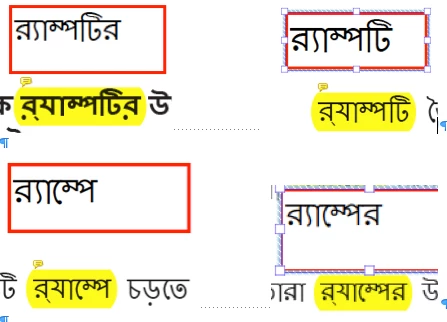
After doing some research, I’ve learned there are a lot of different rules dictating how certain characters should be combined. I’m wondering if some of these rules were left out or misconstrued in Adobe World-Ready Composer. Or is this an issue with the glyph palette? I can copy the incorrect word from InDesign and paste it into Word or Excel and it looks correct. As soon as I paste it into InDesign, it changes. Any suggestions on how to get around this issue would be greatly appreciated!
[Here is the list of all Adobe forums... https://forums.adobe.com/welcome]
[Comments is to ask about the operation of the Forum, not a specific program]
[Moved from the Comments forum to the specific Program forum... Mod]
 AdChoices