
Known Participant
April 18, 2024
Answered

Why does the text in my text boxes sometimes stay below the line and sometimes sit above it?

  • April 18, 2024
  • 3 replies
  • 552 views

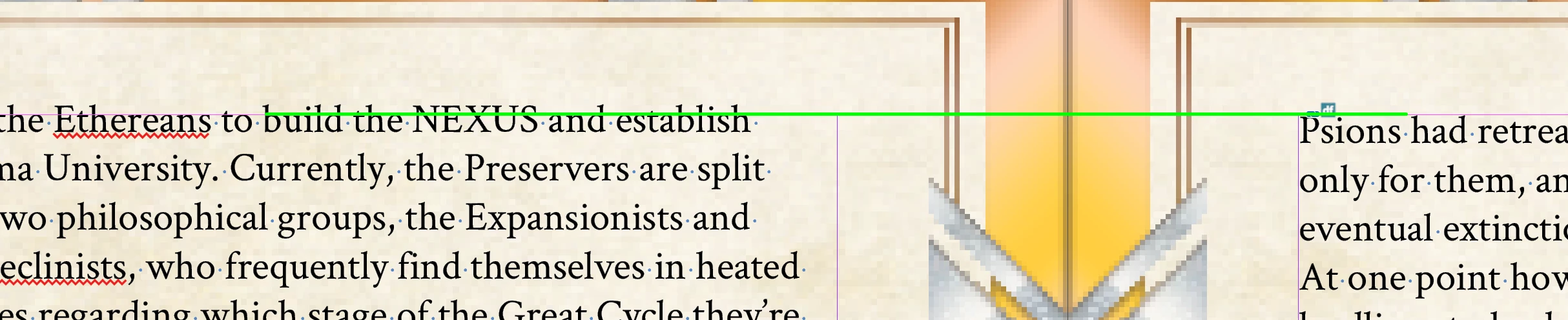
Sometimes when I put my text boxes down I see the text sit above the line. Other times it stays below. I'm not sure why it isn't consistent. Ideally, I'd like it all to sit below like the text on the right.
 

Any ideas?


Thanks a bunch,

Brendan


This topic has been closed for replies.
Correct answer rob day

You can make the default for a document’s new text frames by setting the Text Frame Options with nothing selected. To make it the application default, set Text Frame Options with no documents open.

3 replies

Willi Adelberger
Community Expert
Community Expert
April 18, 2024
  1. Use Object Styles and define the first base line.
  2. Apply those object styles.
  3. Use baseline grid.
rob day
Community Expert
Community Expert
April 18, 2024

Text frames have a First Baseline Offset property–looks like your frame on the left is set to x-Height, and the frame on the right is set to Ascent or Cap Height. With the frame selected check Object>Text Frame Options.

Known Participant
April 18, 2024

@rob day @Frans v.d. Geest Is there a way to make sure it always uses the same option? I used place text and had it flow, creating new pages as needed. Looks like your assessment is correct and some of them are x-Height and some Ascent. I'm just not sure why it's switching.

rob day
Community Expert
rob dayCommunity ExpertCorrect answer
Community Expert
April 18, 2024

You can make the default for a document’s new text frames by setting the Text Frame Options with nothing selected. To make it the application default, set Text Frame Options with no documents open.

Frans v.d. Geest
Community Expert
Community Expert
April 18, 2024

Use the baseline grid.