Known Participant
February 4, 2025
Answered

Why doesn't paragraph height follow the contents?

  • February 4, 2025
  • 3 replies
  • 1750 views

To reproduce this problem, follow these steps:

  • In a new InDesign document, create a text frame. Make it large enough to be able to contain many lines of text without overflowing. I will call this the main frame.
  • Place your text cursor in the main frame and make sure the paragraph uses automatic line spacing.
  • Write a few letters in the paragraph, this will help visualize the problem.
  • Create a second text frame.
  • Write a couple lines of text in the new frame.
  • Double click on the handle in the middle of the lower border of the new frame. I will call this operation "snap to size"
  • Cut the new frame and paste it into the main frame, as an in-line anchored object.
  • Delete or add some lines to the new/anchored frame.
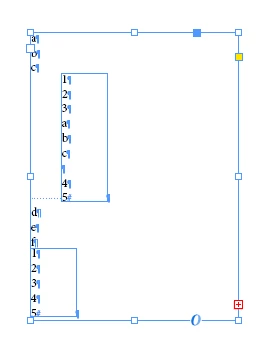
  • Snap to size the anchored frame and notice that the letters you typed in the main frame don't move: the height of the paragraph did not change.

Is that the expected behaviour?
In order to make the paragraph height change, I have to perform extra operations such as manually changing the dimensions of the anchored frame or opening the Paragraph window and adding/removing a border.
After performing one of these operations, however, the paragraph height starts following the height changes of the anchored frame even if they are caused by "snapping to size".


The behaviour is even weirder if the anchored frame is set to auto-resizes.
Do the same operations as above but, after filling and setting to auto-resize the new frame...

  • Cut the new frame and paste it into the main frame, as an in-line anchored object.
  • Place the cursor anywhere in the anchored frame and click enter: the paragraph size does not change.
  • Press enter again: it changes.
  • Keep pressing enter: it changes.
  • Type anything that does not change the line count and the first enter will not change the paragraph height. 

Similar but not identical behaviour will happen when pressing Del or Backspace.
Correct answer Robert at ID-Tasker

Yes, you're right - you've found another bug...


I've done your steps:

Looks like InDesign isn't recomposing Parent Story / TextFrame - because when I change the size of the parent TextFrame - even a bit - everything is fine:

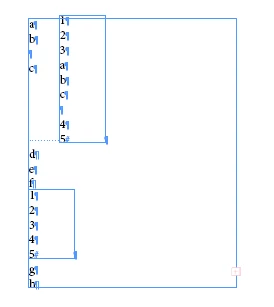
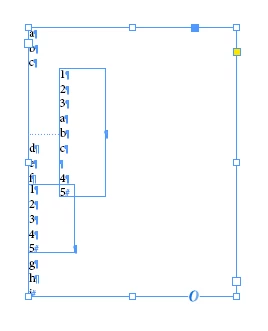
BUT - if I'll edit text BEFORE InLined graphic - after doesn't matter - this happens:

InDesign is refreshing location - but uses info about the old size of the InLined object??


3 replies

Robert at ID-Tasker
Legend
February 4, 2025

@marco-b


Can you share a sample INDD file?


You might have something set by default in an ObjectStyle - or preselected / active ParaStyle or CharStyle, etc. - because you mention "Paragraph window" - which suggests you are using local formatting / overrides instead of styles? 


marco-bAuthor
Known Participant
February 5, 2025

The reason I am using local formatting (and the default styles) is just because I experienced this problem in a complex file where there were many, many things that could have been the cause. For instance, in that document the second text frame is part of a group that is anchored to the main text frame.
So, before starting this thread I tried to simplify the problem as much as I could: this way one wouldn't have to wonder if the group was the problem, or if the object or paragraph styles were the problem.


After succeeding to replicate the problem with a very short sequence of operations, I think this behaviour could be caused by two things: it's just how InDesign works, or there's something in my default settings (and in the settings of the complex file on which I have no control until the file reaches me) that causes it.

You will find attached a two-page file.
On page one, the document created according to my steps above. Everything uses default styles (which, at least in my case, use automatic line spacing).

On page two, an excerpt from the original file. I removed or replaced the contents to hide company data and I used local formatting to place a huge red border on the frame you're supposed to change the height of (and see when the lower rule of the paragraph moves and when it does not). Use preview mode, for there are empty frames and you need to see how high they are!

By the way, the reason I mention the paragraph window and not the paragraph style window is that opening the paragraph window and clicking twice over the border checkbox works to unlock the box and is faster than right clicking the right paragraph style and pressing apply style. Changing the height of the anchored frame a sedocn time by cahnaging the contents and snapping again also work, and I just discovered the changing the text wrap options from the control panel works and is even faster because I don't even need to click into the paragraph.

Robert at ID-Tasker
Legend
February 5, 2025

Yes, you're right - you've found another bug...


I've done your steps:

Looks like InDesign isn't recomposing Parent Story / TextFrame - because when I change the size of the parent TextFrame - even a bit - everything is fine:

BUT - if I'll edit text BEFORE InLined graphic - after doesn't matter - this happens:

InDesign is refreshing location - but uses info about the old size of the InLined object??


The same problem is in 2025 and 2024 - at least on Windows...


@Abhishek Rao - could you please check / confirm?


Willi Adelberger
Community Expert
Community Expert
February 4, 2025

In the used object style, what are the settings about size, position and resizing?

marco-bAuthor
Known Participant
February 4, 2025

Size: no rule
Postion: no rule
Automatic resizing: disabled
Adapt frame: unflagged (flagging it and selecting "adapt content to frame" does nothing different)

(The wording might be a bit different, I'm back-translating from Italian.)

marco-bAuthor
Known Participant
February 4, 2025

I forgot to specify I'm on version 20.1 x64