Inspiring
June 6, 2022
Answered

Why don't my print settings get carried over from my document settings?

  • June 6, 2022
  • 3 replies
  • 1396 views

I'm trying to send out a pdf to the printer for a file created in InDeisgn. When I set up the document I create it with a 0.125in bleed, however once that project is converted into a pdf, the bleed (print settings) revert to 0in. 
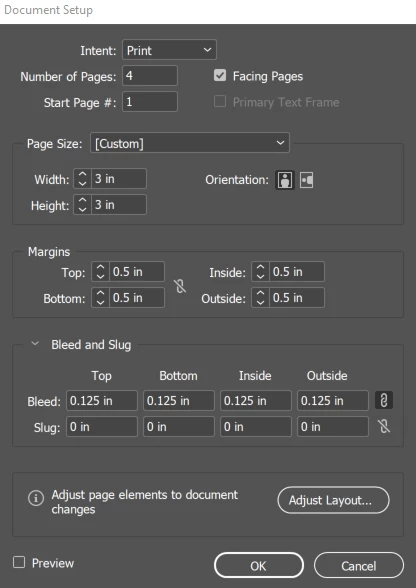
This seems to be a recent issue as this has only been the case for the past couple months. Before, everything worked just like it always has; I set up the document, the output is exactly how it was set up. 

This topic has been closed for replies.
Correct answer Peter Spier

Thank you, that's what I thought it should be doing. My issue is that the document settings aren't being honored which is the mystery. I'll keep playing with it. I have a help desk ticket opened with my IT department and they're trying to figure it out as well. Honestly, I think it's just me 🙂 I can create gremlins in computer software programs that no one can duplicate - it must be my super power! LOL Thank you so much for your insights. You have all confirmed that the way I was setting up my document, PDF export, and print settings were correct, it's just the program doesn't seem to want to play nice with me.


This sort of weirdness can be caused by correupt prefs and caches. See Reset InDesign Preferences and Other Troubleshooting and check if that helps.

3 replies

BobLevine
Community Expert
Community Expert
June 7, 2022

That's a print setting, not a PDF export setting. You're not printing to PDF are you?

Nani BearAuthor
Inspiring
June 7, 2022

Ultimately, yes. InDesign used to allow me to export to pdf with the document settings of 0.125" bleed showing in the exported pdf for my printer. Now, for some reason, the document settings are not carrying over to the export settings or the print settings like they used to and I can't seem to figure out how to fix it. 

Nani BearAuthor
Inspiring
June 8, 2022

Well, that's the behavior that I see over here. If I'm in the PDF Export dialog, and I check the "Use document bleed settings" then those boxes grey out (which makes sense, you're overtly saying "I'm not going to use these boxes to set bleed, use the values from Document Setup").  When I examine the exported PDF, the bleed settings I chose in Indy's Document Setup are respected. It's working as intended. 


You should be able to prove this to yourself by doing something like starting a document with millimeters as the unit of measurement and then set the bleed to something extravangant, like 111 mm. Then, go to the PDF Export dialog, and check that "Use document bleed settings" box. Then the boxes will grey out, and the 111mm values will populate, showing you that in these PDF export settings, you want to not be able to specify 'em, but you want the Document Setup settings honored. 


Thank you, that's what I thought it should be doing. My issue is that the document settings aren't being honored which is the mystery. I'll keep playing with it. I have a help desk ticket opened with my IT department and they're trying to figure it out as well. Honestly, I think it's just me 🙂 I can create gremlins in computer software programs that no one can duplicate - it must be my super power! LOL Thank you so much for your insights. You have all confirmed that the way I was setting up my document, PDF export, and print settings were correct, it's just the program doesn't seem to want to play nice with me.

Joel Cherney
Community Expert
Community Expert
June 7, 2022

I think that all of the generic PDF export settings that ship with ID leave the "Use Document Bleed" box unchecked. If you always want your PDF export to respect your document bleed settings, you'll want to make you own Adobe PDF Preset with your bleed settings box checked. 


Nani BearAuthor
Inspiring
June 7, 2022

thank you for that. I'm wondering though, when I select the check box to use document bleed settings, the bleed area reverts to 0 and the individual top, botton, left and right options become greyed out. It's really frustrating!

Brad @ Roaring Mouse
Community Expert
Community Expert
June 7, 2022

Regardless of whether your Document Settings are correct, you have to specify bleed in whichever PDF Export Preset you are using.