
Inspiring
March 21, 2017
Answered

Why is my exported PDF "Page size" not displaying the full page dimensions from InDesign?

  • March 21, 2017
  • 2 replies
  • 4213 views

My exported full-color, full-bleed Adobe Reader PDF "Page size" (8x10 with .125 and .25 bleeds) doesn't display the full page size from InDesign, i.e. the width is displayed in the lower left corner and in properties as 8.12 x 10.25 as oppose to 8.125 x 10.25. Is this an issue? Would 8.13 bleed width be O.K. even if the printer requests 8.125 width? Why isn't the .125 appearing on the PDF when it's clearly on the InDesign document?

Please help. Thanks,

Scott
    This topic has been closed for replies.
    Correct answer Test Screen Name

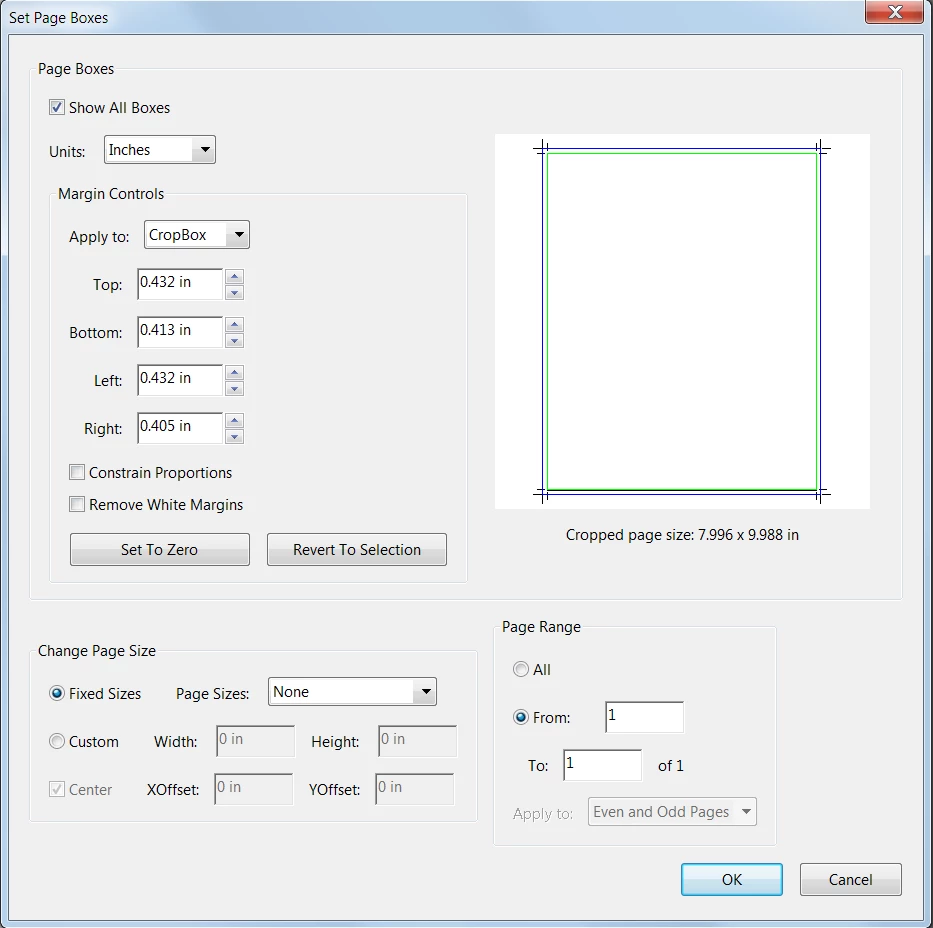
    It's hard to say whether Acrobat has the correct dimensions internally or if there is a rounding error. There are a couple of ways that you can check that will display decimal points with 3 digits.

    • Use the Measure tool. Drag the measure tool over the area you want to measure (hold down Shift as you drag to constrain the movement) and the dimension will display.
    • Use the Crop tool. Drag the crop tool over the page area you want to measure. Then double-click inside the rectangle to display the Set Page Boxes dialog box.

    If CreateSpace rejects your file (doubtful), you could make the page size a bit larger in InDesign then crop to the desired size in Acrobat.


    I can confirm that the page size shown bottom left rounds inches to 2 decimal places. So if you see 8.12, it means the value is somewhere between 8.115 and 8.125. Rounding can happen in page sizes, if so they are rounded to points. Sizes are in fact stored as points, and these are shown with 1 decimal place. 8.125 inches is exactly 585 points.

    2 replies

    barbara_a7746676
    Community Expert
    Community Expert
    March 21, 2017

    8.13 would be ok with your printer. Printer's make allowances for slight differences. It may be that Acrobat is using the correct dimension internally but the numbers displayed are rounding to two decimal places.

    scottyb34Author
    Inspiring
    March 21, 2017

    Hi Bob, Hi Barb -

    Thanks for the timely response. Just to be clear, you're saying it's acceptable to have both 8.12 width and the 8.13 width? (FYI, I got the 8.13 width by making the bleed .128, not .125). Bob, are you saying the 8.12 is actually 8.125 width in the PDF but it just doesn't display it? (I wonder WHY that is). Or is it actually 8.12 width and therefore I should round up to 8.13? I'm being particular because I'm considering using CreateSpace for printing my first run, but their specs seem odd, and they seem to reject files based on these little details. Just getting my ducks-in-a-row.

    Respectfully, Scott

    schroef
    Inspiring
    May 28, 2020

    I can confirm that the page size shown bottom left rounds inches to 2 decimal places. So if you see 8.12, it means the value is somewhere between 8.115 and 8.125. Rounding can happen in page sizes, if so they are rounded to points. Sizes are in fact stored as points, and these are shown with 1 decimal place. 8.125 inches is exactly 585 points.


    Issue with this is that my pagesize now gets adjust all the time. I work with Metric system and use either CM or MM. I need to prepare a document in 1/10 scale. Its being checked automatically online and keeps returning my document size is wrong. This is probably due this conversion from CM/MM to a point size and back. 

    In acrobrat my page dimension is now with 3 decimals and not the correct size. Quite annoying actually, my number are correct in de design application yet creating the PDF is what causes this mismatch.

    BobLevine
    Community Expert
    Community Expert
    March 21, 2017

    Just a rounding error. It only displays to two decimal places. Don’t sweat it.