
November 16, 2014
Answered

Why is my PDF size from my InDesign export still large?

  • November 16, 2014
  • 7 replies
  • 26714 views

I'm doing class project that is a four-page, seven-image document with very little text. The project must be submitted as a PDF under 300 KB. However, when I export the document under the smallest file size preset and with the compression rates down to 72 dpi, I get a PDF that is 612 KB.

All my classmates are able to get it under 300 KB, so I'm confused as to why mine is so large. I'm using 5 JPGs and 2 GIFs, and each take up a 5in by 5in square in the document. They are relatively really small pictures (avg. 250 KBS) and I've even re-saved all to be under 100 KB, but the PDF size only drops to around 500 KB I transferred between InDesign CC on Mac and InDesign CS5 on Windows and wonder if that is a concern.
This topic has been closed for replies.
Correct answer

Just wanted to share the results, in case someone comes across this forum in the future.

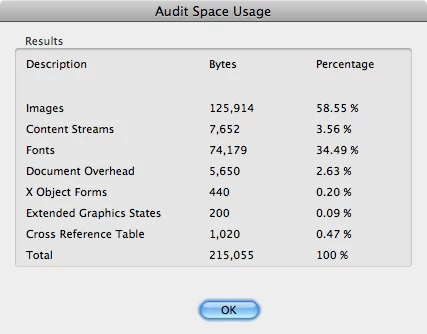
In danegonzalez's four-page InDesign layout, seven black-and-white images were used.  Three pages contained two 5" by 5" images accompanied by seven lines of text under each image, and the last page had one image-and-description set of similar sizes.  An audit of the PDF done on Acrobat (below) showed that the images made up the majority of the file size.

Inline image 1

Since the images had quite a bit of detail, I figured that changing their file type would be the best way to create a more compact PDF and keep the integrity of the images.  So I cropped the images to size and saved them as 24-bit PNG files.  Even though the PNG files were larger than the originals, it gave nice PDF results.  Here is the audit results of the updated PDF after using InDesign's "Smallest File Size" default preset.

I'm glad we were able to resolve this issue. 

7 replies

November 17, 2014

An email from maiyo8

"Thank you for the opportunity to test out your InDesign file.  I did some more experiments due to curiosity and created a PDF that was 217 KB.  Yay!

The issue was mainly due to the JPG images.  I re-saved them as PNG images (GIFs would have worked well too, despite what another forum member wrote) because they were black-and-white images.  To learn the differences between these image file types, I'd recommend you read this Stack Overflow post.  And even though the PNG files were larger than the JPG files, they retained the image details and compressed well to create a smaller PDF than with the JPG files.

After creating more than 200 real estate fliers, I can tell you that the original image file makes a big difference to the overall PDF size in InDesign.  And in your case, it was the image format that contributed to the bulky size.

Though this experiment answers your problem.  I hope the other forum members will be able to give other suggestions.  I'm curious to learn what others may know. 

"

Correct answer
November 17, 2014

Just wanted to share the results, in case someone comes across this forum in the future.

In danegonzalez's four-page InDesign layout, seven black-and-white images were used.  Three pages contained two 5" by 5" images accompanied by seven lines of text under each image, and the last page had one image-and-description set of similar sizes.  An audit of the PDF done on Acrobat (below) showed that the images made up the majority of the file size.

Inline image 1

Since the images had quite a bit of detail, I figured that changing their file type would be the best way to create a more compact PDF and keep the integrity of the images.  So I cropped the images to size and saved them as 24-bit PNG files.  Even though the PNG files were larger than the originals, it gave nice PDF results.  Here is the audit results of the updated PDF after using InDesign's "Smallest File Size" default preset.

I'm glad we were able to resolve this issue. 

Willi Adelberger
Community Expert
Community Expert
November 17, 2014

But you have to be aware, if you want to make print PDF you have to avoid PNG files as they do not support color management and only transparency in form of reduced opacity and not the various kind of fill modes.

November 16, 2014

I do have the template as well, along with the original images. I can email them to someone if you want to try it out.

Legend
November 16, 2014

I meant a fellow student, not someone outside your group. If you want to try a wider appeal at least mention the version of InDesign, it must match.

November 16, 2014

The template is for Adobe InDesign CC 2014 I believe. The template is what everyone starts with so it wouldn't have anything I adjusted. Or I have the one I've been working from that is InDesign CS5.

November 16, 2014

After my file was looked at by maiyo8, he found that 80% of the PDF file size was in the images, which would mean it makes up about 624KB out of the 713KB. Even after optimizing in Acrobat Pro, he was only able to get it under 500KB.

Legend
November 16, 2014

Your resizing before placing might have made it harder for Photoshop to compress, so I'd recommend working with the originals directly.

Why not get someone else to try with YOUR photos? To see if it's settings or the photos.

November 16, 2014

I'm trying to find that out. I have sent my original photos to my professor and she has the template we all use, so that's what she is going to do, but she hasn't gotten back to me yet. I used the originals, and it goes down to the 638KB PDF size.

Peter Spier
Community Expert
Community Expert
November 16, 2014

danegonzalez wrote:

All my classmates are able to get it under 300 KB, so I'm confused as to why mine is so large.

Have you asked any of them how they did it?

Legend
November 16, 2014

You say five pictures, each 250K? Certainly wouldn't expect the PDF to be smaller than its component JPEG graphics, why would you?

November 16, 2014

I resized in Photoshop and saved them all as JPGs around 50KB each and the size of the PDF is still around 600KB. All my classmates have much large file sizes, my professor said even her images were 1-2MB, but after exporting with the [smallest file size] preset and the compression rates set to 72 dbi, everyone's PDF came out under 300KB.

BobLevine
Community Expert
Community Expert
November 16, 2014

What is the purpose of this exercise? There is zero reason to try and get

a PDF file that small.

November 16, 2014

Well, since it is a class project, my teacher wants to combine all the documents into one that won't take up a bunch of space. So we're supposed to do a PDF export under the [smallest file size] preset and specify 72 dpi in the compression rates. When my classmates did it, all of their PDFs are under 300KB naturally with no problem. However, mine was the only one that was high.

Peter Spier
Community Expert
Community Expert
November 16, 2014

What is the effective resolution of your images as placed?

Effective e.g. if you place a 600 dpi image at 50% the effective resolution is 300 dpi.

Perhaps your classmates are using a smaller effective resolution.


Test Screen Name wrote:

What is the effective resolution of your images as placed?

Effective e.g. if you place a 600 dpi image at 50% the effective resolution is 300 dpi.

Not to quibble,but if you place at 50%, the effective PPI doubles, not halves, so 600 ppi actual placed at 50% is 1200 ppi effective.

It shouldn't affect the size that much, but 81 ppi images won't be downsampled to 72...

Finally, do your classmates have as many images? Are they all raster, or did they use vector images?

Willi Adelberger
Community Expert
Community Expert
November 16, 2014

Never use GIF in InDesign. What for?

If you can choose betwen vector and pixel, choose vector.

Use PDF, AI and PSD for placing images.

November 16, 2014

I resized in Photoshop and saved them all as JPGs around 50KB each and the size of the PDF is still around 600KB. And I then saved them all as PSDs and relinked them and the file size went up to 726KB.

November 16, 2014

Hi danegonzalez,

It's odd that your file is that big.  What was the size of your PDF if you chose the default "smallest file size" preset (without changing any settings)?

November 16, 2014

It's 701 KB

November 16, 2014

Did you happen to apply any effects on the images, like drop shadows, by chance?