Inspiring
May 6, 2025
Answered

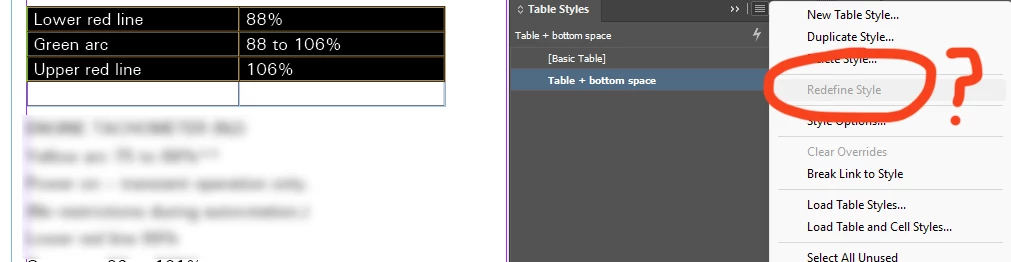
Why is redefine table style always disabled?

  • May 6, 2025
  • 1 reply
  • 1142 views

It doesn't matter if I select rows in the table, or just have the insertion point in it. "Redefine style" is always greyed out in the Table panel.

 

Correct answer Robert at ID-Tasker

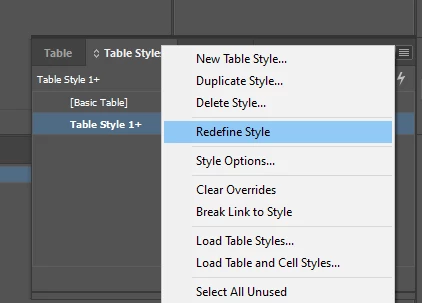
You need to have local overrides first - "+" after the name:


1 reply

Robert at ID-Tasker
Robert at ID-TaskerCorrect answer
Legend
May 6, 2025

You need to have local overrides first - "+" after the name:


Inspiring
May 6, 2025

Thanks. Looks like it's neglecting to pick up quite a few changes, such as "cell insets."

Dave Creamer of IDEAS
Community Expert
Community Expert
May 7, 2025

Thanks. I do see how the default cell style specification in the table style is essential; so once I set up a cell style, I specified it in my table style.


But now I'm finding that even when you re-apply the table style to a table, it won't overwrite local changes to the cell formatting. You must laboriously apply the cell style by right-clicking all cells and using the "overwrite local changes" option. Anyway... I think have it in shape now.


No--you need to select the table, set the Cell Styles to None, then clear any table overrides. However, this may not clear any manually applied Paragraph styles or formats. 

I usually like to

  1. Create my Paragraph styles for the table (I don't reuse other styles but create ones just for the table).
  2. Create my Cell Styles that link to the paragraph styles, usually without any other formatting.
  3. Create the Table style and select the appropriate Cell styles. 

I never apply paragraph styles or formatting directly to the table. If I need a custom paragraph style, I create the Cell style linked to it, and apply the Cell style. This method also makes it very easy to link to Excel files for constantly changing tables. 


David Creamer: Community Expert (ACI and ACE 1995-2023)