
daitranthanhoa
Inspiring
March 8, 2022
Pregunta

Why some text can't auto break to new line?

  • March 8, 2022
  • 2 respuestas
  • 2131 visualizaciones

Why some text can't auto break to new line?

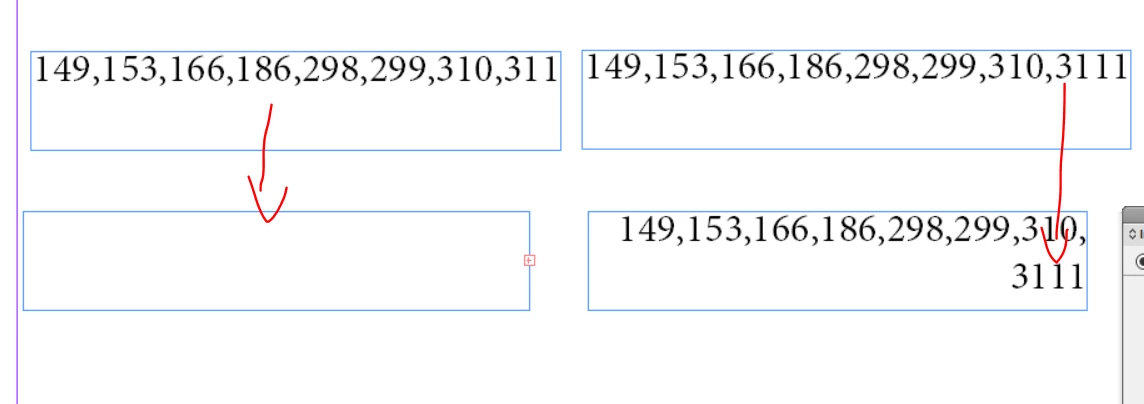
Ex: Text = "149,153,166,186,298,299,310,311" can't auto break to new line when scale down width of TextFrame.

But if I add more a character , it will working: Ex:  "149,153,166,186,298,299,310,3111"
Este tema ha sido cerrado para respuestas.

2 respuestas

Community Expert
March 9, 2022

Hi daitranthanhoa,

post a sample document with your text frame for testing.

Perhaps there are other factors into play here…


Thanks,
Uwe Laubender

( ACP )

daitranthanhoa
Inspiring
March 9, 2022

This is a sample file: 名称 未 設定 -3.indd

Community Expert
March 9, 2022

Thanks!

It's the applied Japanese Paragraph Composer. Bug?

If I change it to the Adobe Paragraph Composer the text will break when the discretionary line break characters were inserted after every comma.


Regards,
Uwe Laubender

( ACP )

Community Expert
March 8, 2022

Hi daitranthanhoa,

cannot tell why. Some speciality of the applied paragraph composer perhaps.


I would add perhaps a discretionary line break special character after every comma.

Unicode value is 200B. You can do it with a Text Find/Change action like that:

Regards,
Uwe Laubender

( ACP )

daitranthanhoa
Inspiring
March 9, 2022

I had try set character <200B> after every comma, but it not break to new line.

If i set a space , it will break to new line, but distance is not good.


Scott Falkner
Community Expert
Community Expert
March 9, 2022

CHeck the Character panel. You might find that No Break is applied.