

Electroscribe_2024
Known Participant
February 1, 2024
Question

Windows Explorer shows generic icon for INDD files

  • February 1, 2024
  • 1 reply
  • 1635 views

Update: Resolved after update to InDesign 19.5 64-bit.
Am using InDesign 2024 version 19.1X64 on a computer running Windows 11 Enterprise version 22H2.

All of a sudden, Windows Explorer stopped showing an InDesign application icon for files made and saved with InDesign 2024. Shows a generic icon instead. Curiously, InDesign Markup Language files show the correct program icon.   Note: redacted the file names in the screenshot because the docs are still in draft status.

I right-clicked the file icon and chose properties, and INDD files are assigned to InDesign 2024.
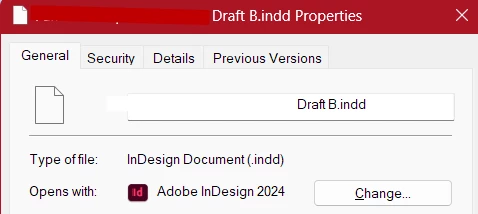
And I have used Windows 11's Default Programs control panel to map all INDD files to InDesign 2024.
But the  icons for INDD files still show up generic.
Do I need to uninstall and reinstall InDesign to get the correct icon to appear?

This topic has been closed for replies.

1 reply

BobLevine
Community Expert
Community Expert
February 1, 2024

Did you uninstall ID 2023 after installing 2024? 

Electroscribe_2024
Known Participant
February 1, 2024

After making sure InDesign 2024 worked (not the newest computer), I removed previous versions, yes.
I did not delete the preferences for previous versions (there were issues getting INDD 2024 to port them over to the new version) -- until I read your post this morning. Did so, and rebooted the computer. That did not solve it. Am on production deadlines, so it will be a couple of days before I can try removing INDD 2024, rebooting, and reinstalling it. That will be my next move.

Electroscribe_2024
Known Participant
August 12, 2024

Hello @jakubc57549599,

We understand that technical issues can be frustrating. Would you mind running InDesign under a different administrator account (Windows / macOS) and checking if it helps?


Looking forward to hearing from you.


Thanks,

Anubhav


The generic file icon problem stopped I updated InDesign to Version 19.5 (64-bit). Now I have a different issue: After I exit InDesign, Windows flashes an error message that "InDesign has stopped working. Please close the program. (But I already did exit the program). Does the same thing after qutting Adobe Acrobat Plus (only the message is about Acrobat, not InDesign). By the way, my large organization does NOT grant Admin rights to anyone except Help Desk techs and IT folks, so can't switch.