
Participating Frequently
February 2, 2022
Answered

Wrap text and anchored text box

  • February 2, 2022
  • 2 replies
  • 467 views

Hi, i need your help.

I've a document with multiple parent pages, and some of them have different margins.

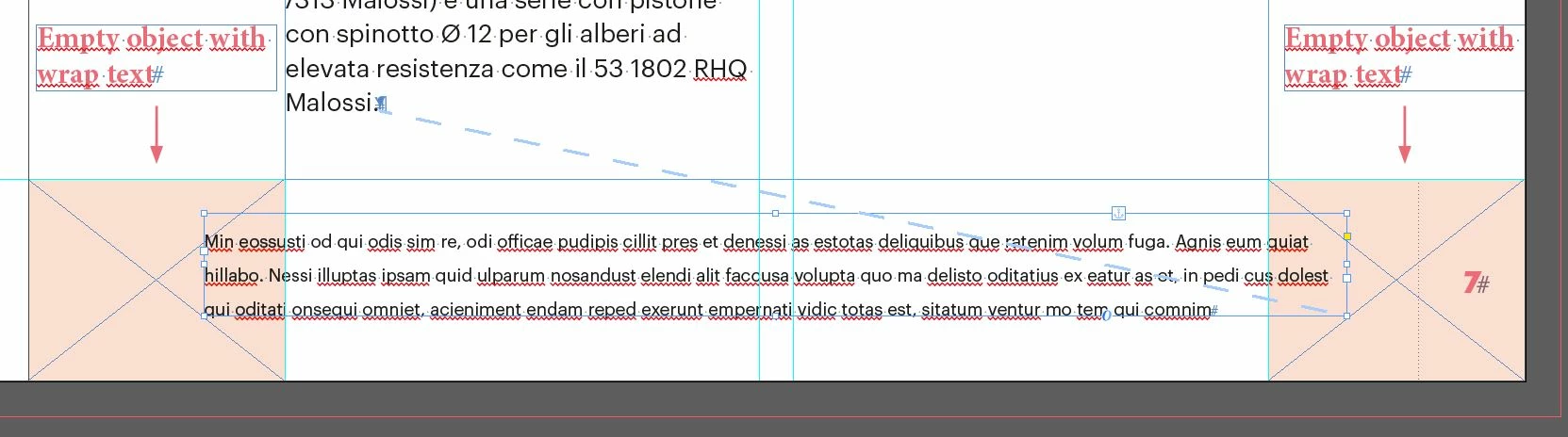
I want to place a text box in the footer, and anchor it to the main text frame. If the main text slides, the anchored box moves in another page with different margins, and I want resize it. I place two invisible object in parent pages, with margins dimension, and wrap text on. In this way, text in the anchored box and the main text frame have always the same width. There is a little problem: anchored text box ignores the wrap text!
I can't believe that there isn't a way to solve it...Please, can you help me?


This topic has been closed for replies.
Correct answer Laubender

"I can't believe that there isn't a way to solve it...Please, can you help me?"


Hi Riccardo,

I can confirm this behavior.


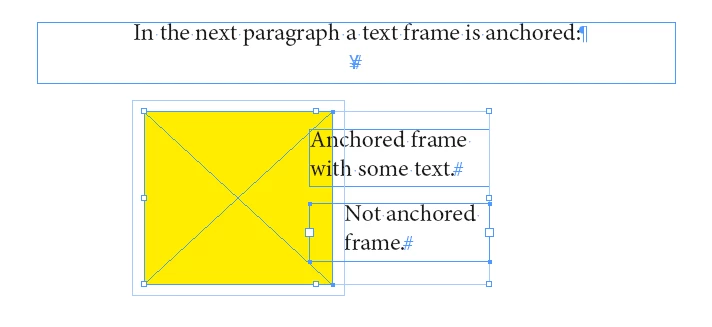
Standard with InDesign. You cannot do anything about it unless you do not anchor this text frame you selected in your screenshot. Also see this where the yellow rectangle has text wrap applied to and only the text in the not anchored frame is affected by the wrap:


Regards,
Uwe Laubender

( ACP )


2 replies

LaubenderCommunity ExpertCorrect answer
Community Expert
February 3, 2022

"I can't believe that there isn't a way to solve it...Please, can you help me?"


Hi Riccardo,

I can confirm this behavior.


Standard with InDesign. You cannot do anything about it unless you do not anchor this text frame you selected in your screenshot. Also see this where the yellow rectangle has text wrap applied to and only the text in the not anchored frame is affected by the wrap:


Regards,
Uwe Laubender

( ACP )


Participating Frequently
February 4, 2022

Thank you, I hope this becomes possible in the future!

Eric Dumas
Community Expert
Community Expert
February 2, 2022

Hi,

I tried to replicate this and it worked. I had the text on a page, the wrap-blocks on a MasterPages. 

I would recommend you check ithe properties of the text frames (Ctrl+B on Windows for 'Text Frame Options'), there is a checkbox that needs to be off for 'Ignore text wrap'


Participating Frequently
February 2, 2022

Hi, thank you for the answer.

I'm sure that ignore text wrap is off.

Are you sure that your text box is anchored?