
Abambo
Community Expert
Community Expert
December 31, 2017
Answered

Wrong date shown in Indesign document.

  • December 31, 2017
  • 3 replies
  • 2499 views

Hi all,

My Indesign is really quite advanced. It's showing a really advanced date:
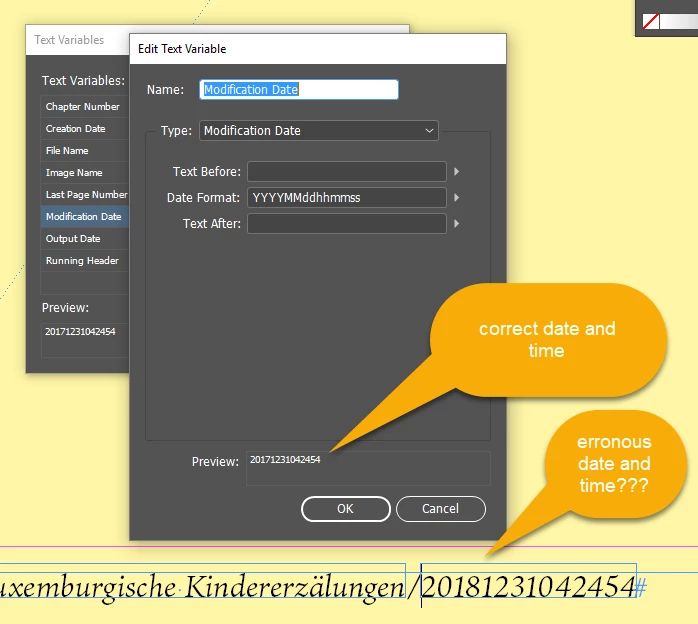
Any ideas?

This topic has been closed for replies.
Correct answer jane-e

Maybe InDesign didn't like 2017 any better than I did, and has high hopes that 2018 will be a better year?

3 replies

jane-e
Community Expert
jane-eCommunity ExpertCorrect answer
Community Expert
December 31, 2017

Maybe InDesign didn't like 2017 any better than I did, and has high hopes that 2018 will be a better year?

Erica Gamet
Inspiring
December 31, 2017

Best answer yet!

Erica Gamet
Inspiring
December 31, 2017

When I use the default format, it reads it just fine. When I manually enter "YYYY," it changes to 2018. It will be interesting to check again tomorrow and see if the bug is still there.

Abambo
Community Expert
AbamboCommunity ExpertAuthor
Community Expert
January 1, 2018

well for today (Jan 1st) 2018 would be correct...  

ABAMBO | Hard- and Software Engineer | Photographer
Steve Werner
Community Expert
Community Expert
December 31, 2017

My preview matches what shows in the file. However, there is definitely a date bug going on for today's date since this is December 31, 2017!