
Exit
  • Global community
    • Language:
      • Deutsch
      • English
      • Español
      • Français
      • Português
  • 日本語コミュニティ
  • 한국 커뮤니티
0

x and y co-ordinates of image frame contents

Community Beginner ,
Mar 20, 2023 Mar 20, 2023

Hi

on my macintosh the x and y coordinates of the position of the content (an image) in a Graphics frame is show relative to the frame. On my PC the same content of a Graphics frame is shown relative to the x and y coordinates of the page. Can I change this on the PC to behave in a more logical manner - as the macintosh?

MTIA Steve
TOPICS
Import and export
641
Translate
Report
Community guidelines
Be kind and respectful, give credit to the original source of content, and search for duplicates before posting. Learn more
community guidelines

correct answers 1 Correct answer

Community Expert , Mar 20, 2023 Mar 20, 2023

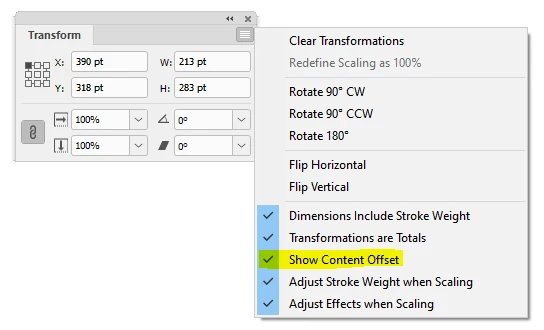
In the Transform panel's fly-out, check 'Show content offset':

PeterKahrel_0-1679320891383.png


Translate
Community Expert ,
Mar 20, 2023 Mar 20, 2023

In the Transform panel's fly-out, check 'Show content offset':

PeterKahrel_0-1679320891383.png


Translate
Report
Community guidelines
Be kind and respectful, give credit to the original source of content, and search for duplicates before posting. Learn more
community guidelines
Community Beginner ,
Mar 21, 2023 Mar 21, 2023

Thanks Peter, and I thought I'd looked everywhere!
With that pointer I've now assigned the top left axis point to the default rectangle frame tool and any image opens 0mm 0mm as I want - oddly though if I create a box usingthe 'Rectangle Tool' frame tool (with default set to 'Basic Graphics Frame') and place an image it works. If I create a  as I wish. If I create a box using the 'Rectangle Frame Tool' (with default set to 'Basic Graphics Frame') - it defaults to 'None' and doesn't work

Translate
Report
Community guidelines
Be kind and respectful, give credit to the original source of content, and search for duplicates before posting. Learn more
community guidelines
Community Expert ,
Mar 21, 2023 Mar 21, 2023

If I create a box using the 'Rectangle Frame Tool' (with default set to 'Basic Graphics Frame') - it defaults to 'None' and doesn't work


How strange. . . No idea how to deal with that.

Translate
Report
Community guidelines
Be kind and respectful, give credit to the original source of content, and search for duplicates before posting. Learn more
community guidelines
Community Beginner ,
Mar 21, 2023 Mar 21, 2023
LATEST

I've always liked the 'Rectangle frame tool' on master pages for image placement as they are easy to see. Looks like I'll have to change my work practices (on pc) and start using the 'Rectangle tool'. I'll have to check on my mac tomorrow and see why/how it behaves differently.

Translate
Report
Community guidelines
Be kind and respectful, give credit to the original source of content, and search for duplicates before posting. Learn more
community guidelines