


- Home
- InDesign
- Discussions
- Re: XML import generating IDML markup
- Re: XML import generating IDML markup
XML import generating IDML markup

Copy link to clipboard
Copied
Hi,
I'm trying to set up a framework to import a class of TEI documents into InDesign. I have an example of the result which I want to achieve, so I saved it as IDML and had a look within the zip file at the story document containing the text of my example. I created an InDesign template by stripping out the content from my sample text and saving as a template. I then wrote an XSLT transform to convert the TEI source to this format, e.g.
<?xml version="1.0" encoding="UTF-8"?><idPkg:Story xmlns:idPkg="http://ns.adobe.com/AdobeInDesign/idml/1.0/packaging" DOMVersion="14.0"><Story Self="u1bf7" AppliedTOCStyle="n" UserText="true" IsEndnoteStory="false" TrackChanges="false" StoryTitle="$ID/" AppliedNamedGrid="n"><StoryPreference OpticalMarginAlignment="false" OpticalMarginSize="12" FrameType="TextFrameType" StoryOrientation="Horizontal" StoryDirection="LeftToRightDirection"/><InCopyExportOption IncludeGraphicProxies="true" IncludeAllResources="false"/><ParagraphStyleRange AppliedParagraphStyle="ParagraphStyle/Body"><CharacterStyleRange AppliedCharacterStyle="CharacterStyle/$ID/[No character style]"><Content/><Br/></CharacterStyleRange></ParagraphStyleRange><ParagraphStyleRange AppliedParagraphStyle="ParagraphStyle/Heading 1"><CharacterStyleRange AppliedCharacterStyle="CharacterStyle/$ID/[No character style]"><Content/><Br/></CharacterStyleRange></ParagraphStyleRange><ParagraphStyleRange AppliedParagraphStyle="ParagraphStyle/Body"><CharacterStyleRange AppliedCharacterStyle="CharacterStyle/$ID/[No character style]"><Content/><Br/></CharacterStyleRange></ParagraphStyleRange><ParagraphStyleRange AppliedParagraphStyle="ParagraphStyle/Heading 2"><CharacterStyleRange AppliedCharacterStyle="CharacterStyle/$ID/[No character style]"><Content>Object entry</Content><Br/></CharacterStyleRange></ParagraphStyleRange><ParagraphStyleRange AppliedParagraphStyle="ParagraphStyle/Heading 3"><CharacterStyleRange AppliedCharacterStyle="CharacterStyle/$ID/[No character style]"><Content>Definition</Content><Br/></CharacterStyleRange></ParagraphStyleRange><ParagraphStyleRange AppliedParagraphStyle="ParagraphStyle/Body"><CharacterStyleRange AppliedCharacterStyle="CharacterStyle/$ID/[No character style]"><Content>Logging all objects coming into your care for whatever reason,
including loans, enquiries and potential acquisitions.</Content><Br/></CharacterStyleRange></ParagraphStyleRange> ...
When I select my template, then import the TEI document with this XSLT transform active, it busily works on the data but nothing appears in the document as a result.
Is this because my whole approach is never going to work, or is it some subtle problem that I will need to track down and solve?
Thanks,
Richard


 11
Replies
11
11
Replies
11


Copy link to clipboard
Copied
Hi Richard,
I really don't know why your approach will not work.
Hm. Maybe it's better to test this with a snippet IDMS file that contains a single text frame?
And not with a structure that is a zip package in essence, the IDML file.
Regards,
Uwe
Copy link to clipboard
Copied
Thanks, I'll try that when I get chance. One reason I haven't explored IDMS is that there is no means of exporting my test file in this format.
Richard
Copy link to clipboard
Copied
richardlight wrote
Thanks, I'll try that when I get chance. One reason I haven't explored IDMS is that there is no means of exporting my test file in this format.
Richard
IDMS can be exported from a selection. Also by scripting, but this is a different story…
Just select a text frame in your InDesign document and export to InDesign's snippet file format.
Alternatively you could drag the selected frame to the file system. An IDMS file will be generated with a generic name.
Regards,
Uwe

Copy link to clipboard
Copied
Success!
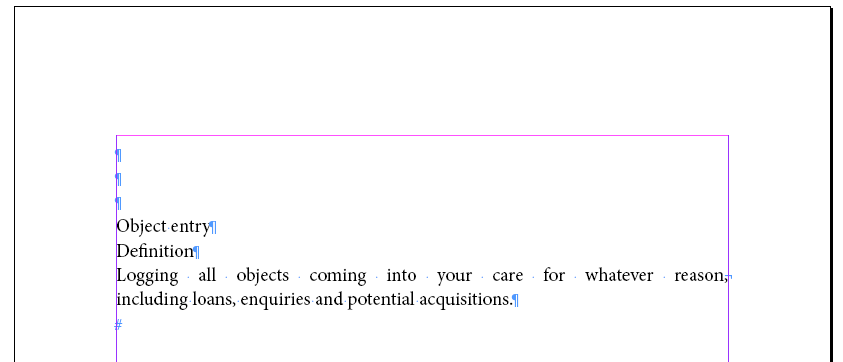
This will look different from your text because I based my test document on other styles. But your text is here!
I encountered the same problem when loading your modified XML: InDesign thinks for a while and then it decides it's done, but no text appears. The file names and their declared contents IDs must match! In your XML sample, the Story ID is
<Story Self="u1bf7" ..
and this must be used in the file name as well: Story_u1bf7.xml
However, if you change the file name from what it originally was, you also must change it elsewhere (I dunno, I expect it gets mentioned at least in designmap.xml; possibly elsewhere too). It is far easier to not change the file name but just re-use that ID for your new story.
My test document name came out as Story_ue9d.xml and it worked when I changed the ID to "Self="ue9d". (There is a space inside "<Pa ragraphStyleRange ..." in your post, but I bet that's just the Jive editor on this forum, and your actual code is okay. I get an un-wellformed error from InDesign without correcting this.)
Copy link to clipboard
Copied
Uwe,
Good thinking: thank you! I'll try that when I get home.
Richard
Copy link to clipboard
Copied
Sadly, renaming the XML document didn't work for me. (This also presumably means that I can't do the XSLT transform on the fly as part of the import, since that wouldn't allow me to name the resulting file.)
When I look at the full document which I am trying to emulate via this approach, it has references to no less than 1,147 stories. So maybe my intended approach isn't scalable anyway for a real-life document.
I'm confused as to what is actually going on when you do an XML import. What exactly are you importing into? Should you be importing into an empty document? An existing one? I see an option to 'import into current element': how does that work?
Thanks,
Richard
Copy link to clipboard
Copied
richardlight wrote
Sadly, renaming the XML document didn't work for me. (This also presumably means that I can't do the XSLT transform on the fly as part of the import, since that wouldn't allow me to name the resulting file.)
If you rename the XML file, then InDsign won't be able to locate it (unless you also added that new file name into designmap.xml, as I said). What worked for me was the other way around: use that same name as the Story ID inside it so they match. It doesn't matter if you have lots of story files -- you must be changing only one, right? That is the one whose ID you must copy in its containing XML.
(XSLT does allow you to specify an output name, but it is of no help at this point.)
richardlight wrote
I'm confused as to what is actually going on when you do an XML import. What exactly are you importing into? Should you be importing into an empty document? An existing one? I see an option to 'import into current element': how does that work?
Where did this come from? "XML Import" is something else. I extracted an existing IDML file, replaced one of its Story file contents with yours and copied my own file name as its ID, and compressed it again to get an IDML file back. That's where my image came from.
Copy link to clipboard
Copied
Hi,
Apologies: my misunderstanding. I have been trying to import an XML document all the way through this conversation, and didn't pick up that you were tackling the issue another way. I'll have another try ...
Richard
Copy link to clipboard
Copied
That ... actually explains a lot. IDML is a beast of a file format, and usually, if one needs creating from scratch, you'd typically use a full-fledged programming language with an appropriate library. However, I guesstimated changing only a single Story file to be possible, and so it was. But it comes with a lot of overhead.
If you only want to import formatted text then forget about IDML and start a-new with Tagged Text. Tagged Text can include all regular text formatting, such as styles and local overrides, and relatively complex objects such as footnotes and tables. An IDML is a "new" file butTagged Text must be imported into an existing document (just like a Word document).
To the untrained eye, Tagged Text looks like XML, but it really is not. You still can use XSLT to transform existing data into Tagged Text, but you cannot write it out as XML -- I think that's the default for most XSLT processors, so make sure to specify your output type as "text". (It also means that you have to labouriously encode all of its <...> codes as "<....>".)
There are references for Tagged Text on the Adobe Resources site somewhere, but you can quickly generate a Tagged Text example from any text frame by simply exporting its contents as Tagged Text and then inspecting it with any plain text editor.
Copy link to clipboard
Copied
Hi,
I've done all that, and when I loaded my custom Tagged Text file into an otherwise empty document, I got the 'markup' appearing along with the text:
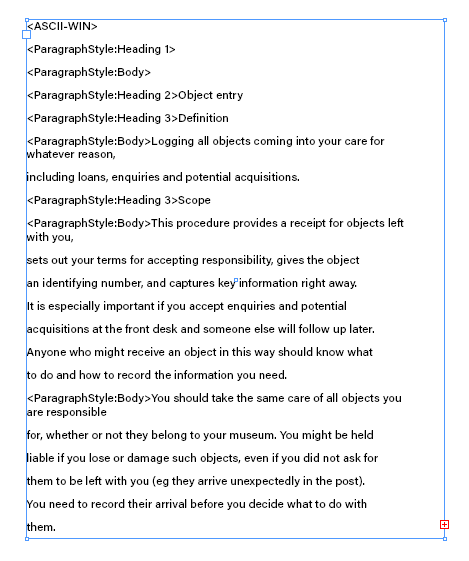
Also, after the first page it gave up and didn't insert anything else. (This failure to flow into existing pages, and to create new pages, is something I have seen at other points in my InDesign Odyssey.)
Let me turn this around, and ask you: if you were starting with an established workflow which generates TEI-encoded XML documents, how would you set up a procedure which allows them to be published as PDFs using InDesign? I've tried every way I can think of, and I'm no closer to having a clue how to proceed.
Thanks,
Richard

Copy link to clipboard
Copied
This is well out of my league but I always love seeing a use for IND that I probably could never have imagined.


Get ready! An upgraded Adobe Community experience is coming in January.
Learn more
 AdChoices