
sak95456465
Known Participant
August 17, 2024
Question

zwnj character (unicode) will be omitted in "Text variable" and export to epub

  • August 17, 2024
  • 1 reply
  • 1100 views

Hello

In Farsi-persian writing zwnj character (unicode) is vital. (https://en.wikipedia.org/wiki/Zero-width_non-joiner). unfortunately If I use text variable like "running header" this character will be omited. 


It will happen in any version of indesign however I use middle eastren version. zwnj is sessential character in persian and it is not possible to use another character (It os not optional It is mandatory). meanwhile If I export it to epub it will be omitted as well.


and if I copy text with zwnj like (می‌خانه) and copy it on "numbering and section options it will be omitted as well.
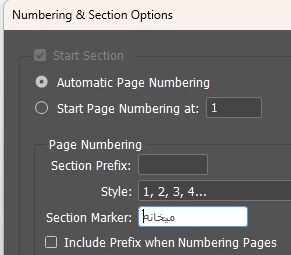
 

Thanks.


This topic has been closed for replies.

1 reply

James Gifford—NitroPress
Legend
August 17, 2024

InDesign's text variables, including running headers and captions, have a number of quirks. (For one thing, they are inherently non-breaking text, which can create all kinds of problems with long strings in short text frames.) I can't think of any examples offhand, but there are other instances of glyphs being dropped, substituted or misformatted.


I don't know that there's any simple solution; just possibly a GREP style might be applied to fix this problem in the running header style.

Known Participant
August 19, 2024

I don't think its just headers, I'm up against the same issue throughout an entire book I'm migarting to Farsi.  I don't speak or read Farsi, I submitted the draft to the proofreader and she noticed this issue is throughout the book.  It appears InDesign strips the zwnj character out of the text when its cut and pasted into the ID doc from a word document.  The only solution we've hit upon is to find and replace all the zwnj chararters in the source text doc with a white space and then I'll replace all the text again throughout the entire document.  This is going to cost me me a few days of work so its quite vexing.   It seems pretty fundamental that if Adobe supports partiuclar language that that its should also be supported all the characters needed to properly display that language.    If anyone has any other solutions, I'm keen to hear them.

sak95456465
Known Participant
August 19, 2024

I speak persian-farsi and I use indesign from version 1.5 so I can help you for Farsi If you want. There is no problem for using zwnj in indesign and Microsoft word and If you type standard zwnj in word and copy it when you past it in indesign It will be preserved. Unfortunately Normal "Persian keyboard" on mac and windows doesn't have necessary key to type It so some amateur users type "optional hyphen" instead and It will show normal but when place .docx file to indesign It will be omitted. The solution is replace "Persian standard" keyboard on mac and windows and use "shift+space" to type zwnj.
omitting zwnj on header and export to epub is a bug and It is critical. there are some temporal workaround but will not be resolved completely. unfortunately zwnj is only vital in Persian and because Persian users of InDesign are in minority adobe don't pay attention to It.
This topic has already been mentioned years ago:
https://community.adobe.com/t5/indesign-discussions/zwnj-in-text-variable-dropping/m-p/8748838#M33305
I posted another critical bug here:
https://community.adobe.com/t5/indesign-discussions/harfbuzz-issue-didnot-resolved-even-in-19-5-version/m-p/14805784#M585514
and I don't know why adobe did this Big change in core type engine that didn't resolve even in 19.5 Which is almost a disaster