
az69376135
Participant
August 14, 2018
Answered

Überlappung im Inhaltsverzeichnis

  • August 14, 2018
  • 2 replies
  • 467 views

Hallo Community,

ich habe zum ersten Mal mit CS6 ein Inhaltsverzechnis erstellt und stehe vor zwei Problemen:

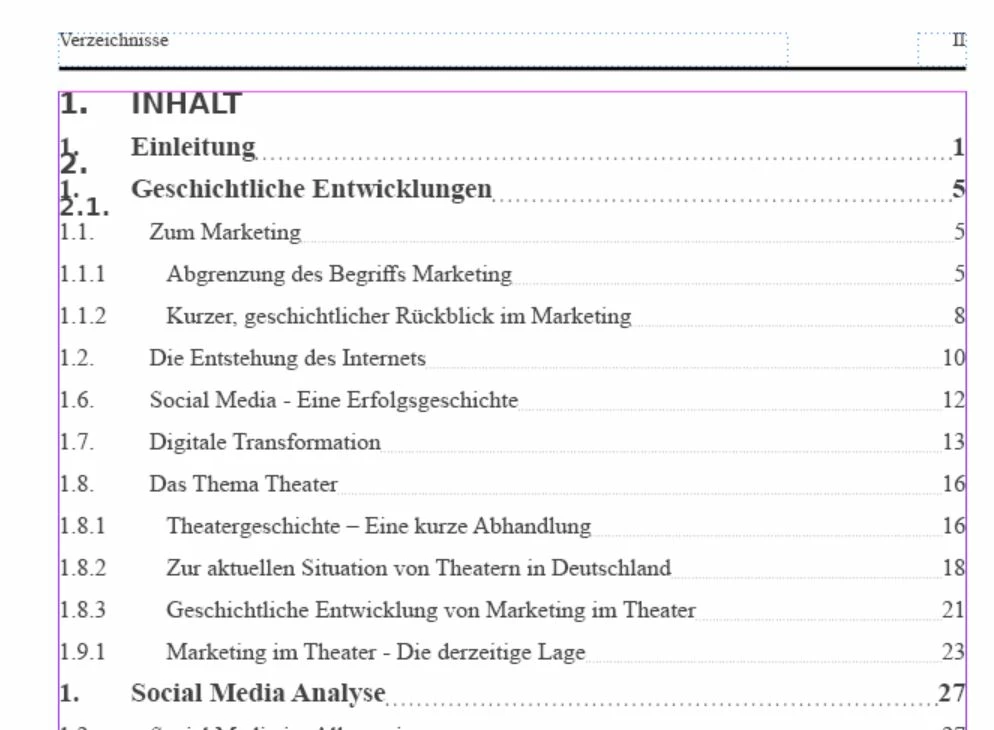
1. Wie unten im Bild zu sehen, tauchen von irgendwo einfach Nummerierung auf ohne dazugehörigen Titel, die nicht mit einem Absatformat versehen sind (gemeint sind die 1., 2. und 2.1, die zwischen die Zeilen gerutscht sind9

2. Die Nummerierung ist teilweise fehlerhaft (springt von 1.2 auf 1.6) und sie wird im nächsten Kapitel nicht übernommen (beginnt wieder bei 1.)
Kann mir jemand bitte helfen? Habe schon etliche Foren ausgekuntschaftet, aber noch keine Hilfe gefunden
This topic has been closed for replies.
Correct answer Colin Flashman

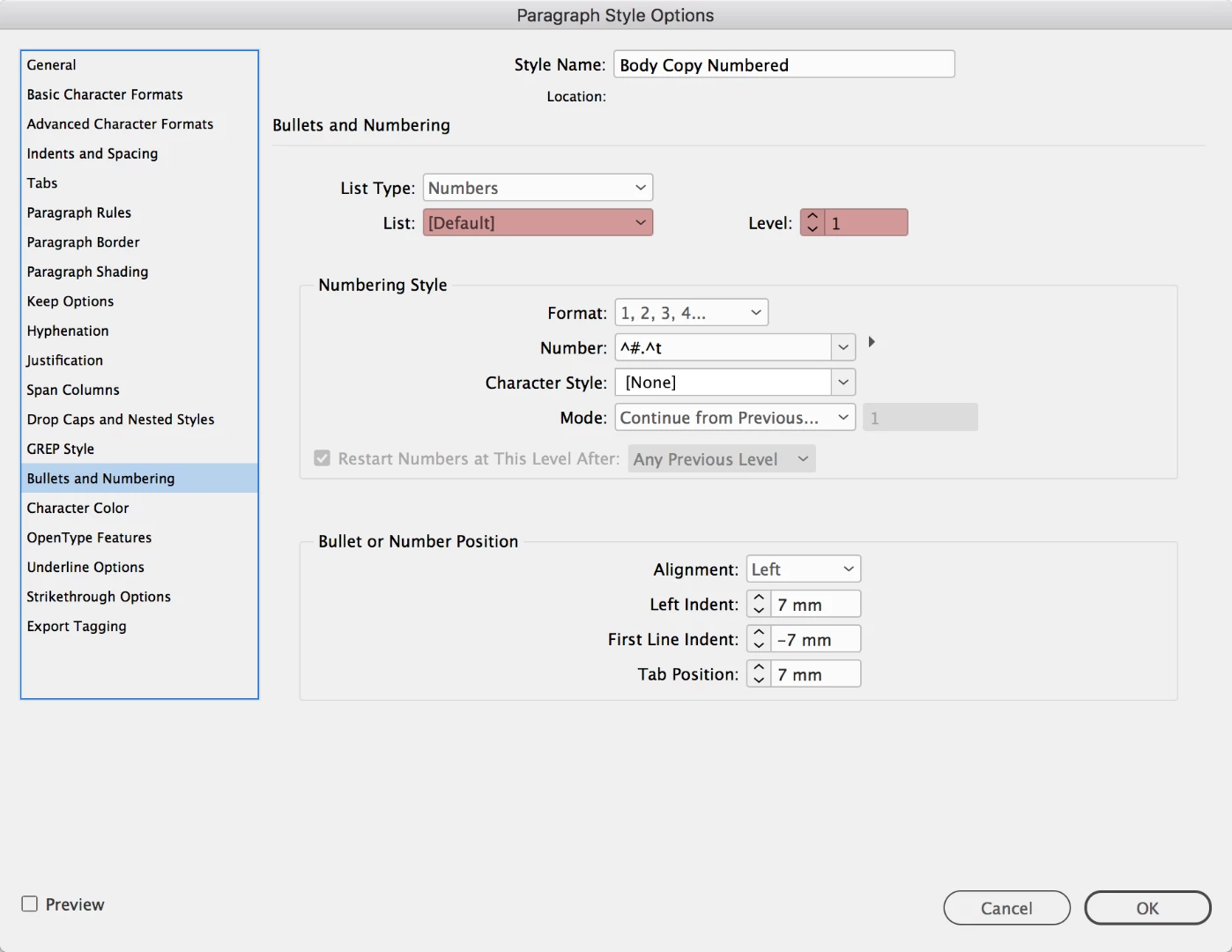
I suspect it will have to do with one of these two options in the paragraph style that controls the formatting for the Table of Contents, OR the heading style itself:

Perhaps try using a different list instead of the [Default] one as shown in this dialog box, and check to make sure the levels of the bullets and numbering are consistent for the formatting that needs to be applied (e.g. 1 is level 1, 1.1 is level 2, 1.1.1 is level 3, etc).

Let us know how you go

2 replies

az69376135
Participant
August 15, 2018

Hey Colin,

I accidently started numbering on the "Musterseite" layout, not in normal "Seiten" modus (dont know what it is called in english indesign version). So the problem with the second layer numbering is solved.

And thanks for the list hint. When i changed it from default to list2 and unticked the second option in the new dialog, it worked out.

thanks for your help.

Community Expert
August 15, 2018

Hi,

FWIW: "Musterseite" is master page or master spread.

"Seiten" is document pages.

Regards,
Uwe

Colin Flashman
Community Expert
Colin FlashmanCommunity ExpertCorrect answer
Community Expert
August 15, 2018

I suspect it will have to do with one of these two options in the paragraph style that controls the formatting for the Table of Contents, OR the heading style itself:

Perhaps try using a different list instead of the [Default] one as shown in this dialog box, and check to make sure the levels of the bullets and numbering are consistent for the formatting that needs to be applied (e.g. 1 is level 1, 1.1 is level 2, 1.1.1 is level 3, etc).

Let us know how you go

If the answer wasn't in my post, perhaps it might be on my blog at colecandoo!