
seanf33852861
Known Participant
June 24, 2019
Question

Adobe Indesign CC 2019 / Apple MacOS Mojave 10.14.5

  • June 24, 2019
  • 10 replies
  • 5739 views

Hello, I really hope somebody can help me with this issue I am having. I hope I can explain it correctly, if you have any questions please let me know :

First of all this is a question about accessibility

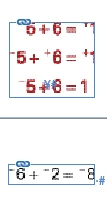
My document ( INDESIGN 2019 ), has little .eps file in my indesign document. Its how the document was conceived.

My Job is to convert this document into a accessible document. Just to make it short, I have to convert all the .eps into a OUTLINE format.

But this is what Happens :

1. I am in my indesign document ( 2019 )

2. I right click a .eps and open it in Illustrator

3. TO give you and idea what are my .eps I have attach and image, If I dont convert it in outline, I get a Character encoding problem in my PDF, which causes big problems in a accessible document. Its basically a Symbol ( MATHTYPE )....I really hope I am explaining myself corectly.

4. When My .eps is converted to outline in Illustrator and then...I save it

5. Go back to indesign, then it updates the link I GET THE WHEEL of COLOR OF DEATH ROLLING for 12 to 15 seconde per .eps. you know what wheel I am talking about.

now. I have tried about everything to try to make this wait shorter and shorter, but no go. So this is why I am putting my question on the Adobe Forum, are you having issues with the new operating system MOJAVE with Indesign. Is their a update I need to do to Adobe!...

If you have a solution, this will help me a lot, cause its causing my a lot of time waiting for it to update.
This topic has been closed for replies.

10 replies

seanf33852861
Known Participant
June 26, 2019

Hello, I could not find one for the tag...

Is their a applescript for selecting all Anchors images at once in a document!

seanf33852861
Known Participant
June 26, 2019

Oh thank you Rob, il check in the script forum, thank you for all yoru help! really apreciated!

I took off at least a day of work with all that!...

seanf33852861
Known Participant
June 26, 2019

All my images to be tag IMAGE : I indicated in this image for you!...

rob day
Community Expert
Community Expert
June 26, 2019

XML can be scripted, but I don't have anything. You could ask in the scripting forum.

seanf33852861
Known Participant
June 26, 2019

Would you have a script also that TAGS all the images : IMAGE

rob day
Community Expert
Community Expert
June 26, 2019

Not sure what you mean by TAGS, but probably not.

seanf33852861
Known Participant
June 26, 2019

Its giving me this msg when I run the script indesign, Its because its a ducment of 119 pages
If I can just do it for ONE page selected, I think that should work!

rob day
Community Expert
Community Expert
June 26, 2019

This would skip any links that are causing the error

tell application "Adobe InDesign CC 2018"

    tell active document

        repeat with x in links

            --the image

            set i to parent of x

            --the frame

            set f to parent of i

            try

                set vertical scale of i to 100

                set horizontal scale of i to 100

                fit f given center content

            end try

        end repeat

    end tell

end tell

seanf33852861
Known Participant
June 26, 2019

Rob, I think with the oversized document, its causing a problem, but the script does work!

Wondering if you can adjust the scrip just the 100 % scale one, so When I run it it does just one page, the one I have the page selected in the page panel, is that possible.

seanf33852861
Known Participant
June 26, 2019

It work

seanf33852861
Known Participant
June 26, 2019

Is giving this error msg when I ry save it...I have indesign CC 2019..by the way...I change it in your script and it did not work!

thank you

seanf33852861
Known Participant
June 26, 2019

Hello, I am new to the script, and using them. How do I save this as a .jsx file for my indesign ( MAC ).

thank you again!

rob day
Community Expert
Community Expert
June 26, 2019

It's AppleScript not JavaScript.

In your Applications Utility folder look for the Script Editor application. Copy the code, open Script Editor, create a New file, paste the code, and Save with the File Format as Script into your InDesign Scripts folder. Open your doc and double-click the script, which should show in your Scripts panel. It will loop thru all of the document links and set them to 100%

dave c courtemanche
Inspiring
June 24, 2019

First off, I would not use the .eps format. Save the file as a .ai file and see if that fixes your issue. Eps should be avoided at all costs and I know of know benefit to using this archaic format.

dave c courtemanche
Inspiring
June 24, 2019

Also, you could not convert to outlines, save your PDF from Indesign and convert all fonts to outlines in Acrobat (Print Production/Prefilght/PDF fixups/ convert all fonts to outlilnes). This is the process I use when I need to outline anything and retain transparency.

seanf33852861
Known Participant
June 24, 2019

Can you convert just images to outline. I dont want the whole documents to be outline, just the vector images ( like the image I posted ). Thank you for the fast reply!