jarraha57510274
Participating Frequently
April 24, 2021
Answered

Adobe Indesign ME

  • April 24, 2021
  • 2 replies
  • 2648 views

Greetings,


I have been trying to launch a Word file with "Arabic" text into Adobe Indesign but it doesn't support it; is there is a way to make Indesign supports Arabic text (Like ME version)?


With thanks,

Jarrah 

This topic has been closed for replies.
Correct answer Zaid Al Hilali

Thanks so much; I will


Once your InDesign is removed from your system, follow the below steps to re-install the Middle Eastern copy of InDesign.

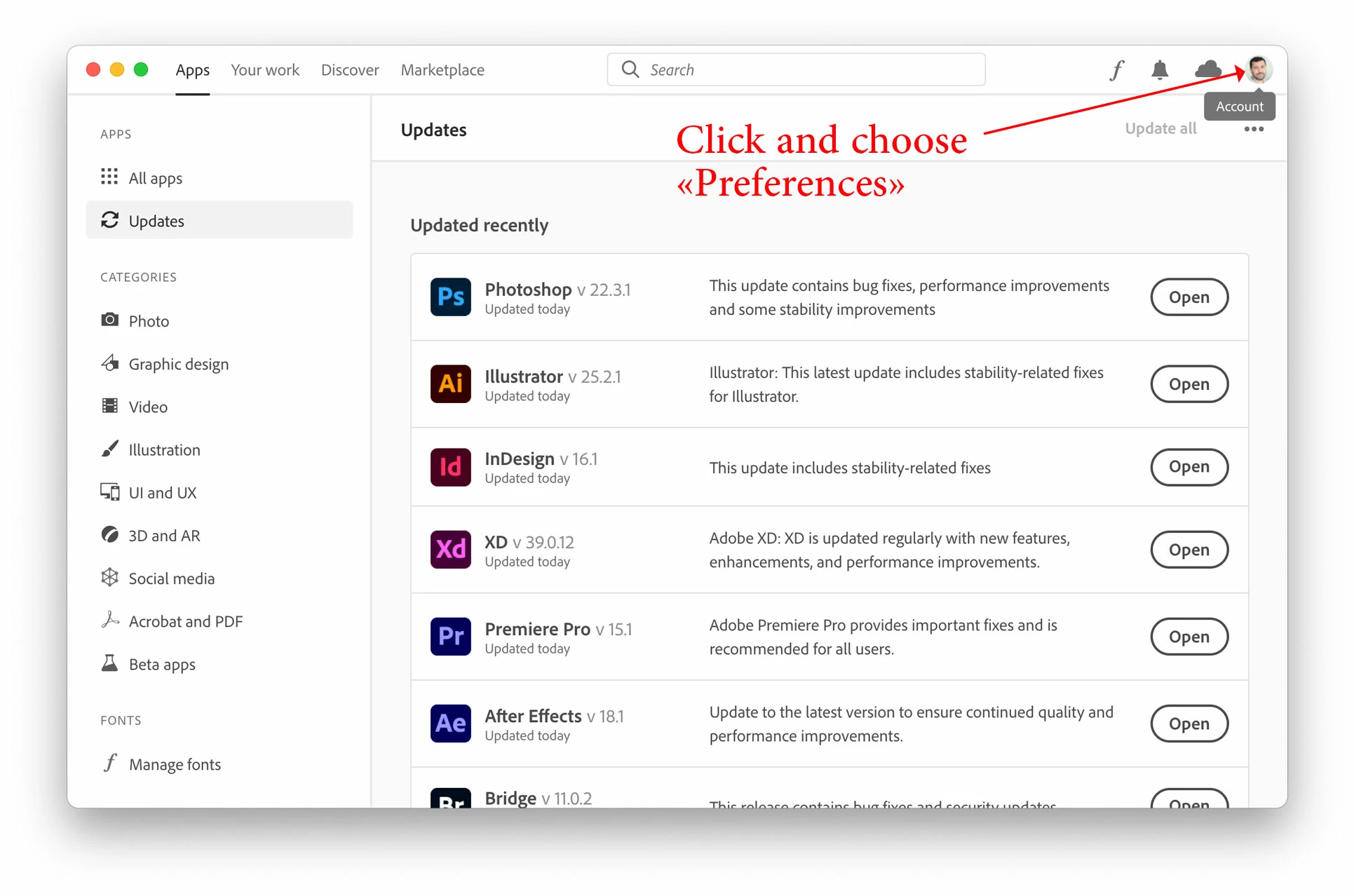
Open Adobe CC desktop application, click on the account button on the top-right corner then choose "Preferences"
In the Preferences window, click on the "Apps" in the left pane, to allow you to choose the language: English يدعم العربية
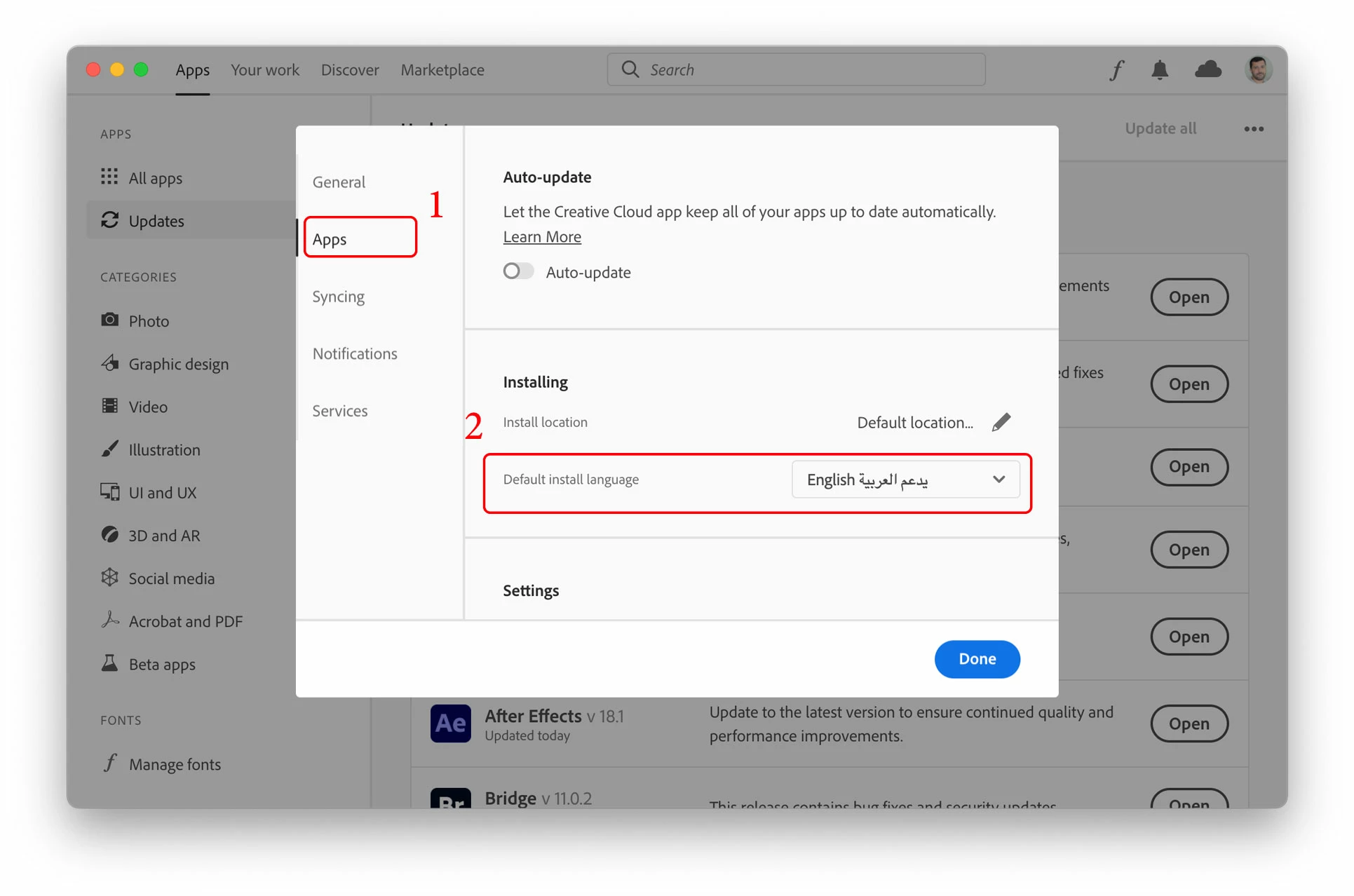
Click Done, and now you may install a fresh InDesign with full Arabic support.


2 replies

Community Expert
April 25, 2021

You can download the ME version via the Creative Cloud App.

Click the 3 dots beside InDesign and choose Other Versions

Select the Language from the screen that pops up.

And you can install the ME version of InDesign.


https://helpx.adobe.com/ie/indesign/kb/access-install-hebrew-arabic-indesign-illustrator-CC.html


jarraha57510274
Participating Frequently
April 25, 2021

Thanx Eugene for your kind reply,


The languages presented to choose from in the "language" section in the versions bar do not contain Arabic language (ME) version. I checked that before I send the thread here. 


I did as the instructions in the link you sent; I changed the language to English-Arabic support in the preferences. I re-installed InDesign which should be an ME version now; the version I downloaded does not contain the (ME) sign or the (MENA) sign at the entery label. Inside Indesign, again the Arabic font is not supported as I tried to upload a Word file with  anArabic text. 


It seems Adobe-Cloud didn't make ME version in the Cloud botuqie, although Adobe Indesign ME is being sold here in Kuwait as a separate version!


Thanks for your reply 

Jarrah Al-Tubaikh (MD)  

Zaid Al Hilali
Community Expert
Community Expert
April 25, 2021

Marhaba Mr. Zaid,


Nice to meet you Sir. 


Thanks for your prompt reply; my brother just solved this problem in an unconventional way; after launching the Indesign version that supports Arabic, we uploaded an Arabic text font, it was compsed on a separated letters, then he went to "Type > Paragraph", and he chose from the right-sided list (Adobe World-Ready Single Line Composer), then the text linked together into a readable text! I didn't know how he knew this, but it worked!


As for the (ME Type Tool) that you are showing, it is not appearing in the Indesign type tools; I downloaded the 15.1 version. 


The version of InDesign you have there doesn't support Arabic fully. If you were going to put together a right-to-let booklet, report, or a long article, you would be better off removing the existing copy of InDesign by going to the InDesign folder in your applications/programs dierctory, and there you will see the "Uninstall Adobe InDesign", launch it, then choose "Remove" InDesign Preferences when prompted.

jane-e
Community Expert
Community Expert
April 24, 2021

Hi @jarraha57510274 

In the Paragraph panel menu, have you set the Paragraph Composer to "World Ready"?

~ Jane

jane-e
Community Expert
Community Expert
April 25, 2021

I'll tag our MENA expert to chime in with his thoughts: @Zaid Al Hilali 


~ Jane

jarraha57510274
Participating Frequently
April 25, 2021

I am thankeful