
christinaS27
Participant
September 11, 2017
Answered

Apply black or a spot colour where CMY colours are used

  • September 11, 2017
  • 1 reply
  • 3289 views

I have created a file in Indesign and when I run the preflight the following error message appears.

Problem: Content generates cyan, magenta or yellow plate.

Fix: Edit the source file. Apply black or a spot colour where CMY colours are used.

I am sure this has been answered somewhere on this forum, but I am just not understanding it.

Can someone please give it to me in 'dummy' version please.
    This topic has been closed for replies.
    Correct answer amaarora

    Hi,

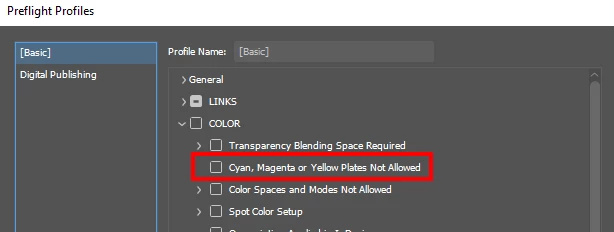
    Why you are seeing this is because most likely that you have set a preflight profile with the following option enabled and CMYK colors are being used in the document:

    Whether you can use these color plates or not is something you need to ask your printer.

    -Aman

    1 reply

    amaarora
    amaaroraCorrect answer
    Inspiring
    September 11, 2017

    Hi,

    Why you are seeing this is because most likely that you have set a preflight profile with the following option enabled and CMYK colors are being used in the document:

    Whether you can use these color plates or not is something you need to ask your printer.

    -Aman

    christinaS27
    Participant
    September 11, 2017

    Thanks Aman