
Inspiring
April 18, 2018
Answered

Best proofing printer for graphic design?

  • April 18, 2018
  • 1 reply
  • 1176 views

For the past several years, I've been using an Epson WF-7520 wide format printer to proof my designs. When paired with a ColorMunki Photo this seems to work reasonably well.

However, this printer doesn't do a very good job with light screens (less than 10%) or light grays. For example, even though I have my light gray dialed in to be neutral (C-5, M-5, Y-5, K-0), most of the time the printer will show it as slightly pink, and that's using Epson Ultra Premium Matte coated paper, which tends to be a very blue-white.

Does anyone have a recommendation on a more accurate, reasonably-priced color inkjet printer for in-house proofing? Also, is it better to stick with a printer with a traditional CMYK ink system since that's what commercial printers use?

Thanks!
This topic has been closed for replies.
Correct answer rob day

For example, even though I have my light gray dialed in to be neutral (C-5, M-5, Y-5, K-0), most of the time the printer will show it as slightly pink, and that's using Epson Ultra Premium Matte coated paper, which tends to be a very blue-white.

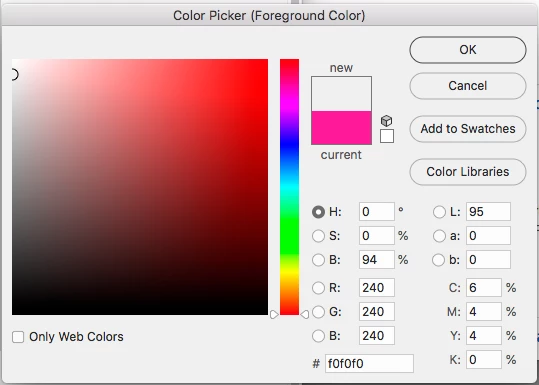
C-5, M-5, Y-5, K-0 isn't really neutral at least on an offset press, so I would expect at least a slightly brown cast. If you convert perfectly neutral RGB values to a typical offset profile like Coated GRAcol you'll see the balance has extra cyan. Here's 240|240|240 to GRAcol which converts to 6|4|4|0:

Most composite printers are CMYK, but almost all use RGB drivers, where your CMYK values get reconverted by the print driver's color management. This has to happen because the profile of an offset press wouldn't be anything like your inkjet printer's. There are third party RIPs (i.e. EFI Color's Fiery, or ColorBurst) that might make better proofs, but they have a learning curve. For expensive press runs nothing beats a proof from the printer.

1 reply

rob day
Community Expert
rob dayCommunity ExpertCorrect answer
Community Expert
April 18, 2018

For example, even though I have my light gray dialed in to be neutral (C-5, M-5, Y-5, K-0), most of the time the printer will show it as slightly pink, and that's using Epson Ultra Premium Matte coated paper, which tends to be a very blue-white.

C-5, M-5, Y-5, K-0 isn't really neutral at least on an offset press, so I would expect at least a slightly brown cast. If you convert perfectly neutral RGB values to a typical offset profile like Coated GRAcol you'll see the balance has extra cyan. Here's 240|240|240 to GRAcol which converts to 6|4|4|0:

Most composite printers are CMYK, but almost all use RGB drivers, where your CMYK values get reconverted by the print driver's color management. This has to happen because the profile of an offset press wouldn't be anything like your inkjet printer's. There are third party RIPs (i.e. EFI Color's Fiery, or ColorBurst) that might make better proofs, but they have a learning curve. For expensive press runs nothing beats a proof from the printer.

kcrossleyAuthor
Inspiring
April 18, 2018

Rob, thanks for the very thorough explanation. And yes, on expensive press runs I usually do get a proof from the printer.