
carlangel
Known Participant
April 21, 2020
Answered

black strokes still in table even though I set strokes to 0. Please help..!!

  • April 21, 2020
  • 2 replies
  • 4337 views

Hi Experts,

I inserted a table into the body of a text. I tried to hide the borders by doing things I saw here in the forum:


1. I selected the table icon at the top of the horizontal menu and clicked until the whole thing was selected, and set the strokes to 0 and the color of the strokes to "none." Exported, but still get a border around the table.

2. I highlighted the cells and went into cell options > strokes and fills and clicked there and set the stroke to 0 and color to "none." Still get a border around the table on export. 


Usually, I'm able to accomplish this by hovering over the edges of the table and doing it section by section but that didn't work either. Am I missing something? I'm attaching screenshots: one is the ID file and the other is a screenshot of the epub export in Apple's Books app.


Thanks in advance
 

This topic has been closed for replies.
Correct answer federico platon

Done. thanks.


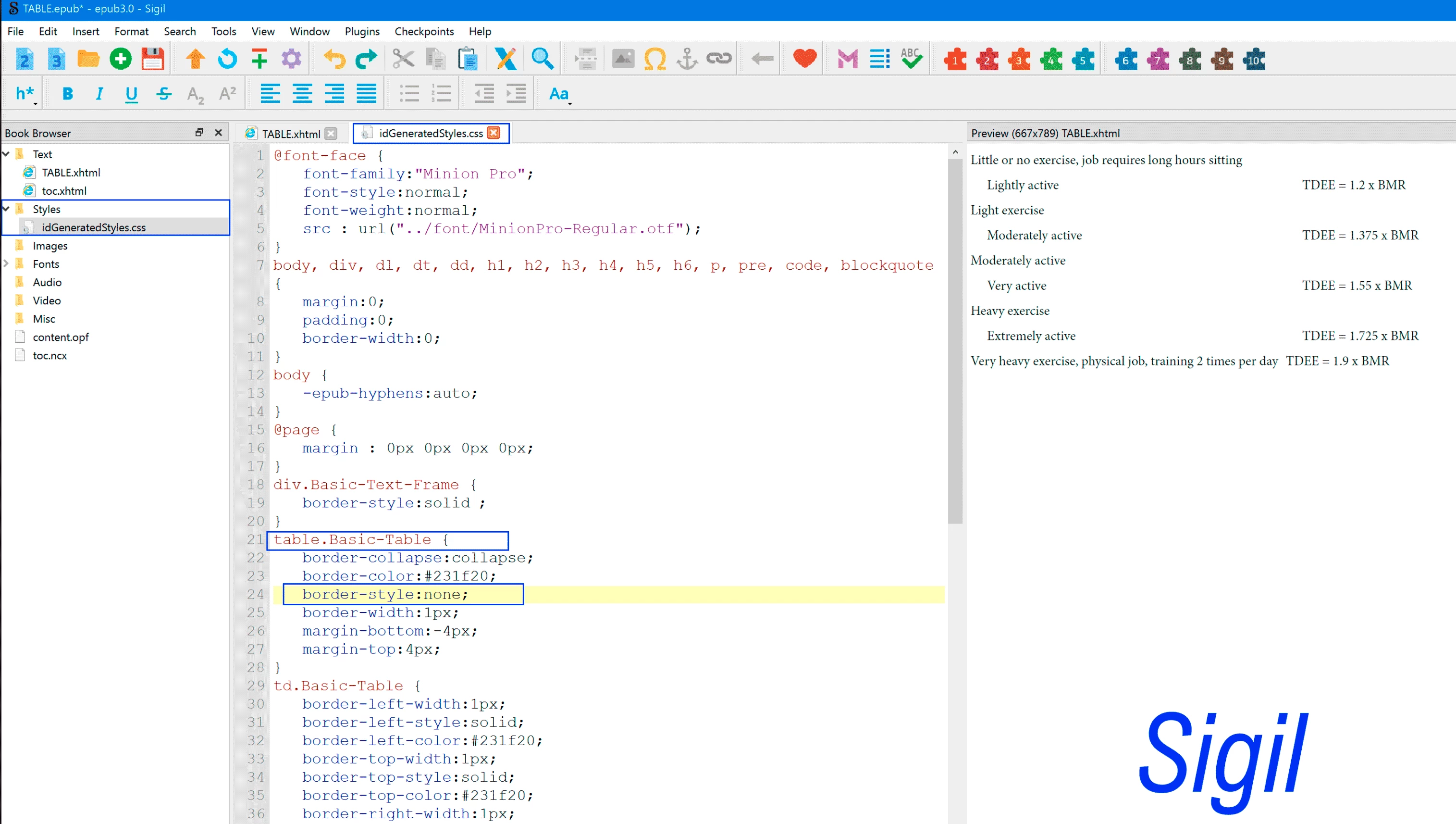
Install Sigil or any other epub editor

Open the epub and slect the auto generated (InDesign) CSS file.

By default a stroke is placed around any table. To remove that table border, change the Table > border-style to none (or  even delete that line).

2 replies

federicoh31997127
Participating Frequently
May 8, 2020

none

federicoh31997127
Participating Frequently
May 8, 2020

none

carlangel
carlangelAuthor
Known Participant
May 14, 2020

Thanks so much for your help, Federico!

Legend
April 21, 2020

What yiur screeshots show are a frame selected. the blue path and the center anchors.

You have it selected.Please click outside, in an empty area.

Oh, I see a black line around in the other capture from the epub, excuse me.

Well, You need to select the external lines around, or all of them. Please take a look to my second capture, where I click inside that small window to click and select the unselected segments until they are blue. Then as all are selected, choose empty or none for the stroke and/or 0 for the value.

Finally, with nothing selected (press Esc) preview the page: press W or Shift +W 

carlangel
carlangelAuthor
Known Participant
April 21, 2020

Hi Federico, 


Thanks so much for your response. I'm still getting the same result on my epub, with the black lines around the table. Would you mind taking a look at my screenshot to confirm if I selected correctly?

Legend
April 22, 2020

Select the Table.

(click once into a cell, press Esc and type Ctrl/Cmd+A. To make sure everyting is selected)

In the control bar miniature: Click the blue lines to unselect them all  and proceed  then to select them all back again.


Then, press Esc to unselect the table. Select the Selection Tool, and preview the page. Press W or Sfift W.


Do they border around still appears?

Export to EPUB again. It's still there?