

Shayde48
Known Participant
May 16, 2018
Answered

Blank Business card preset missing

  • May 16, 2018
  • 2 replies
  • 908 views

I'm doing an online course and our teacher has a blank business card preset. I'm on the subscription Adobe package and have all the same presets EXCEPT the business card. Has this been removed from the newer version or have I got a different set-up? I'm in UK and the only answer I've been able to find about missing presets was for non-Englishess intsallation and I don't think that was even In Design anyway. I don't want a pre-fancied up card made by someone else I just want a basic blank one. I know I can just create one anyway I suppose, but why isn't it there?
    This topic has been closed for replies.
    Correct answer Jose M. Ramos

    Hi Shayde,

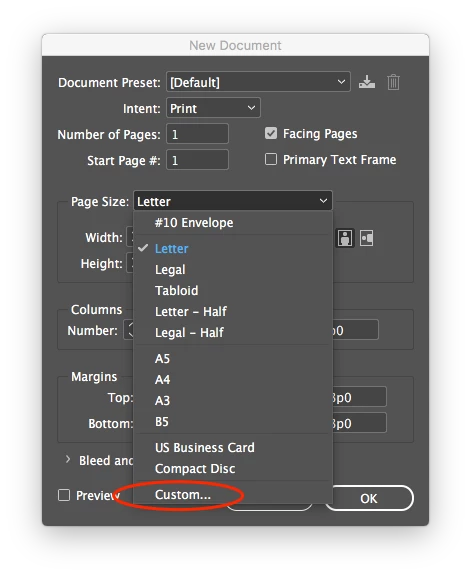
    You can easily add this preset by choosing "Custom" from the Page Size menu, when creating a new document or from the "Edit page size" icon at the bottom of the pages panel, if the document is already created. In either case, you'll be able to create a new preset, name it whatever you want and size it accordingly.

    Hope this helps!

    Jose

    2 replies

    Jose M. Ramos
    Jose M. RamosCorrect answer
    Inspiring
    May 16, 2018

    Hi Shayde,

    You can easily add this preset by choosing "Custom" from the Page Size menu, when creating a new document or from the "Edit page size" icon at the bottom of the pages panel, if the document is already created. In either case, you'll be able to create a new preset, name it whatever you want and size it accordingly.

    Hope this helps!

    Jose

    Shayde48
    Shayde48Author
    Known Participant
    May 16, 2018

    Thank you that's really helpful. I just thought I'd lost something. Thanks again.

    Jose M. Ramos
    Inspiring
    May 16, 2018

    You may be missing something for real. I wonder if resetting preference would help. Sometimes your preference file gets corrupted and InD starts acting weird.

    Do one of the following:

    (Windows) Start InDesign, and then press Shift+Ctrl+Alt. Click Yes when asked if you want to delete preference files.

    (Mac OS) While pressing Shift+Option+Command+Control, start InDesign. Click Yes when asked if you want to delete preference files.

    Geоrge
    Legend
    May 16, 2018

    What's wrong will be with you/InDesign if you do this preset by your hands?

    Create documents from a wide variety of templates and presets  look into "modify preset"

    Remember, never say you can't do something in InDesign, it's always just a question of finding the right workaround to get the job done. © David Blatner
    Shayde48
    Shayde48Author
    Known Participant
    September 20, 2019
    I never said there was anything WRONG with it. That wasn't my question. I wanted to make sure I wasn't missing anything I should have already. Last year I was brand new to EVERYTHING and wanted to understand more. Nothing wrong in that.