
Known Participant
June 17, 2015
Answered

Can't access fonts with InDesign CC 2015

  • June 17, 2015
  • 8 replies
  • 16301 views

Help!!! I just downloaded the newest 2015 versions of InDesign, Photoshop, Illustrator, Acrobat and Muse from the Cloud. The problem I have now is that I can't change my fonts. InDesign sees the font but will not allow me to click on the list and change fonts. I thought it was because Suitcase version was old, so I updated Suitcase Fusion 6 and the problem still exists. Please help.

I can change the font but only if I type the name into the box. This is frustrating. To make matter worse I did not un-check the box to save the older version. All I see in the Cloud is the older version InDesign CS6. I just want 2014 back.

Anyone have this problem or know of a fix.

I'm using Mac OS 10.10.3.

Thanks-Todd
    This topic has been closed for replies.
    Correct answer Javed_ali

    Good to know. Thanks Steve.


    Hi,

    Sorry to see you facing issues with the latest version of InDesign.

    We have figured out why this issue is being seen and have a workaround other then deleting the preferences and caches.

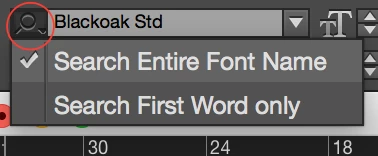
    This issue is seen with the Font Menu mode being "Search First Word Only". Please use the mode "Search Entire Font Name" as a workaround till we fix this issue.

    To change the mode click on the Search (magnifier) icon on the Font Menus Edit Box and chose "Search Entire Font Name" from the Drop down.

    We deeply regret the inconvenience caused.

    Regards

    Javed

    8 replies

    merinokids
    Participant
    August 15, 2016

    I'm only just having this issue with Indesign 2015 now. I have 'search entire font name' selected but that didn't work. I've copied all the fonts from Library > Fonts to Indesign > Fonts and this resolves about 80% off my issue but not all the fonts from my Font Book were in the Library folder.

    How do I get Indesign to find all fonts in my Font Book?

    Participant
    May 31, 2016

    I just had this issue and the fix marked "correct answer" worked.

    Adobe, you really need to fix this problem, this response was almost a year ago.

    It is a big time waster with such a simple fix.

    arica35664826
    Participant
    March 22, 2016

    This issue just wasted me an hour while freelancing for an agency. Made me look very bad and cost me time I couldn't afford to lose!

    Participant
    December 23, 2015

    I have all latest updates to Suitcase Fusion 6 and Indesign CC 2015. I have fonts that show that they are "ON" in Suitcase, but when I open files only a partial selection of the font family will display. EX" Frutiger STD (OT) family is all on, but 47 Light Condensed and a few others show up missing in InD. If I open the file in Indesign 6.0, everything works fine, so it would seem that the problem is with CC. I tried suggestions above, but nothing is working. Any other suggestions.

    Known Participant
    December 23, 2015
    Participant
    July 2, 2015

    InDesign will not recognize the font I need to use.  I've tried the find font to change things, Adobe support worked on my 624 page document via remote (and thought they'd found a work-around), I've tried backtracking to InDesign 2014...but nothing works.  Once the document is saved, whether in 2014 or 2015, it goes back to not recognizing the font.  It worked brilliantly before the upgrade. Anybody have any other ideas?

    Peter Spier
    Community Expert
    Community Expert
    July 2, 2015

    What is the font, and what type of font is it (TT, OT, T1)?

    You can go back to a previous version to finish the project...

    How to Find and Install Previous Version of Adobe Apps in CC 2015 | Adobe Customer Care Team

    Participant
    July 2, 2015

    Thanks for your response, Peter.

    The font is Helvetica.  The "Missing font" message shows that it's missing Helvetica TT - medium.  When I choose Helvetica TT it switches to T1 and when I go to choose the medium the T! switches again to just Helvetica.  Confusing, I know, but so frustrating as I do have these fonts in the system.  I have un-installed and then re-installed these fonts.  The computer fellow I use did the same thing.  The Adobe support fellow moved/copied the fonts to the InDesign 2015 font folder.  None of this has helped.  Even after we thought it was fixed when we created a new doc in the 2015 (with layout errors but those could be fixed), once it was saved then re-opened, the font issue was rearing its ugly head once more.

    I had re-downloaded the InDesign CC 2014 thinking it would give me a good work-around but alack and alas, 'twas not to be...but am now downloading the InDesign CC.  I think I'll have issue with opening the doc in it as the docs are from newer versions.  So will probably have to save it in 2014 as an idml?

    tallguyGAuthor
    Known Participant
    June 17, 2015

    sssmith65

    I contacted tech support at Adobe. Here is the fix.

    Shut down InDesign. go to Go in the finder menu- Go to folder- type in ~/library then click on preferences then go to Adobe InDesign version 11. then rename en_us to 2en_us

    shut that down and start InDesign. It should work.

    Steve Werner
    Community Expert
    Community Expert
    June 17, 2015

    That's a another way to restore your InDesign preferences. Thanks.

    tallguyGAuthor
    Known Participant
    June 17, 2015

    Good to know. Thanks Steve.

    ssmith65
    Participant
    June 17, 2015

    I am having same issue with no fix in sight

    Steve Werner
    Community Expert
    Community Expert
    June 17, 2015

    Start by restoring your InDesign preferences:

    Trash, Replace, Reset, or Restore the application Preferences

    Steve Werner
    Community Expert
    Community Expert
    June 17, 2015

    That might be a clue. Try turning OFF Suitcase 6, and see if you have the problem. Suitcase may not be properly updated yet. Check on their website.

    tallguyGAuthor
    Known Participant
    June 17, 2015

    I did try turning off both Suitcase and I have tried Font Book. Nothing works. All the fonts are working in the other Adobe programs.

    Thanks for your reply.