
Known Participant
February 6, 2020
Answered

Can't see or use fonts from Adobe Font

  • February 6, 2020
  • 2 replies
  • 3531 views

Hi there,


I am trying to use the Museo Slab font family in InDesign. I have activated it through TypeKit, but it still isn't showing in my font drop down in InDesign. Cam I doing something wrong? 


Or can I download the actual font files and install them locally?


Thanks
This topic has been closed for replies.
Correct answer Bill Silbert

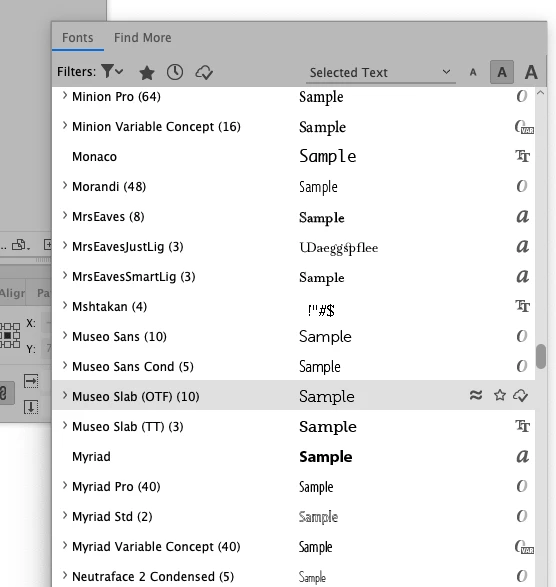
You didn't say how you went about downloading the fonts through TypeKit (now officially known as Adobe Fonts). The correct way is to click on the font pull-down menu either in the Character Panel or the Control Panel. When you pull down that menu you'll see an option above the list of font names called "Find More". Click on that and the Adobe Fonts will appear. Click on the cloud icon next to the name of the font you want and it should download quite quickly. I tried this with the font you mentioned and I got almost instant access to the font family. Note in the screen shot showing my font list after I loaded Museo Slab that when the font is loaded correctly you will see a cloud with a check mark icon on the far right of the font name.

2 replies

Bill Silbert
Community Expert
Bill SilbertCommunity ExpertCorrect answer
Community Expert
February 6, 2020

You didn't say how you went about downloading the fonts through TypeKit (now officially known as Adobe Fonts). The correct way is to click on the font pull-down menu either in the Character Panel or the Control Panel. When you pull down that menu you'll see an option above the list of font names called "Find More". Click on that and the Adobe Fonts will appear. Click on the cloud icon next to the name of the font you want and it should download quite quickly. I tried this with the font you mentioned and I got almost instant access to the font family. Note in the screen shot showing my font list after I loaded Museo Slab that when the font is loaded correctly you will see a cloud with a check mark icon on the far right of the font name.

Known Participant
February 6, 2020

Thanks Bill, I think that has sorted it. I clicked on the Find more link and activated them that way.


Thanks again 🙂

Bill Silbert
Community Expert
Community Expert
February 6, 2020

Happy to help.

Steve Werner
Community Expert
Community Expert
February 6, 2020

I've noticed lately that there it can take several minutes (sometimes, but not always) between when I activate the font in the fonts.adobe.com website, and when InDesign realizes that the font is activated. Give it enough time.


If that doesn't work, make sure you're signed into your Adobe ID in the Creative Cloud app (menu bar on Mac, task bar in Windows), trying signing out and signing back in.  Also in CC app preferences (the gear icon), in the Services tab, make sure Adobe Fonts is turned on.