

dublove
Legend
April 3, 2021
Answered

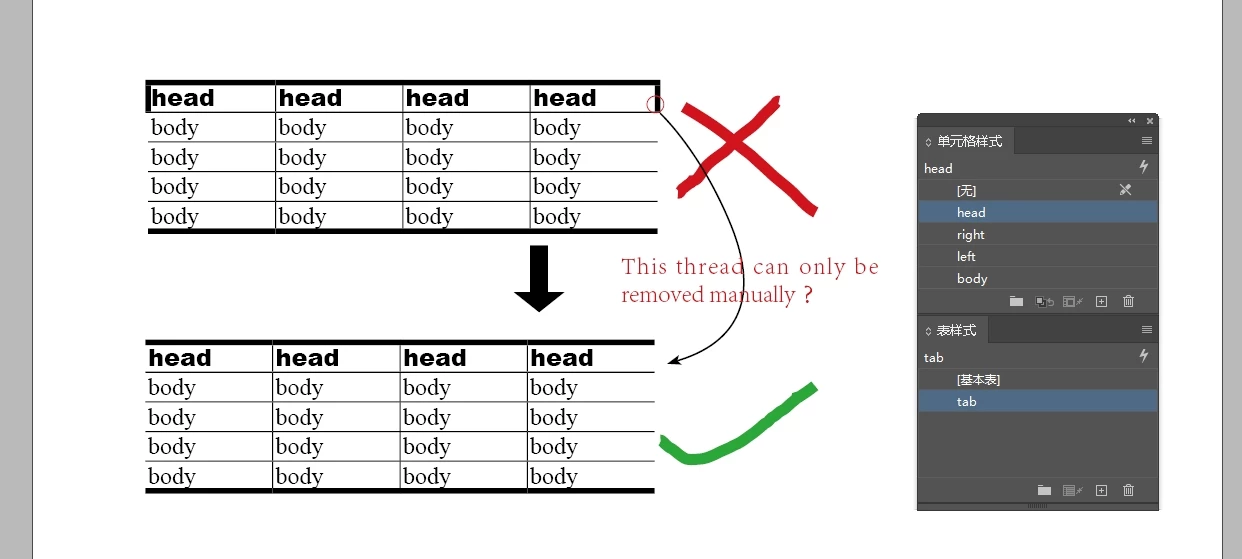
Can table and cell styles automatically achieve this effect?

  • April 3, 2021
  • 5 replies
  • 2127 views

The first line is the header, can you use the table style and cell style to automatically realize that the left and right lines are empty and the top and bottom lines are bold?


The first one in the figure below is implemented automatically, and the left and right headers are not empty (this is not what I want).

The second is the effect I want, which is to manually set the left and right lines of the meter head to 0 on the basis of the first one.

------

Note: The first line must be the header
This topic has been closed for replies.
Correct answer FRIdNGE

This problem can only be improved by adobe.

The form should be controlled in three parts:

①header-Left,Head-Center,Head-Left

②Body-Left,Body-Center,Body-Right

③Tail-Left,Tail-Center,Tail-Right.


[I let you play until now! ...]


… So reading this thread, there could be apparently 4 ways to handle this question (fixing it or not):


• Using existing InDesign functionalities and your own current skills. But it seems too "fringe" for you!
• Using the line of code I gave ("fast and furious").

• Waiting for Adobe!


• … The 4th way: an immediate and free course on "How-To-More-Deeply-Use-InDesign-Table-Feature!"! [I'm not a trainer (and definitely not interested about that). I've just updated the .indd doc shared. All is in the table-cells parameters!]


https://www.dropbox.com/s/9n5tnm6l1jv6odd/Table%20rules-3%20by%20FRIdNGE.idml?dl=0


(^/)


5 replies

Participant
March 17, 2022

@dublove wrote:

The first line is the header, can you use the table style and cell style to automatically realize that the left and right lines are empty and the top and bottom lines are bold?


The first one in the figure below is implemented automatically, and the left and right headers are not empty (this is not what I want).

The second is the effect I want, which is to manually set the left and right lines of the meter head to 0 on the basis of the first one.

------

Note: The first line must be the header

the same time 

the first time 


Community Expert
April 19, 2021

Hi 喜狼_edny,

hm, for the "continue" issue you could use a function in the table style.

It would allow to skip header rows in the first text frame or the first text column where the table is running through.


From my German InDesign 2021 on Windows 10:


A table is running through several text frames. Only on the second frame and the next frames after the second one the two header rows are visible. In the first frame you simply can put in the header's contents to the first body row of the table. The yellow rows are header rows, the white ones are all body rows:


There is a control for skipping all the header rows in the first frame or first column of a table:


Regards,
Uwe Laubender

( ACP )

Dave Creamer of IDEAS
Community Expert
Community Expert
April 10, 2021

喜狼_edny,

Take a look at Fridnge's example. It's built more efficiently than my original quick example. 

David Creamer: Community Expert (ACI and ACE 1995-2023)
dublove
dubloveAuthor
Legend
April 12, 2021

I saw it. Thank you very much~

It's true that there are experts in the world

amazing, my God

Dave Creamer of IDEAS
Community Expert
Community Expert
April 5, 2021

The body rows can be automated with the table style and a first/last column cell styles.


The header row needs cell styles applied to the first and last column cell(s). Not much of an issue since the header automatically repeats if the table flows on multiple pages. 


The ID file has been updated with the modifications.

David Creamer: Community Expert (ACI and ACE 1995-2023)
FRIdNGE
April 6, 2021

You know I know how to build a table and I think for a very long time that this is a game for scripting and true automation that will make simpler things and do them in 1 click, maybe even you have hundreds of tables and thousands of cells.


(^/)

Dave Creamer of IDEAS
Community Expert
Community Expert
April 6, 2021

I would prefer using Table and Cell styles for global updates of the formats. Certainly having a script to automate the five clicks would be helpful (apply style, select first header cell and apply cell style, select last header cell and apply cell style). Of course, there would be more clicks if a footer is involved.


Scripting can make just about anything in ID easier. If you have a script, feel free to post it.

David Creamer: Community Expert (ACI and ACE 1995-2023)
Dave Creamer of IDEAS
Community Expert
Community Expert
April 3, 2021

Yes. 

Put a table border in the Table Style settings that matches the top and bottom rules.

For the header and body Cell Styles, change the rule setting.

For example, for the header:

  • Leave the top rule alone.
  • Select just the left and right rules and set to 0 (zero) weight.
  • Set the bottom to your desired weight.

Do the same for the body cell style.

Below is an example of a one-click Table Style. 

Here is the link to the InDesign file if you want it: https://1drv.ms/u/s!AoUnkZfvAJFlqOVScaFKLB3pE7_E1A?e=gcr0k2

David Creamer: Community Expert (ACI and ACE 1995-2023)
FRIdNGE
April 5, 2021

… and if I want a 1-point black stroke between columns!


(^/)  The Jedi