
Inspiring
July 17, 2017
Answered

Can you force non-pdf generating copy/paste?

  • July 17, 2017
  • 4 replies
  • 2623 views

Hi There,

Title says it all really, is there a way to speed up copy/paste in InDesign?
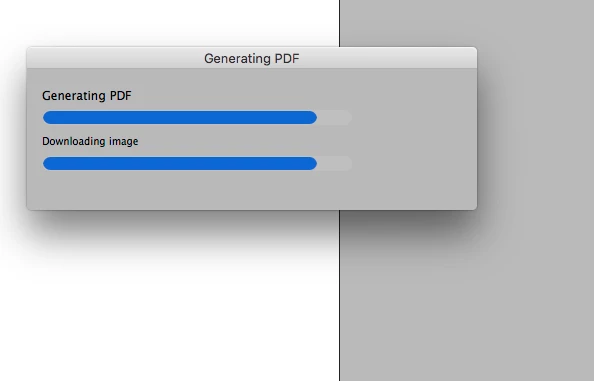
Waiting for the 'Generate PDF' window whenever copying anything has finally gotten too painful sorry!

Cheers

Ben

    This topic has been closed for replies.
    Correct answer cmscss

    But what if you have to update a logo or an image across a hundred projects? Anyway, all good!


    This answer worked for me: How to stop InDesign generating a PDF when copying?

    4 replies

    00rhodiad
    Participating Frequently
    July 17, 2017

    Indesign uses PDF as copy/paste format. Otherwise, you wouldn't get much in the way of copy/paste ability between Indesign, Photoshop, and Illustrator. It's just a way to format the data into the equivalent of an old-school EPS so that each app can parse the image data as it comes in.

    You can adjust the functionality in the top section of the Clipboard Handling section of Indesign's Preferences if it's slowing you down, just remember where to turn it back on later when you need to be able to paste between apps.

    TᴀW
    Legend
    July 17, 2017

    cmscss  wrote

    Hi There,

    Title says it all really...

    I have to disagree. The title is profoundly enigmatic...

    Ariel

    Visit www.id-extras.com for powerful InDesign scripts that save hours of work — automation, batch tools, and workflow boosters for serious designers.
    cmscssAuthor
    Inspiring
    July 17, 2017

    OK, now I'm confused!

    At some point in the last ten years, when you copy a certain number of elements, or copy elements of a certain size (I haven't worked out why) InDesign displays the 'Generating PDF' box attached in the first post and seems to convert the copied items to a PDF as part of the copy/paste process. This is painful as it takes an annoying amount of time.

    That box in the screenshot above appeared after I cut a bunch of elements in this instance but the same thing happens when I copy. No file is actually generated so I suspect it's some sort of clipboard thing?

    My question is, can you force InDesign to NOT generate a PDF when copying and pasting and go back to the faster, good old days?

    I'm using InDesign CC 2017 under OSX 10.11.6 but have noticed this  for at least 8 years across many different computers and OSX versions.

    If you guys never see this behavoir then tell me how!

    Bill Silbert
    Community Expert
    Community Expert
    July 17, 2017

    Okay, thanks for clarifying. I have to confess that in all the years I've been using ID daily (since CS2), I have never once seen that happen.

    Under Preferences > Clipboard Handling, what are your settings? You don't have "Prefer PDF when pasting" checked, by any chance? (I don't.) If so, try unchecking it.

    Ariel


    I tried copying and pasting using the preference setting pointed out by TaW above and still could not make anything that I pasted both from within InDesign and from Illustrator act in this manner. Could you post a screen shot of your preferences for File Handling and Clipboard Handling? Any other possible personal settings that you do with InDesign would be helpful for assisting you. As far as I can tell this will not happen with InDesign's default settings.

    Bill Silbert
    Community Expert
    Community Expert
    July 17, 2017

    I can't think what possible connection there is between copying and pasting something either within InDesign or from an outside program like Illustrator or even one of the Microsoft Office programs and exporting a file as a pdf. Exporting a document as a pdf should have nothing to do with copying and pasting. Could you please explain what it is you're doing and what help you need.

    Steve Werner
    Community Expert
    Community Expert
    July 17, 2017

    What exactly and you copying and pasting? What verson of InDesign?