
Jonnykermode
Participant
October 18, 2018
Answered

Change spelling of UK document to US English

  • October 18, 2018
  • 1 reply
  • 1292 views

I have an InDesign document that is all in UK English, and I need to make a US version.

What's the best way to do this please? I've changed the document dictionary to US and also the paragraph styles, but it isn't flagging up existing text to change to US. Such as "colour" and "organisation"...

Any help much appreciated. Thanks.
This topic has been closed for replies.
Correct answer Bill Silbert

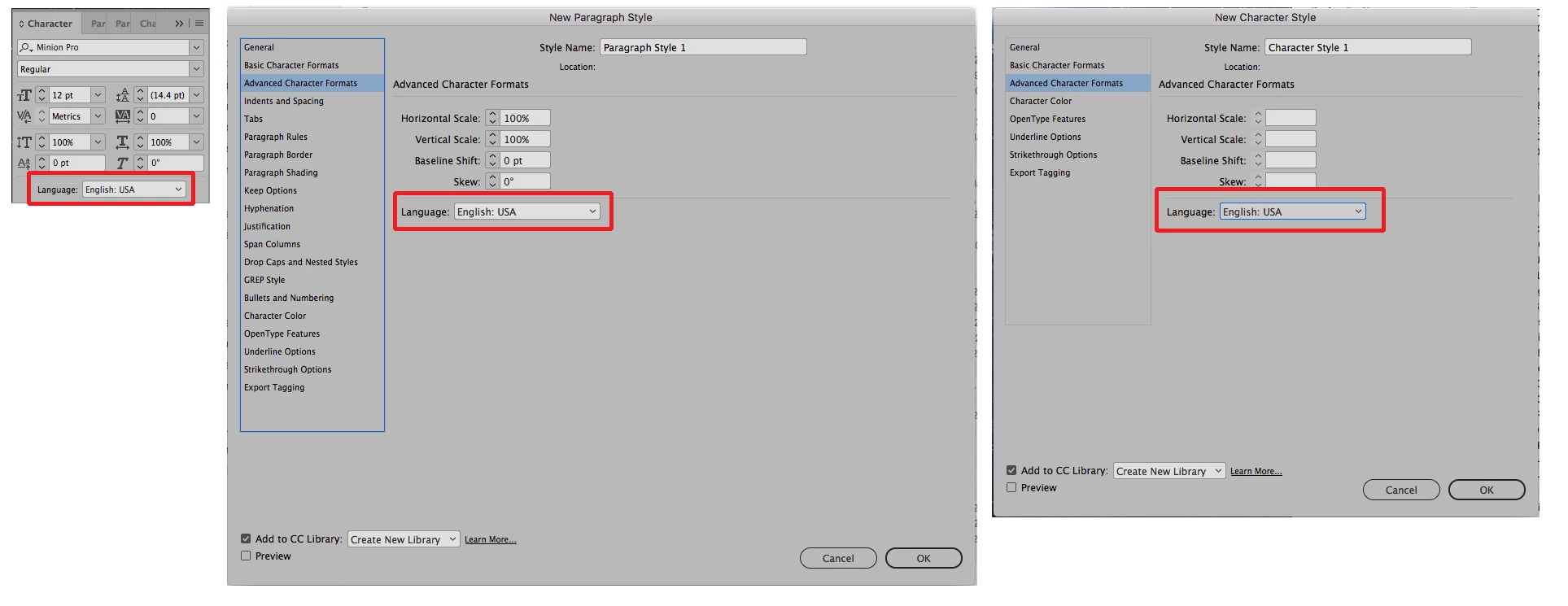
Check your Character Panel to make sure that it is set for English USA and also that the Advanced Character Formats sections of the Basic Paragraph Style and New Character Styles dialogs are set to English USA.

1 reply

Bill Silbert
Community Expert
Bill SilbertCommunity ExpertCorrect answer
Community Expert
October 18, 2018

Check your Character Panel to make sure that it is set for English USA and also that the Advanced Character Formats sections of the Basic Paragraph Style and New Character Styles dialogs are set to English USA.

Srishti Bali
Legend
November 2, 2018

Hi Jonny,

I would like to know if the steps suggested by Bill worked for you, or the issue still persists.

Kindly update the discussion if you need further assistance with it.

Thanks,

Srishti