
Answered
change textbox color with checkbox
Hello,
is it possible to change a textfield color when a checkbox is clicked in an finished pdf form?
like this:


thanks!
Kind regards,
Heimo

Hello,
is it possible to change a textfield color when a checkbox is clicked in an finished pdf form?
like this:
thanks!
Kind regards,
Heimo
There are probably several ways to go about it in InDesign using the Show/Hide features and/or Multi-State Objects (MSO's). But the most relaiable way I've found to do things like this is assigning Javascript in Acrobat. At first it sounds complicated, but it's really not. If you'd like to try, here's a quick-and-dirty jumpstart:
1. In InDesign, add a separate rectangle to the page, assign the desired fill color, convert it to a Button named colorFill, and move it "behind" the text field. (Optionally, you could add this field in Acrobat, post-export.)
2. Export to Interactive PDF and open in Acrobat. Enter Acrobat's Form Edit mode.
3. Add a Text Field and open its properties.
4. Name the field anything you want, and set it to Hidden and Read Only:
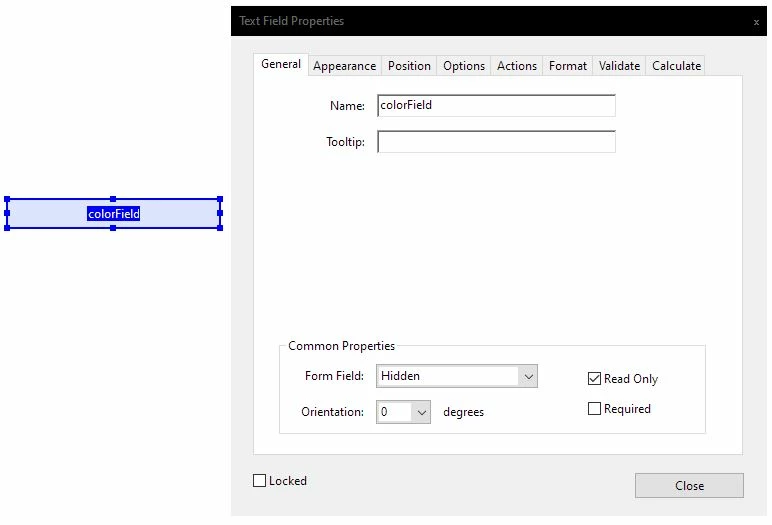
5. On the Calculate tab, choose Custom Calculation Script and click Edit. Paste the following script commands (assumes your checkbox is named 'checkBox01'; substitute the actual name of yours):
var check = this.getField("checkBox01").value;
if (check == "Off")
{
this.getField("colorFill").display = display.hidden;
}
if (check == "Yes")
{
this.getField("colorFill").display = display.visible;
}
6. Click OK and Close. Click the Preview button on the Forms toolbar and test the behavior.
Already have an account? Login
Enter your E-mail address. We'll send you an e-mail with instructions to reset your password.
 AdChoices