
Color profile + Pantone + Export PDF
Hello everyone. I have a problem at the office, and I really do not know how to solve.
We designed a book with different colours in the background and an icon on each page composed in white + 30% white. When the background is in CMYK, everything works fine. But one of our backgrounds is Pantone, and when we export the pdf, the 30% white becomes 100% white only in this page.
In the indesign, we work with the color profile Coated V2. We export in PDF/X-3:2002 without colour conversion, so we keep the Pantone as spot colours. We also like to export this way because the standard PDF/X-3:2002 assures that we will not have small technical problems. When we export this way, the problem mentioned above happens.

Trying some different settings to solve the problem, it happens that when we do not use the standard PDF/X-3:2002 and use the colour conversion to Coated V2 (as we are using in the Indesign), and the transparency worked fine. Though the standard appears on the dialogue box, we checked it directly in Acrobat and it does not appear there.
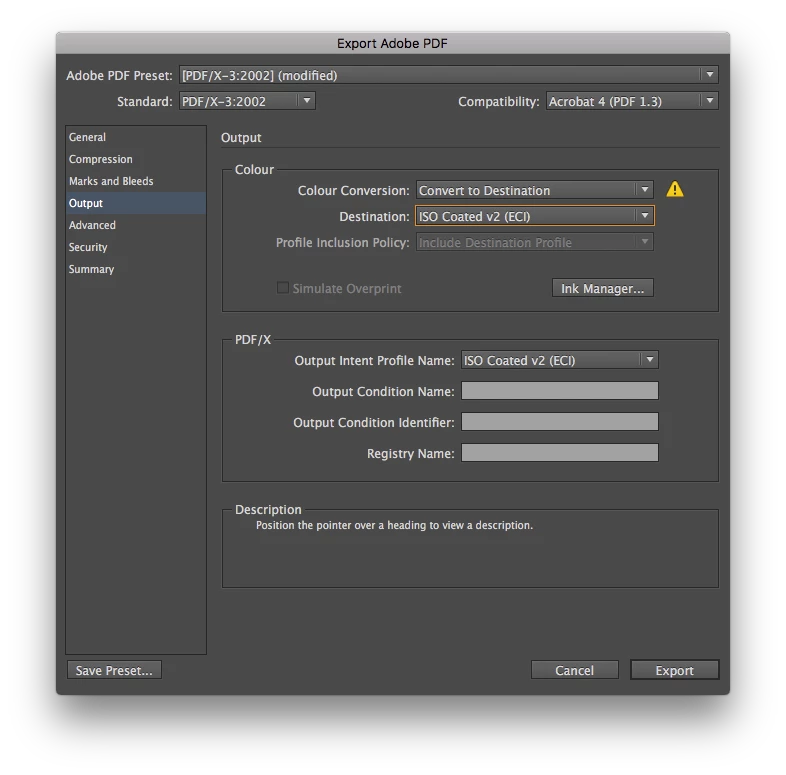
The thing is we do want to use the standard PDF/X-3:2002, because we consider it a safer version, but we do not understand why there is this problem with Pantone + transparency.
Is there someone able to help me here?
Thanks in advance 🙂
Cheers,
Natalia.
 AdChoices