
Known Participant
April 11, 2017
Answered

Convert color photos to Black and White in Indesign

  • April 11, 2017
  • 13 replies
  • 306309 views

How about a photo filter option in Indesign? It would save me so much time, if i didn't have to launch photoshop, convert a color photo to BW, save and then go back to indesign and reimport the BW image.

Thanks!
Page
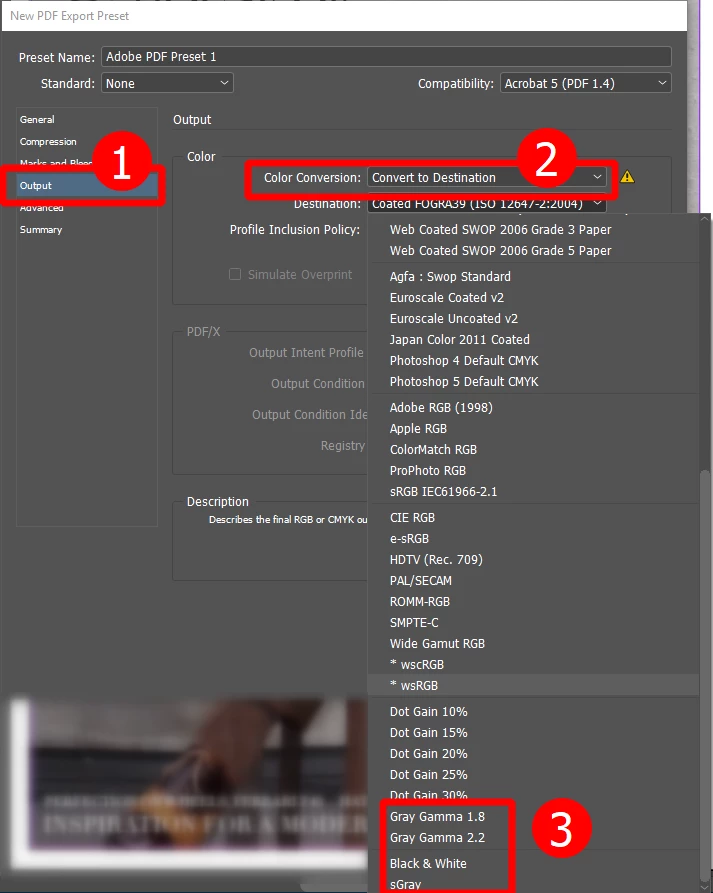
Correct answer loyal_operator154A

InDesign is a program for layout design, not image editing...

but, technically, you can do the color conversion while exporting PDF file

13 replies

Participant
August 27, 2021

The luminosity workaround below makes b&w images a funny colourm and leaves a slight border from the black b/g. Quickest and simplest way is to drop the image into Word, change to b&w there, then drop straight into ID. Quick, simple, effective.

Community Expert
August 31, 2021

Hi Mari5E71,

I disagree! That will not convert an image to grayscale.

The resulting image is in RGB with a dubious conversion result.

PhotoShop is still the way to go and to automate the process.


Regards,
Uwe Laubender

( ACP )


Inspiring
October 30, 2018

thanks

Gusgsm
Inspiring
June 7, 2019

If you want to avoid spending much more, for almost 20 euros you've got ColorTranslator by LittleCMS. It's an utility that makes straight conversions (and unattended) using the Little CMS colour engine and ICC profiles.

But all the caveats about the amateurity and unproffesionality of converting colour to grayscale in such an automatic way apply.

And, if you use more software from Adobe (Illustrator or Acrobat Pro) in a professional way, a subscription to CC Suite will put even much more software at your disposal.

Best regards

Inspiring
October 30, 2018

Hi,

I am expecting some freeware tool to this process. Please let me know if you know that.

by

hasvi

Community Expert
October 30, 2018

I will not expect any freeware tool working with ICC profiles and grayscale mode.

Especially not running the Adobe Engine for color conversion. So you'll be out of luck, I think.

Invest in PhotoShop. That's my suggestion.

Regards,
Uwe

Inspiring
October 30, 2018

Is this freeware tool "pixel editing tool"?

by

hasvi

Community Expert
October 30, 2018

What tool exactly?

Inspiring
October 30, 2018

thanks for your reply, but I am expecting indesign script or pdf plugin to this conversion process without photoshop (because I don't have photoshop).

by

hasvi

Community Expert
October 30, 2018

Without PhotoShop?

No chance, I think. At least not with a script that will control the imaging process.

What's the pixel editing tool of your choice?
If it can go along with color management and the gray scale mode, you might have a chance to use that.

But not in an automatic way. For that you need PhotoShop.

Regards,
Uwe

Dov Isaacs
Legend
September 26, 2018

I have been “watching” this thread for a while and after seeing what has and has not been said, a few observations:

(1)     InDesign was implemented primarily to be a document layout program, excelling at text layout and placement of specialized graphic arts and even enterprise text, vector, and raster image content with support for special effects applied to single or groups of such graphic arts objects. As-is, it is a very complex and highly functional piece of software with an exceptionally steep learning curve due to all the functionality provided.

(2)     Years ago, within Adobe, within engineering we actually discussed whether it made sense to fold together InDesign, Illustrator, and Photoshop functionality into a single application. Forgetting the technical complexity involved therein and the difficulty in implementing same (and this was before we added transparency to the Adobe imaging model), we came to the conclusion that the result would be a piece of software was overly complex to learn and use, not to mention develop and maintain. An attempt to be everything to everybody would have yielded something unusable by anybody! If you look at the complexity of Photoshop which tries to combine text and vector support with an already exceptionally complex set of raster image manipulation tools, you “get the picture” (pun very much intended) of what InDesign could have been worse than.

(3)     Once add one piece of allegedly simple raster image “editing” functionality, you open up the floodgates to a myriad of others and tweaks to the initial feature. There is no end to that and overall program usability suffers per (2) above. An example of functionality requested many times has been that directly placing “camera raw” images. But for those who understand Photoshop and Lightroom's Camera Raw features, it is exceptionally rare for one to simply take a raw image from a professional camera and simply use it “as-is” with some default conversion. Camera Raw is like using a darkroom in the days of analog photography in terms of a vast array of adjustments that generally are made (otherwise one would simply use the JPEG directly out of the camera).

(4)     The discussions in this thread have centering around a simple conversion from ICC color managed RGB images to “grayscale” where by “grayscale” we mean simply removing color data yielding R=G=B converted to grayscale or for InDesign's purposes, CMYK=(0,0,0,1-G).

(5)     Unfortunately, as most long term, serious photographers know, such simple conversion to grayscale very often yields exceptionally suboptimal results with low contrast and distorted tonal values. Much if not most amateur and semi-professional content that I see these days in which color images are “converted” to grayscale is quite poor.

In the days of analog photography, black+white film did not give equal weight to all colors. And for many types of black+white images, especially landscapes, we used filters over the lenses to correct the rendition of color on black+white film.

If you want/need grayscale from color digital imagery, you don't simply convert to grayscale, you at least use the Image=>Adjustments=>Black & White tool to yield a conversion that is appropriate for the image content. Only the should you use the Image=>Mode=>Grayscale tool!

(6)     And the same thing is true for text and color content “simply” converted to grayscale. Contrast and values are totally lost. Amateur hour prevails!

Bottom line is that if you really need to produce content in which color needs to be or even if you simply want the content to be converted to grayscale, overly simple hacks don't cut it. You can ask all you want for a new mediocre feature to be added to InDesign, but I doubt you will get it and if you did, whether you really would put up with the mediocre results.

          - Dov

- Dov Isaacs, former Adobe Principal Scientist (April 30, 1990 - May 30, 2021)
Inspiring
October 30, 2018

Hi,

In indesign, I am having more images with combination of color and gray. Is there any way to convert particular image to gray mode?

Thanks in advance.

by

hasvi

Community Expert
October 30, 2018

Hi Hasvi,

yes, with the help of PhotoShop.

Select the image you want to convert and do Open With > PhotoShop

Then either directly convert or first optimize the image for gray representation and then convert.

Regards,
Uwe

Participant
September 26, 2018

I'd like to request this feature too. For me- I need to designate some photos to print B&W, but not necessarily the entire document. It is helpful for those who print in-house and are billed by the page for color copies versus B&W copies. You shouldn't have to save a separate B&W copy of an image in order to print it that way from time to time. That just needlessly creates multiple copies of the same file - say, our logo, for example.

BobLevine
Community Expert
Community Expert
September 26, 2018
Participating Frequently
September 10, 2018

This is pretty simple

  1. make the background of the image holder black
  2. put your colored image in
  3. direct select your image
  4. while image is directly selected head to the effects controls and change the effect from normal to luminocity.

BOOM!

feel free to upvote / like if this helped.

Community Expert
September 11, 2018

Hi delanomyers ,

what does your Separation View readings tell?

Using Luminosity effect will not convert to grayscale or values of [Black] only.

No good advise, I think.

Here a screenshot from my German InDesign where I applied Luminosity to a color image. The cursor is in a black spot of the image.

Regards,
Uwe

Participating Frequently
September 11, 2018

Well I agree with you partially.

it all depends on what you're using it for to be honest...it would definetly not be good when sending to a newspaper for example that don't gernerally print 4 color black. to be honest you should even be sending black and while images to a printer who doesn't print 4 color black in the first place.

unfortunatly it would be best to manually edit images in photoshop to "grayscale"

but for digital ads and publications, and printers that allow for 4 color black my solution is a good "option".

peterpica
Inspiring
October 2, 2017

Rorohiko.com has InD plugins for this that works quite well.

Participant
September 21, 2017

I'm with you on this one. It would be a lot more helpful to have a simple "Convert to Black & White" option in the Effects menu so that I can quickly sample what any photo would look like in my concept designs as B&W. This would be especially useful and a huge time saver when I'm creating concept designs for my clients and I'm having to find dozens (if not hundreds) of stock photos, then dropping them into my layouts, scaling them, positioning them, and then I should be able to (and would love to) just be one or two clicks away from seeing what the image would look like/do for my layout in B&W.

It would be far better than manually picking and choosing images to convert to greyscale in Photoshop, and it would also save a fair amount of hard drive space.

If Quark Xpress can you do it, then InDesign damn well better be able to do it too.

Participant
September 27, 2017

I have also tried to use the black shape over the picture with the saturation effects option on it, but that doesn't result in a PDF with black & white photos. And that PDF is what my clients need to review the layout designs, so that solution doesn't really work for 90% of the issue for me.

Jongware
Community Expert
Community Expert
October 2, 2017

Exporting your PDF in grayscale ought to work, though. Have you tried that?