
Participant
June 13, 2017
Answered

Delete a set of tags - Indesign

  • June 13, 2017
  • 1 reply
  • 2228 views

Hi everybody.

I need some help with the code below. Unfortunately, I have no experience with the Java language, but I guess that (for my needs) it should be easy to get to a solution.

The code below helps me to automate a compilation of an instruction manual automatically deleting tags (in Indesign).

In particular, I create a database document with all the parts of the manual, each tagged with a particular XML tag.

Now, the process that I want to automate is:

  1. Declare a set of tags to be deleted (in the code below tag01, tag02, and tag03);
  2. Delete the contents marked with the above tags;
  3. Delete empty frames.

I found the code below that should do these operations, but it deletes only a part (I dont know why!) of the contents marked with tag to be deleted. Anyone can help me?

Further, does anybody know a code that allows me to declare a set of tags in an external file, as an example a txt file or js file, and then take these tags in the script in object (operation n°1)?

P.S. The operation n°3 work correctly.

In this figure is shown a part of the xml schema of the document in object.
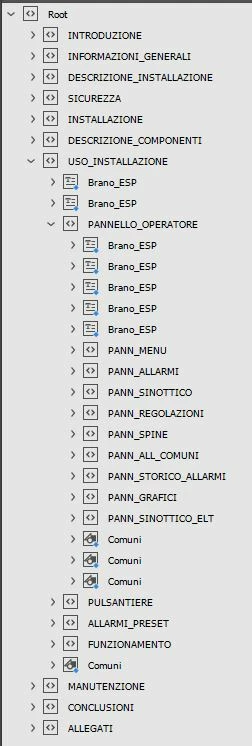
Thank you for your time.

var myDocument= app.activeDocument;

//  1.  Declare a set of tags to be deleted

var tag_da_eliminare = new Array();

tag_da_eliminare[0] = "tag01";

tag_da_eliminare[1] = "tag02";

tag_da_eliminare[2] = "tag03";

//  2.  Delete the contents marked with the above tags

for (var j=0; j<tag_da_eliminare.length; j++) {

    var tag_incriminato = tag_da_eliminare;

    alert(tag_incriminato)

    FindEmail(myDocument);

}

//  3.  Delete empty frames (WORK CORRECTLY)

var myStories = app.activeDocument.stories.everyItem().getElements();

for (i = myStories.length - 1; i >= 0; i--){

    var myTextFrames = myStories.textContainers;

    for (j = myTextFrames.length - 1; j >= 0; j--)    {

        if (myTextFrames.contents == ""){

            myTextFrames.remove();

        }

    }

}

alert("process Completed");

// FUNCTIONS

function FindEmail(elm)

{

for (var i=0; i<elm.xmlElements.length; i++)

{

       XMLelementName=elm.xmlElements.markupTag.name.toString();

       if(XMLelementName==tag_incriminato)

       {

            //elm.xmlElements.markupTag = "mail";

           elm.xmlElements.remove();

           //alert(i);

       }    

      FindEmail(elm.xmlElements);

   }

}

This topic has been closed for replies.
Correct answer Loic_Aigon1

Try this:

//Our main function

var main = function() {

var doc = app.properties.activeDocument, xTags, tagNames;

//Exit if no open documents

if ( !doc ) return;

xTags = doc.xmlTags;

//Exit if there is only one tag, meaning no contents has been added to the root

if ( xTags.length==1 ) {

alert("Only one xml tag found. Add an d apply more tags then start again…" );

return;

}

//Getting tag names while excluding teh root name

//because you don't want and can't remove the root xml element.

tagNames = xTags.everyItem().name;

tagNames = tagNames.join("#").replace ( "#"+doc.xmlElements[-1].markupTag.name, "" ).split("#" );

//Displaying window so user can pick 1 to n tags to remove

var w = getWindow(tagNames);

//Exit if user cancelled dialog

if ( w.show()==0 ) return;

//Calling cleaning routine

cleanDoc ( doc, w.tags );

}

//Cleaning routine

var cleanDoc = function ( doc, tagNames ) {

var n = tagNames.length, root = doc.xmlElements[0];

//Looping through tag names to remove them.

//Be aware there are actually scriptUI list items

//So we need to look at the text property

while ( n-- ) {

removeXMLElements ( root, tagNames.text );

}

//Cleaning empty text frames

removeEmptyTextFrames ( doc );

};

//removing Empty TextFrames routine

var removeEmptyTextFrames = function( doc ) {

var fgp = app.findGrepPreferences.properties,

cgp = app.changeGrepPreferences.properties,

found = [], n = 0;

app.findGrepPreferences = app.changeGrepPreferences = null;

//getting empty frames thanks to GREP

app.findGrepPreferences.findWhat = "\\A\\Z";

found = doc.findGrep();

n = found.length;

//removing found items

while ( n-- ) {

found.parentTextFrames[0].remove();

}

app.changeGrepPreferences.properties = cgp;

app.changeGrepPreferences.properties = cgp;

}

//Removing specific XMLEelemnts given supplied tag name

var removeXMLElements = function (root,  tagName ) {

//getting compliant items

var xes = root.evaluateXPathExpression ( ".//"+tagName ),

n = xes.length;

//Looing through results and remove them

while ( n-- ) {

xes.remove();

}

}

//Window factory function

var getWindow = function(tags) {

var w = new Window("dialog", "XMLCleaner"),

u,

ls = w.add('listbox',u,tags,{multiselect:true}),

btnGp = w.add('group'),

koBtn = btnGp.add('button',u,'Cancel'),

okBtn = btnGp.add('button',u,'Apply');

w.preferredSize.width = 200;

w.alignChildren = ["fill","top"];

okBtn.enabled = false;

koBtn.onClick = function(){ w.close(0) };

okBtn.onClick = function(){

w.tags = ls.selection;

w.close(1);

};

ls.onChange = function() {

okBtn.enabled = ls.selection!==null;

}

return w;

}

var u;

//Calling our script

app.doScript ( "main()",u,u,UndoModes.ENTIRE_SCRIPT, "The Script" );

1 reply

Loic_Aigon1Correct answer
Inspiring
June 13, 2017

Try this:

//Our main function

var main = function() {

var doc = app.properties.activeDocument, xTags, tagNames;

//Exit if no open documents

if ( !doc ) return;

xTags = doc.xmlTags;

//Exit if there is only one tag, meaning no contents has been added to the root

if ( xTags.length==1 ) {

alert("Only one xml tag found. Add an d apply more tags then start again…" );

return;

}

//Getting tag names while excluding teh root name

//because you don't want and can't remove the root xml element.

tagNames = xTags.everyItem().name;

tagNames = tagNames.join("#").replace ( "#"+doc.xmlElements[-1].markupTag.name, "" ).split("#" );

//Displaying window so user can pick 1 to n tags to remove

var w = getWindow(tagNames);

//Exit if user cancelled dialog

if ( w.show()==0 ) return;

//Calling cleaning routine

cleanDoc ( doc, w.tags );

}

//Cleaning routine

var cleanDoc = function ( doc, tagNames ) {

var n = tagNames.length, root = doc.xmlElements[0];

//Looping through tag names to remove them.

//Be aware there are actually scriptUI list items

//So we need to look at the text property

while ( n-- ) {

removeXMLElements ( root, tagNames.text );

}

//Cleaning empty text frames

removeEmptyTextFrames ( doc );

};

//removing Empty TextFrames routine

var removeEmptyTextFrames = function( doc ) {

var fgp = app.findGrepPreferences.properties,

cgp = app.changeGrepPreferences.properties,

found = [], n = 0;

app.findGrepPreferences = app.changeGrepPreferences = null;

//getting empty frames thanks to GREP

app.findGrepPreferences.findWhat = "\\A\\Z";

found = doc.findGrep();

n = found.length;

//removing found items

while ( n-- ) {

found.parentTextFrames[0].remove();

}

app.changeGrepPreferences.properties = cgp;

app.changeGrepPreferences.properties = cgp;

}

//Removing specific XMLEelemnts given supplied tag name

var removeXMLElements = function (root,  tagName ) {

//getting compliant items

var xes = root.evaluateXPathExpression ( ".//"+tagName ),

n = xes.length;

//Looing through results and remove them

while ( n-- ) {

xes.remove();

}

}

//Window factory function

var getWindow = function(tags) {

var w = new Window("dialog", "XMLCleaner"),

u,

ls = w.add('listbox',u,tags,{multiselect:true}),

btnGp = w.add('group'),

koBtn = btnGp.add('button',u,'Cancel'),

okBtn = btnGp.add('button',u,'Apply');

w.preferredSize.width = 200;

w.alignChildren = ["fill","top"];

okBtn.enabled = false;

koBtn.onClick = function(){ w.close(0) };

okBtn.onClick = function(){

w.tags = ls.selection;

w.close(1);

};

ls.onChange = function() {

okBtn.enabled = ls.selection!==null;

}

return w;

}

var u;

//Calling our script

app.doScript ( "main()",u,u,UndoModes.ENTIRE_SCRIPT, "The Script" );

steu40Author
Participant
June 14, 2017

Thank you for your time. The code works perfectly.

Unfortunately I have a lot of tag to delete, so for me it would be more convenient define the tags in a external txt (o js/jsx) file.

In this case, I could manage the txt file by an Excel file (Is the easiest way for me and my colleagues to manage the content of the manual).

Is possible to replace the part of code witch get tag name by window?

Thanks a lot.