Lavitas Macutis
Inspiring
October 23, 2020
Answered

diminishing text size

  • October 23, 2020
  • 4 replies
  • 1575 views

Dear community.


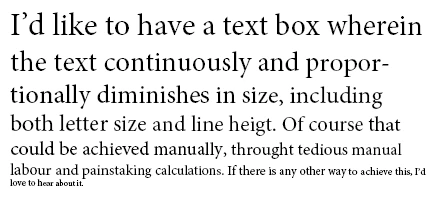
I’d like to have a text box wherein the text continuously and proportionally diminishes in size, including both letter size and line heigt. Of course that could be achieved manually, throught tedious manual labour and painstaking calculations. If there is any other way to achieve this, I’d love to hear about it.


Thanks!

This topic has been closed for replies.
Correct answer Jongware

A fun little script. You don't need to decrease the text leading if you set it to "Auto". Save the following as "smaller-text.jsx" in your local User Script folder, select any text frame and run it.

The script runs on all text linked to that text frame, so it will continue across frames if they are linked, and it is not bothered by overset text.


//DESCRIPTION: Decrease the text size incrementally of a selected text frame
// A Jongware script 23-Oct-2020

if (app.selection.length == 1 && app.selection[0] instanceof TextFrame)
{
	// set the start and end values in points
	startSize = 16;
	endSize = 4;
	// get a handle to the text frame contents
	textContents = app.selection[0].parentStory.characters;
	// grab the contents and get its length in characters
	textLength = textContents.length;
	// calculate the difference needed per character
	stepSize = (startSize-endSize)/textLength;
	// apply the new sizes to the text frame contents
	for (i=0; i<textLength; i++)
	{
		textContents[i].pointSize = startSize - stepSize*i;
	}
	// and we're done!
} else
{
	alert ("Please make sure to select a text frame first!")
}


.. with the following result, for initial and end sizes of 16 and 4 points:
4 replies

davidblatner
Community Expert
Community Expert
November 3, 2020

This is wonderful! I wish we had this back in the 1990s when I wrote "The Joy of Pi." We printed a million digits of the book — starting large and then they quickly got smaller until most of the book was about 4 pt text. 

Jongware
Community Expert
JongwareCommunity ExpertCorrect answer
Community Expert
October 23, 2020

A fun little script. You don't need to decrease the text leading if you set it to "Auto". Save the following as "smaller-text.jsx" in your local User Script folder, select any text frame and run it.

The script runs on all text linked to that text frame, so it will continue across frames if they are linked, and it is not bothered by overset text.


//DESCRIPTION: Decrease the text size incrementally of a selected text frame
// A Jongware script 23-Oct-2020

if (app.selection.length == 1 && app.selection[0] instanceof TextFrame)
{
	// set the start and end values in points
	startSize = 16;
	endSize = 4;
	// get a handle to the text frame contents
	textContents = app.selection[0].parentStory.characters;
	// grab the contents and get its length in characters
	textLength = textContents.length;
	// calculate the difference needed per character
	stepSize = (startSize-endSize)/textLength;
	// apply the new sizes to the text frame contents
	for (i=0; i<textLength; i++)
	{
		textContents[i].pointSize = startSize - stepSize*i;
	}
	// and we're done!
} else
{
	alert ("Please make sure to select a text frame first!")
}


.. with the following result, for initial and end sizes of 16 and 4 points:

Lavitas Macutis
Inspiring
November 1, 2020

Hello Jongware, forgive my very belated answer. Thanks! Very helpful undeed. As one possibly useful remark: The script doesn’t reign the space before and after a paragraph. As this is a common feature, maybe in a future version you could, in your ingeniosity, include that feature? Thanks so much again!

rob day
Community Expert
Community Expert
October 23, 2020

If you want to blend lines without change each character, I think there would have to be a return between the lines, otherwise the text will reflow as the size changes. 


So the script below does this to the selected one line paragraphs:


The ease variable is a number between .1 and .9, the higher the number the greater the change.

The vs variable is the space between the line’s ascent and the descent of the line above.


//an ease amount for the blend—a number between .1 and .9
var ease = .5

//visual line space (not leading)
var vs = 8

//the selected text
var sel = app.activeDocument.selection[0];

//blend the selected text
blendLines(sel, ease, vs);


/**
* Blends point size and leading 
*  the selected text 
*  an ease amount number between .1 and .9 
*  visual space between lines 
*  void 
* 
*/
function blendLines(s, e, vs){
    //save prefs
    var doc = app.activeDocument;
    var oPL = doc.textPreferences.useParagraphLeading;
    var oVUnits = doc.viewPreferences.verticalMeasurementUnits;
    var oHUnits = doc.viewPreferences.horizontalMeasurementUnits;

    //set prefs
    doc.textPreferences.useParagraphLeading = false;
    doc.viewPreferences.verticalMeasurementUnits = MeasurementUnits.POINTS;
    doc.viewPreferences.horizontalMeasurementUnits = MeasurementUnits.POINTS;
    
    if (e > .9) {
        e=.9
    } else if (e < .1) {
        e=.1
    }
    
    var x = s.lines;
    var psize = x[0].pointSize;
    var c = x.length;
    var pp = (1/c)*psize;

    for (var i = 1; i < x.length; i++){
        x[i].pointSize = psize - ((pp * i) * e)
    };

    for (var j = 1; j < x.length; j++){
        var d = x[j-1].descent;
        var a = x[j].ascent;
        x[j].leading = d+a+vs;
    };  

    doc.textPreferences.useParagraphLeading = oPL;
    doc.viewPreferences.verticalMeasurementUnits = oVUnits;
    doc.viewPreferences.horizontalMeasurementUnits = oHUnits;
    
    return 
}


Barb Binder
Community Expert
Community Expert
October 23, 2020

This is not a feature of InDesign, so I'll add the scripting tag to your post with the hope that it may help bring it to the attention of the InDesign scripting community.


~Barb 

~Barb at Rocky Mountain Training
Lavitas Macutis
Inspiring
October 23, 2020

Thanks Barb!

brian_p_dts
Community Expert
Community Expert
October 23, 2020

By line or by character?