
michaeljarvis50
Participant
March 5, 2019
Answered

Editing text from English to Japanese

  • March 5, 2019
  • 2 replies
  • 905 views

I am a new user ! I have created documents using English text. I need to edit this text into Japanese. I have configured my Mac for Japanese language and opened the Japanese 'keyboard' facility but when I type I get error messages is in  'x'  or 'o'

Given this is a cloud based software I am unable to actually talk with anyone for what I believe is a simple issue.

I have tried using copy and paste using Google Translator but it doesn't work with ID
    This topic has been closed for replies.
    Correct answer monokano

    Do you use Japanese font? Japanese input must use Japanese fonts.

    InDesign does not fallback to other language fonts automatically.

    If you use vertical setting, ruby, etc., you will need Japanese version InDesign.

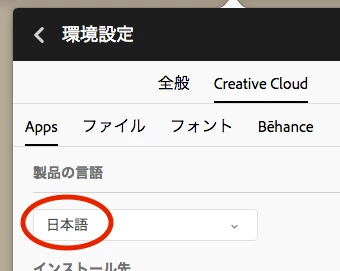
    1. Uninstall InDesign

    2. Change the language of CC to Japanese (日本語)

    3. Install InDesign

    2 replies

    monokano
    Community Expert
    monokanoCommunity ExpertCorrect answer
    Community Expert
    March 23, 2019

    Do you use Japanese font? Japanese input must use Japanese fonts.

    InDesign does not fallback to other language fonts automatically.

    If you use vertical setting, ruby, etc., you will need Japanese version InDesign.

    1. Uninstall InDesign

    2. Change the language of CC to Japanese (日本語)

    3. Install InDesign

    Srishti Bali
    Community Manager
    Community Manager
    March 22, 2019