
January 25, 2018
Answered

Epub error codes from InDesign—anchor missing (but not!)

  • January 25, 2018
  • 4 replies
  • 5360 views

OK. Another one I can't seem to figure out.

I get this:

External Text Anchor not found: 3

  Text Anchor in "/Users/SueCampbell1/Dropbox (Personal)/ImbrifexBooks/RTA-25AZNM-Workingfiles/Ebook Working Files/K_eBook_SST_Ch4.indd" is missing: 3

External Page Anchor not found : 294

  Page Anchor in "/Users/SueCampbell1/Dropbox (Personal)/ImbrifexBooks/RTA-25AZNM-Workingfiles/Ebook Working Files/K_eBook_SST_Ch1.indd" is missing: 19

  Page Anchor in "/Users/SueCampbell1/Dropbox (Personal)/ImbrifexBooks/RTA-25AZNM-Workingfiles/Ebook Working Files/K_eBook_SST_Ch10.indd" is missing: 11

  Page Anchor in "/Users/SueCampbell1/Dropbox (Personal)/ImbrifexBooks/RTA-25AZNM-Workingfiles/Ebook Working Files/K_eBook_SST_Ch11.indd" is missing: 12

(snippet, of many more of the same)

This would seem to be the ToC. But I manually removed all the text anchors for ToC entries and made sure that "include book docs" and "make text anchor in paragraph" is on. It is.
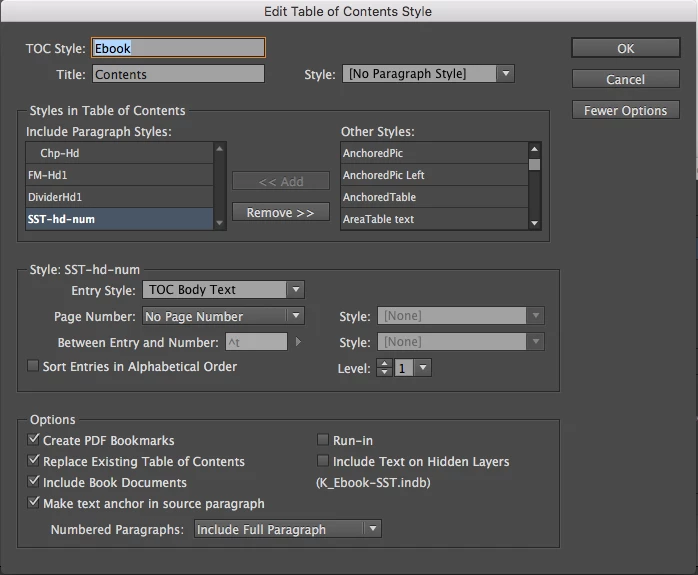
So then I updated ToC again, and it put all new text anchors in. They are there and it does generate the ToC in the epub. But I still get these errors. Why?

I am specifically confused about what the number after "is missing:" refers to? It isn't a page number. So what is it?

I can still get a good epub (though it still doesn't convert to mobi yet). I am trying to go through all possibilities one at a time to determine what the issues really are.

This topic has been closed for replies.
Correct answer Hamza_J

Hello SueCampbell54, I was facing the same problem (and frustration) and this is what I found. In my document, there were hyperlinks to websites that didn't exist. As we know that InDesign checks the integrity of the hyperlinked web addresses, this feature is what led to the generation of the "External Text Anchor not found: 3" error. 


I removed those hyperlinks and the error disappeared when I exported the file to epub again. Hope this helps.

4 replies

Carin Camen
Participant
October 10, 2023

Here is the solution I found for my same issue. I do the same thing, in using a previous formatted InDesign file for another book. In my Connections page I had a couple of hyperlinks. Here's what I did to resolve the issue.


  1. Highlight link
  2. Right click and go to Hyperlinks, Edit Hyperlink
  3. In the Link To dropdown menu go to Text Anchor.
  4.  Under Destination, select the Document dropdown and choose your current InDesign file. (I do not know what the list in the dropdown menu is. Maybe old Text Anchors?)
  5.  Select None from the Text Anchor Dropdown.
  6.  Save
  7.  Repeat process but select URL in the Link To drop down and put your hyperlink URL in.
    7. Save

    That took care of my issue. I hope you find this helpful.

HARSHIKA_VERMA
Community Manager
Community Manager
October 12, 2023

Awesome. Thank you for sharing the solution that worked for you. It will definitely help future customers experiencing the same issue. Thank you so much for your help and contribution to the InDesign community.


Thanks,

Harshika

Hamza_JCorrect answer
Participant
August 12, 2021

Hello SueCampbell54, I was facing the same problem (and frustration) and this is what I found. In my document, there were hyperlinks to websites that didn't exist. As we know that InDesign checks the integrity of the hyperlinked web addresses, this feature is what led to the generation of the "External Text Anchor not found: 3" error. 


I removed those hyperlinks and the error disappeared when I exported the file to epub again. Hope this helps.

Balsam5FB3
Participant
October 16, 2021

Thank you so much, you just made my day!

Participant
October 2, 2019

Did you ever figure out where the bad text anchor was? I have the same error when exporting an epub file, however my InDesign document does not contain a TOC, nor does it contain any links to images or text shown in the path listed in the error. Also notable is that the export to epub process did create a file, but it won't open in Adobe Digital Editions. There were no other errors when I generated the epub file so I am really confused. I am hoping someone out there can help figure out how to find the text anchor. I am stumped.

FeAle-7IZsBx
Participating Frequently
February 14, 2018

Hi,

The book file is the same folder of indesign files?

The path of anchors is not right. Is not possible use absolute path to apply link.

Regards