


- Home
- InDesign
- Discussions
- EPUB inconsistent results when published
- EPUB inconsistent results when published
EPUB inconsistent results when published

Copy link to clipboard
Copied
Hello,
Initial problem: When exporting my project from InDesign CC 2018 as a fixed layout EPUB all animated objects (images and text) would already be present on the screen (iPad) but would then disappear and then animate-in as it was supposed to. (I am using iPad/iBooks as my client can only use this platform - also it is Retina resolution if that makes a difference)
I got around the above somewhat by adding in .25sec delay on the animated objects and disabling the 'Hide Until Animated'.
Current problem: However, when I open the same EPUB file in iBooks multiple times to test it, the results vary each time. Sometimes all the animated elements work perfectly but sometimes the old bug returns (as I described above) This EPUB project will be rolled out to a department team in a large organization and so the likelihood is that they will experience these variable glitches because of the multiple installs.
Is there another solution to this EPUB -> iPad/iBooks bug where animated elements appear then disappear. I tried and tested a new document using simple shapes and text and got the same results so I am sure it's not the specific content in my project causing the issue.
Any advice or help would be great.
Thanks in advance,
Eoin


 23
Replies
23
23
Replies
23




Copy link to clipboard
Copied
Without seeing exactly what’s happening and knowing what kind of animations you’re using, it’s very difficult to answer your questions.
I can only tell you that iBooks is the most reliable epub reader available.
Copy link to clipboard
Copied
Thanks for the prompt reply Bob,
I agree that iBooks is the most reliable. I tested many alternatives and it was by far the best and most responsive in terms of user interaction.
I can't share the file unfortunately as it contains confidential client information. An example page from the project would be a simple text box to the left, image to the right of the text and a design element (shape object) to the right-hand border of the screen. Quite simple in terms of construction.
To describe the glitch again: Imagine the screen should start out blank. Then the text box fades/flies in from right, followed by the image and finally the shape object. But what happens to either all the animated elements or just some, is all the animated elements are visible when the page opens but suddenly disappears and then the animation happens.
Each element (Text box, image and shape object) uses a preset animation one of which is shown below:
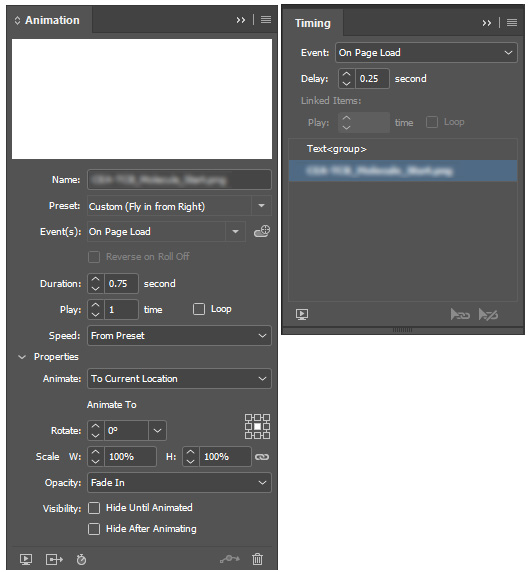
With the above settings, it fixed the problem most of the time but the same EPUB file will have an element animate-in correctly on one occasion and then next time it's added to iBooks it's broken again - same file but different results causing the animation glitch.
Sorry if that's not much more helpful...Are there any pre-made templates you know of with animated elements such I have used that I can test?
Thanks,
Eoin
Copy link to clipboard
Copied
Did you toy around with the timing panel. I’ve found that setting a slight delay on any “on page load” items allows things to load properly.
Copy link to clipboard
Copied
Thanks again Bob,
Yep, on the screengrab, I have a .25sec delay but maybe I should test longer delays? That said, I would still like to work out why on the iPad it works only sometimes...
Copy link to clipboard
Copied
I haven’t seen any issues with the EPUBs I’ve done so it’s hard for me to guess. Good luck.
Copy link to clipboard
Copied
OK thanks Bob, I appreciate your help! I will keep searching for a solution.
Cheers,
Eoin
Copy link to clipboard
Copied
If you do come across anything that helps, do come back and let us know. It might help someone else in the future.
Copy link to clipboard
Copied
Absolutely!

Copy link to clipboard
Copied
EoinWinston wrote
To describe the glitch again: Imagine the screen should start out blank. Then the text box fades/flies in from right, followed by the image and finally the shape object. But what happens to either all the animated elements or just some, is all the animated elements are visible when the page opens but suddenly disappears and then the animation happens.
Hi,
As you start the animation with objects inisde the page, maybe this would be the glitch orign. You can try start the objects outside the page and change the propertie Animation: From current location
Regards
Copy link to clipboard
Copied
That would be, in my opinion, a nightmare to get everything to animate the proper position.
Copy link to clipboard
Copied
Other options is settinh Hide until animated. It's working for me in that cases
Copy link to clipboard
Copied
Hey,
Disabling this option was part of what worked fixing it happening to everything every time... just not everything consistently upon exporting/importing to iBooks.
Thanks again,
Eoin
Copy link to clipboard
Copied
Hey,
I tried that and it resulted in the same glitch problem. It occurs with any type of animation (Fades, animate 'from' and 'to' options).
Adding in a 0.35sec to 0.5sec delay on the animated elements and always unchecking the 'Hide until animated' was the biggest help and stopped it happening to anything animated element in the document - apart from the rogue and random ones that appear upon export...the inconsistency of when it exports is maddening:
I export the EPub and open it in iBooks and let it load. There may be 4 or 5 pages (of 35 pages in total) with the glitch. I then export the same document again without having made any changes and open in iBooks again and it could have 1 or 10 pages with the glitch - not always the same pages or animated elements. 
The document is due to go to the client soon and I am nowhere near a solution.
Thanks for the suggestions!
Eoin

Copy link to clipboard
Copied
Es muy extraña la descripción del problema. Pregunto: se trata de un documento hecho desde 0 con la versión CC 2018?
Tal vez en la conversión desde una versión anterior esté el problema.
Copy link to clipboard
Copied
Hi Silvia,
Thanks for the reply,
Yes, this document was made using InDesign CC 2018 only and not in an older version or another application. Also, it is not unique to this document. I made another simple document to test the animations and the same error occurred.
Interestingly, here is an update:
I have noticed that if I interact with the exported document while it loads in iBooks (for example open and scroll through the thumbnails in the Table of Contents) it makes the occurrence of the problem worse. If I leave the document alone for a good while and then go through the document page-by-page the occurrence of the error is reduced - but not eliminated - in 42 exports I have only managed one version with no glitches/errors. Three exports in a row from the same InDesign file, I get three different results.
This is what gives me the best results so far:
1) Adding in .35/.5 second delay on all animated elements.
2) Disabling 'Hide Until Animated' for all animated elements.
3) Select all page in the document while exporting (not sure why this helps)
4) Have iBooks App closed on the iPad when I open the exported EPUB.
5) When the file opens leave it to load without interacting with it whatsoever.
6) Scroll through each page in the document to the end without visiting the Table of Contents option within iBooks.
These steps reduced having maybe 15 pages of approx. 40 pages with the error to sometimes none or 2 or 3...
Will keep looking for a solution!
Eoin

Copy link to clipboard
Copied
I get the same results and I'm using a 0.25 delay on all entry animations!
Copy link to clipboard
Copied
Hi, thanks for the response,
Do you mean that you get the same results I am getting (inconsistent errors after exporting) or that you get the same consistent results everytime you export using 0.25 second delay on animations??
Eoin
Copy link to clipboard
Copied
No errors, just inconsistent results, slower/faster on different devices
Copy link to clipboard
Copied
Thanks for that,
That's another issue I will have to address at some point - there is a great inconsistency in load speeds per page.
Copy link to clipboard
Copied
I know, my client is noticing this too!
I'm also have display issues when viewing ePubs on a Mac using ADE (Adobe Digital Editions) also web links don't work!
On a PC I get an error message and I cannot get back into the ePub, have to go back out of ADE.
All of these issues are unaffected using iBooks 😞
See discussion here: Mac and PC errors with client's ePub
Copy link to clipboard
Copied
Sorry to hear that!
In my recent experience having tested many EPUB readers Adobe Digital Editions was far more problematic than iBooks. It was much slower, crashed a lot and had more of the occurrences of the animation glitches. I reverted to iBooks pretty quickly.
I have been investigating/contemplating the idea of exporting as HTML first and then using a third party application combined with an HTML programmer to convert the HTML to EPUB. Would be great not to have to go that route but I might have to at least try something.
Copy link to clipboard
Copied
It's terrible! The problem is I don't have any HTML experience so I'm pretty much stuck and relying on InDesign What I really need is for Adobe Digital Editions to sort it out ASAP!

Copy link to clipboard
Copied
Having the same issue. I have a series of photos that fade in and the first one flickers for a split second before it actually fades in, followed by the others.
The only thing that worked for me was putting a hidden animated object on the page. For example, since my page background is white, I have a white box that fades in – so you can't see it – before the other animated photos fade in. This keeps that first photo from not flickering for a second before it and the others fade in.
This is a pain, I know. But using layers/masters to hide animated objects may help streamline the process somehow.
Just make sure the hidden object isn't linked (in the Timing panel) to the other animated objects. It should come first, followed by whatever else animates on the page.
Seems to be an iOS glitch since it works perfectly on desktop. I'm viewing with the iBooks app.
If anyone found any other solution, let us know!


Get ready! An upgraded Adobe Community experience is coming in January.
Learn more
 AdChoices