Participant
July 16, 2020
Answered

exporting png does not match colors

  • July 16, 2020
  • 5 replies
  • 947 views

Since a few months the colour of the file does not match the colour in the PNG export. 

It keeps fading the colour, so it's kind of a flattened colour than the original one I used in the file. 
All the colours are RGB and it's also a web file, not a print file. 

If you someone could help me, I would really appreciate! 
This topic has been closed for replies.
Correct answer rob day

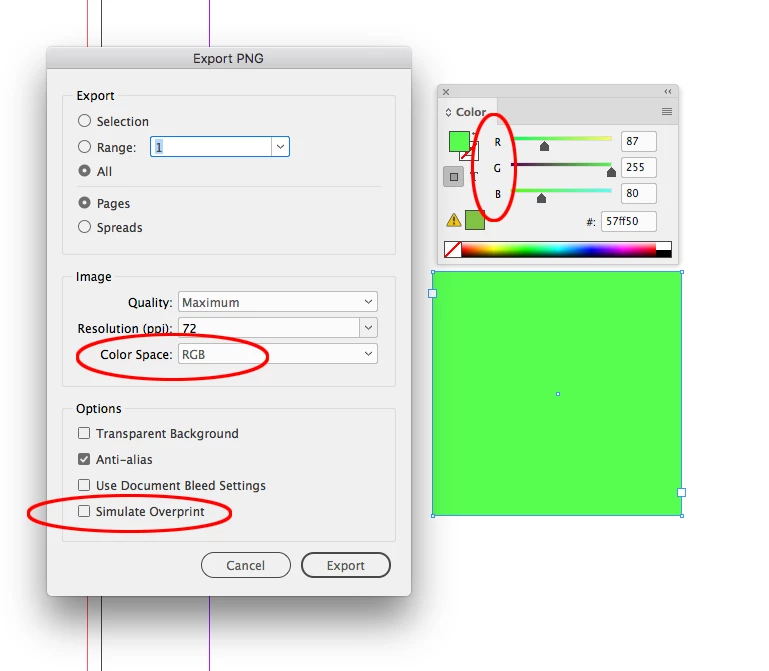
Also, make sure you don’t check Simulate Overprint:


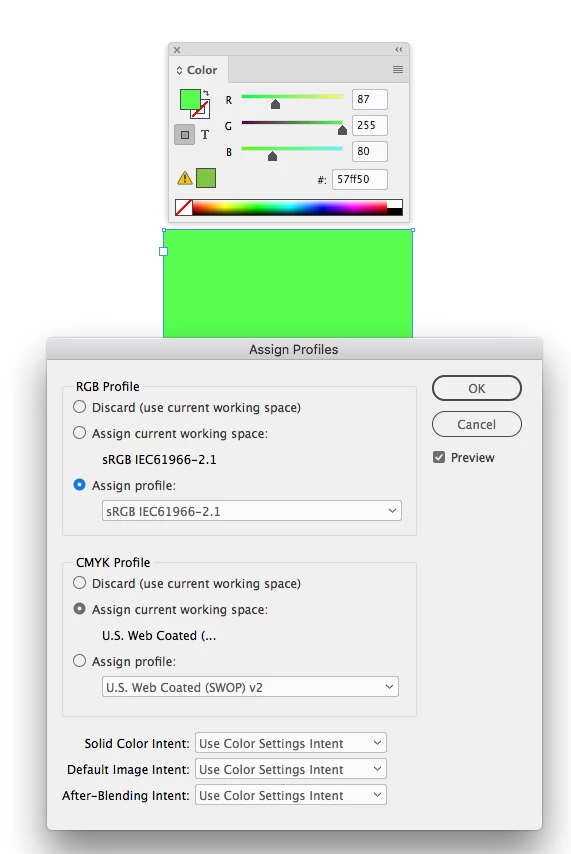
And, set your document’s RGB assignment to sRGB Edit>Assign Profiles...


5 replies

Ashutosh_Mishra
Inspiring
July 25, 2020

Hi there,


Thanks for reaching out. I hope your issue is resolved now. We'd appreciate if you can mark the appropriate answer correct.

If you used any other method, please share it here. It'll help other users having similar concern.

If you still have issues, let us know. We'll be happy to help.


Regards,

Ashutosh

rob day
Community Expert
rob dayCommunity ExpertCorrect answer
Community Expert
July 16, 2020

Also, make sure you don’t check Simulate Overprint:


And, set your document’s RGB assignment to sRGB Edit>Assign Profiles...


Mike Witherell
Community Expert
Community Expert
July 16, 2020

When you use the Export to PNG dialog box, is the color model set to RGB? (It should be!)

Mike Witherell
Mike Witherell
Community Expert
Community Expert
July 16, 2020

Should stay RGB

Mike Witherell
Mike Witherell
Community Expert
Community Expert
July 16, 2020

What is your color model when you check on Edit > Transparancy Blend Space? Is it RGB?

Mike Witherell
Participant
July 16, 2020

Thanks for your quick reply! It's on RGB. Should I change it to CMYK?