
F_Rivera
Known Participant
March 4, 2019
Question

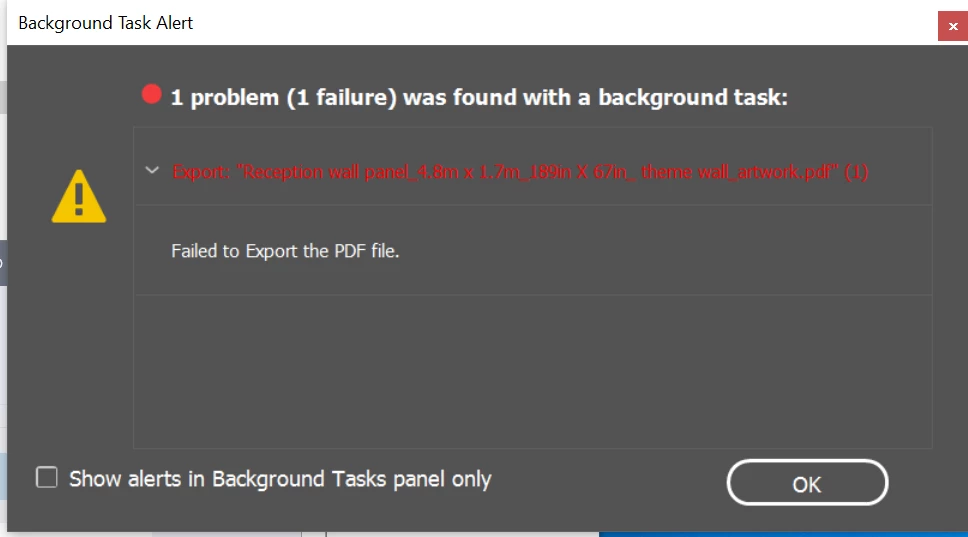
Failed to export to PDF for a large poster

  • March 4, 2019
  • 3 replies
  • 4981 views

I cannot seem to save 2 large projects to PDF

These are my steps for exporting:

1. file

2. adobe presets : PDF X-4 or hi quality print

3. include bleed

4. attempt to save

5. rejection

I have recreated the file from scratch

I have moved the file to a new file

I have asked a different person to save the file > no luck

I had our IT guy try to "downsample"... it only worked when we scaled it half way and then weird stuff happened

C:\Users\frivera\Creative Cloud Files
This topic has been closed for replies.

3 replies

BobLevine
Community Expert
March 8, 2019

You haven't explained anywhere near enough.

In your original post you said "weird things." Please be specific.

You said you have more than the requirements but didn't tell us what they are.

Have you tried scaling everything down to say 25% and letting the printer scale it up?

F_Rivera
F_RiveraAuthor
Known Participant
March 8, 2019

Hi Bob,

Thanks for jumping in to help,

  1. "weird" the final imaged was warped. See below, this is on a second project I am also struggling with


  2. For the requirements I wasn't told what they were, I will ask and reply back
  3. I have tried scaling it at 50% but I was still having issues with the low resolution. I will try again to see if anything else has changed


I have attached the final image below, this is the low res version

BobLevine
Community Expert
March 8, 2019

First thing I would try is to export to IDML and work on that.

Then I'd start deleting half the object in the file and exporting a PDF. Then try the other half.

Keep going to until you find the culprit.

Derek Cross
Community Expert
March 4, 2019

What is the size of the document?

If it's a large poster that's to be viewed from a distance the resolution of images can be quite low – say 50PPI.

F_Rivera
F_RiveraAuthor
Known Participant
March 4, 2019

They will be wall posters, the dpi right now is 150-300 and the image still isn't as sharp as I'd prefer it to be. I'm concerned going lower will blur or pixelate the images

Derek Cross
Community Expert
March 4, 2019

Make a copy of the document, lower the resolution of images to say 100PPI and see if you can export it as a PDF. If it works, you've isolated the issue.

And try a bit of Unsharp Mask filter on the images.

Scott Citron
Brainiac
March 4, 2019
  1. Do you have enough hard drive space on your destination drive to hold the PDF?
  2. Have you tried restarting your computer?
  3. Also, are you getting this error when exporting from InDesign?
F_Rivera
F_RiveraAuthor
Known Participant
March 4, 2019

Hi Scott,

1. Yes, my IT department has ensured i have more than enough space

2. restarted multiple times

3. yes, from indesign