
Question
Fill only fills half of shape
When I create a shape and apply a fill only half of the shape if filled. When zooming in and out the whole shape is visible so I guess the programme has registered that it as an actual full shape. It is also viewable in the fast display mode but none of the other two, so not really ideal.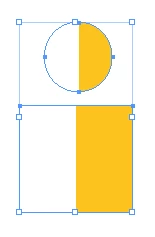
I've tryed updating to the newest version of InDesign. Uninstalling and reinstalling. Restarting my computer. Quitting and reopening. But nothing has helped.
It seems there would be a very simple solution to this.. I thought!
My specs are:
iOS 10.14.6
MacBook Pro (13-inch, Mid 2012)
Thanks in advance
 AdChoices