
Participating Frequently
August 27, 2017
Question

Font Dropping out in Exported PDF

  • August 27, 2017
  • 4 replies
  • 2410 views

Hello!

In a document that I've exported to a PDF, the font is randomly dropping off throughout the document. The only advice I can find that seems relevant is to adjust the below setting to 0% to embed the font, which I've done. I know that the fonts are embeddable.

What can I do to fix this? I can't figure out what I'm doing wrong. Any help would be SO appreciated.
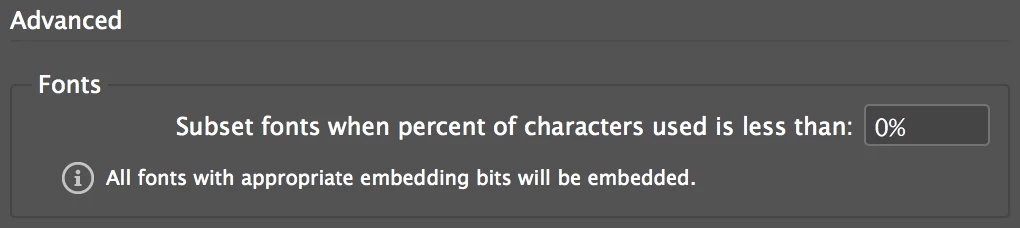
Here's an example of what it looks like when it's been uploaded online after export (high quality print):

Here's what it should actually look like (this is how is appears in indesign and when I open it on my local drive):

This topic has been closed for replies.

4 replies

Participating Frequently
September 2, 2017

Hey! Just wanted to bump this.

If anyone has any thoughts or ideas please throw them out there - If it doesn't have anything to do with the fonts or embedding, I'm not sure where to start..

Any help would be SO appreciated

[vid removed by ussnorway]

Michelle

Participating Frequently
August 27, 2017

Do you get any warning when you export? What is the font face?

Participating Frequently
August 27, 2017

Hi Lisa,

No warnings at all, which is what makes me think that the fonts should be able to be embedded.

The font is Avenir Next / TTF.

Thanks Lisa,

Michelle  

Participating Frequently
August 27, 2017

I have the same font, and did a straight export from ID to Acrobat Pro DC. No embedding. It seems fine.

Maybe your doc is corrupt. Maybe your font is? Can you try a different font face?

Willi Adelberger
Community Expert
Community Expert
August 27, 2017

Are you sure that the fot does permit to be embedded? Is it a TTF or OTF?

Participating Frequently
August 27, 2017

Hi Will,

All of the listed fonts used in my document have a restriction of 'normal'. From the information I've found, you can tell if a font is permitted to be embedded if the restrictions are 'normal', so that's what I've been working off. I'm a complete indesign newbie, so excuse my lack of knowledge.

My font/s are all TTF - can this impact the final document? It's strange because on my local drive it works fine, but when it's uploaded online it goes mental.

Any thoughts on how to fix this would be much appreciated

Dov Isaacs
Legend
August 27, 2017

Having read this thread, I suspect something other than font embedding is involved. Could you please post a copy of the resultant PDF file someplace for us to download and analyze? And maybe even a copy of a fragment of an InDesign document that shows the issue?

Thanks!

     - Dov

PS:     Whatever you are seeing has absolutely nothing to do with the fonts being TrueType or what percentage threshold of the font you are specifying for embedding!

- Dov Isaacs, former Adobe Principal Scientist (April 30, 1990 - May 30, 2021)
Bill Silbert
Community Expert
Community Expert
August 27, 2017

Change the subset value to 100% and see what happens.

Participating Frequently
August 27, 2017

Hi Bill, When I change the subset value to 100% the same thing happens - it jumps between the different fonts just the same as if I were to set the value to 0%