April 27, 2017
Answered

Fractions in Indesign

  • April 27, 2017
  • 4 replies
  • 42928 views

When I select the paragraph style and make fractions on, all numbers in my text go up and down even if they are no fractions.

Can there be a way to use so only the number that are fraction are set to fraction?

    This topic has been closed for replies.
    Correct answer amaarora

    Hi,

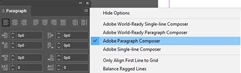
    Can you also tell what composer is your paragraph style using? you can check it from paragraph panel menu here...
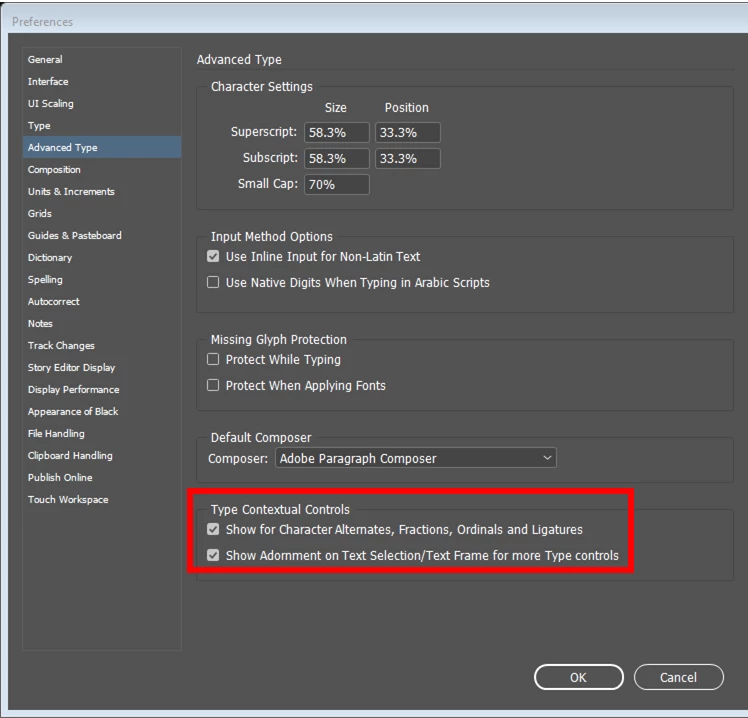
    In addition do you have this preference enabled?
    I am assuming you are on English locale.

    -Aman

    4 replies

    Jens Trost
    Inspiring
    November 20, 2020

    Just wanted to add there's also the possibilty to use a script/plugin from Dan Rodney called "Proper Fraction".
    https://creativepro.com/the-best-way-to-make-fractionsever/
    https://www.danrodney.com/scripts/properfraction.html

    There's a free lite version available.

    Barb Binder
    Community Expert
    Community Expert
    November 17, 2020

    @Qzzzzzzzzzzzz and @Malks123:


    Two options:

    1. Using Aman's GREP from above, add a separator between the whole number and the fraction: a spacebar space, thin space, puncutation space, hair space, whichever width you like. Anything to separate the whole number from the fraction.
    2. For cooking,  you shouldn't end up with crazy fractions like 12/123—I would guess you would only have a single character numerator and denomenator. If that is correct, you could change the GREP to: \d/\d/ (remove the plus after each \d to indicate a single digit before and after the slash.


    ~Barb 

    ~Barb at Rocky Mountain Training
    Participant
    September 28, 2018
    • I'm making a recipe book in indesign and really stuck on the fractions- When doing GREP to fractions all numbers are becoming small, for example if its "11/2 cups flour" the 1 before the half is becoming small too. Any solutions?
    Qzzzzzzzzzzzz
    Known Participant
    November 17, 2020

    I would love an naswer to this as well. It loks like a good answer above, but I can't read any of the screenshots, so thats a bummer.

    Qzzzzzzzzzzzz
    Known Participant
    November 17, 2020

    OK - if you open screenshots in new tab, you can read them - but they are no longer aplicable if you are using the latest version of inDesign.

    amaarora
    Inspiring
    April 27, 2017

    Hi,

    If you are on InDesign version CC 2017.0 or CC 2017.1, you can do the following...

    1. Select the text (or text frame) that has the numbers you wish to convert to fractions

    2. Click on the small "O" that appears when you select

    3. From the menu, which now shows up enable the fraction OpenType

    This would convert only the valid numbers as fractions instead of converting all numbers/digits to "up" and "down".

    Otherwise if you are on earlier InDesign version, you can do the following...

    1. Turn off the fraction property in your paragraph or character style first

    Then

    2. Either select each of the number and convert it to fraction from the character panel  ( this is a time consuming manual method )

    or

    2. You can make a grep style that converts only valid numbers to fractions. To do so...

      a. Make a new character style with fraction property enabled name it C1

      b. In your paragraph style (say P1) make a new grep style entry with the following settings

      c. Once you do this, only valid numbers in text with paragraph style P1 applied will be converted to fractions

    You can read ore about formatting fractions here https://indesignsecrets.com/formatting-fractions.php

    You also should ensure that the font you are using is an OpenType font with numerator and denominator glyphs.

    -Aman

    April 27, 2017

    Thanks.

    I am on 12.1..0.56 and this is the latest but i do not see any "O"

    -thanks

    April 27, 2017

    Hi,

    Can you also tell what composer is your paragraph style using? you can check it from paragraph panel menu here...

    In addition do you have this preference enabled?

    I am assuming you are on English locale.

    -Aman


    The option was off in preferences