

John Hawkinson
Inspiring
September 22, 2011
Answered

Getting a greyscale value from the Eyedropper?

  • September 22, 2011
  • 5 replies
  • 35626 views

Today, someone asked me how to pick up a gray value with the Eyedropper, and get a grayscale (K-only) color value in an otherwise CMYK document.

As we all know, the eyedropper tool gives RGB colorspace back, at least for raster images. So, fine, I get a gray rectangle with RGB:
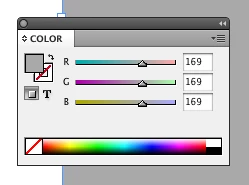
Now, how can I convert this to grey? I can't really find a reasonable way. Converting to CMYK gives me 35/28/28/0, which is useles.

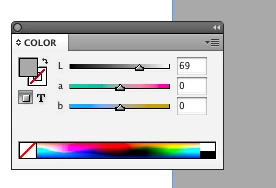
Converting to L*ab gives me 69/0/0, which seemed promising, but also is kind of a dead end:
In Illustrator, I have the choice for greyscale:
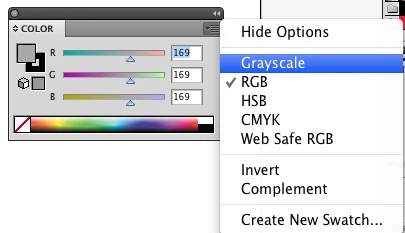
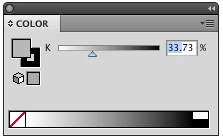
So, short of ducking over to Illustrator, is there a reasonable way to get the equivalent gray value out of InDesign?

I suppose one could write a script that uses math...but color math is hard, and it is easy to screw it up.

Of course, there is some amusing color science irony that if one tries to go the other way, say, from 39.0% K to RGB, one gets 169/171/174 . I suppose it relates to color profiles and whatnot (as does why Illustrator and InDesign may not end up with the same numbers).

Anyhow, any tips or convenient workarounds?

Sure would be nice if ID had "Grayscale" as an option like Illustrator...

This topic has been closed for replies.
Correct answer Peter Spier

I generally just go to separations preview and read it...

5 replies

Harbs.
Legend
October 7, 2011

Just a quick note that I posted an improved version of my script in my blog post here:

http://in-tools.com/article/scripts-blog/convert-colors-to-grayscal-in-indesign/

rob day
Community Expert
Community Expert
October 7, 2011

In your blog you're implying the eyedropper can't pick up accurate color from placed images, but as long as the link is an image (tiff, psd, jpeg) and the color space is supported by ID (RGB, Lab, CMYK) the eyedropper does get accurate source values. PDFs can have multiple color spaces, and there's no ID grayscale space, so in those cases the eyedropper returns the RGB proxy values.

Peter Spier
Community Expert
Community Expert
September 26, 2011

So why has nobody yet asked the obvious question?

If ID KNOWS the correct grayscale numbers (and CMYK numbers, for that matter, in CMYK images), which it clearly does in seps preview, WHY is it not possible to pick those up directly from placed rasters?

Harbs.
Legend
September 26, 2011

Oh. I'm sure it's possible.

You interested in attempting to write a plugin to do this?

There's just very little exposed to scripting about placed images...

Harbs

rob day
Community Expert
Community Expert
September 26, 2011

Oh. I'm sure it's possible.

Not until ID has a grayscale space.

Harbs.
Legend
September 25, 2011

I'm a bit late to this party, but how's this?

var color = app.selection[0].fillColor;

if(color.space == ColorSpace.LAB||

    color.space == ColorSpace.CMYK){

    color.space = ColorSpace.RGB

}

if(color.space == ColorSpace.RGB){

    var totalValue = color.colorValue[0] + color.colorValue[1] + color.colorValue[2];

    var averageValue = totalValue/3;

    color.colorValue = [averageValue,averageValue,averageValue];

}

var calcValue = 100 - (averageValue/255 * 100);

if(calcValue > 100){

    calcValue = 100;

}

if(calcValue < 0){

    calcValue = 0;

}

color.space = ColorSpace.CMYK;

color.colorValue = [0,0,0,calcValue];

John Hawkinson
Inspiring
September 25, 2011

Harbs:

I'm a bit late to this party, but how's this?

if(color.space == ColorSpace.RGB){
    var totalValue = color.colorValue[0] + 
        color.colorValue[1] + color.colorValue[2];     var averageValue = totalValue/3; } var calcValue = averageValue/255 * 100; color.space = ColorSpace.CMYK; color.colorValue = [0,0,0,calcValue];

Err. That does a terrible job! But what I didn't think of and just thought to try (by misreading your post!) is 100-(rgb/255). Which actually seems pretty good:

You can still see differences though. I think Peter's answer is still the best so far though...

Harbs.
Legend
September 25, 2011

I was tired when I wrote the script.

I fixed the code to what it should have been...

Community Expert
September 22, 2011

Pick up the color and change to lab. The "l" value can be used, just invert it. (i.e. "l" reading is 22, gray equivalent would be 78)

John Hawkinson
Inspiring
September 22, 2011

Jeffrey: Would you believe I tried that? At least in my color profiles,

that does not look anywhere close.

Community Expert
September 22, 2011

John, after a few more tests, my suggested lab method is flawed.

Peter Spier
Community Expert
Peter SpierCommunity ExpertCorrect answer
Community Expert
September 22, 2011

I generally just go to separations preview and read it...